
The Ultimate Guide to Video Editing Apps: Enhance Your Videos With Ease
Are you tired of using dull, unedited videos on social media or personal projects? Do you want to take your video content to the next level without breaking the bank? Look no further! In this article, we’ll explore the best video editing apps for Android and iOS devices that will transform your videos into stunning masterpieces.
Top Video Editing Apps For Android And Ios
- Kinemaster
- A comprehensive video editor with a user-friendly interface
- Offers various effects, filters, and titles to enhance your videos
- Free version available, with optional in-app purchases
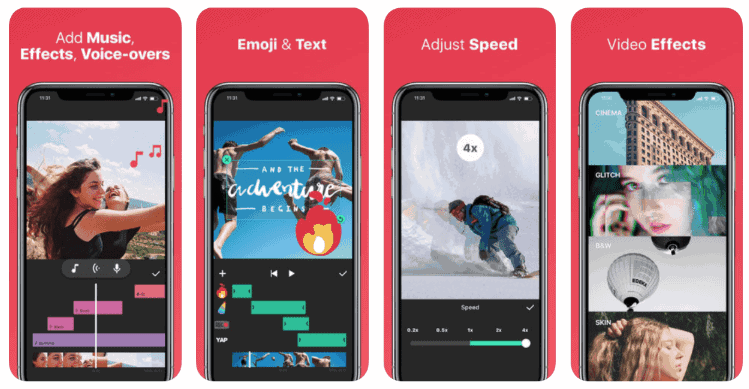
- Inshot
- A versatile video editor that supports photo editing as well
- Features various effects, filters, and transitions
- Free version available, with optional in-app purchases
- Magisto
- A mobile-first video editor with a unique AI-powered approach
- Offers various templates, effects, and music tracks to enhance your videos
- Free version available, with optional in-app purchases
Quik: The Fun Video Editing App
- Quik
- A fun and easy-to-use video editing app from GoPro
- Features various effects, transitions, and music tracks
- Free version available, with optional subscription for full features
Other Noteworthy Video Editing Apps
- Videoshop
- A simple and intuitive video editor with various effects and filters
- Free version available, with optional in-app purchases
- Videoshow
- A video editing app that offers various templates, effects, and music tracks
- Free version available, with optional in-app purchases
Instagram Video Editing Apps
- Cute Cut
- A best-in-class video editor for Instagram stories
- Offers various effects, filters, and transitions
- Free version available, with optional in-app purchases
- Adobe Premiere Rush
- A mobile version of the famous Adobe Premiere Pro software
- Features advanced editing tools and effects for professional-grade videos
- Free version available, with optional subscription for full features
Splice: The Ios Video Editing App
- Splice
- A powerful video editing app for iOS devices
- Integrates various effects, transitions, and music tracks
- Free version available, with optional in-app purchases
Tips And Tricks For Mastering Video Editing Apps
- Experiment with different effects, filters, and templates to find the perfect look for your videos.
- Use the free versions of these apps to test their features before upgrading to the paid versions.
- Don’t be afraid to try new things and push the boundaries of what’s possible with video editing.
Conclusion
With so many amazing video editing apps available on Android and iOS devices, there’s no excuse for not enhancing your videos. Whether you’re a seasoned pro or just starting out, these apps will help you create stunning visual content that will engage and impress your audience. So go ahead, get creative, and show the world what you’re working with!
Faqs
- What is The Best Video Editing App For Android?
- KineMaster is a top contender, offering advanced features and effects.
- Is There an Ios-only Video Editing App Worth Mentioning?
- Splice is a powerful video editor exclusive to iOS devices.
- Can I Use These Apps on my Computer?
- Some of these apps have companion software for Windows or macOS, but most are designed specifically for mobile devices.
- Do I Need an Internet Connection to Use These Apps?
- While some features may require an internet connection, you can still edit and export videos offline with many of these apps.
- Can I Share my Edited Videos Directly From The App?
- Yes, most of these apps allow you to export your edited video in various formats and share it directly on social media or via email.
- How Much do These Apps Cost?
- Many of them offer free versions with optional in-app purchases for full features or premium upgrades.
- Are There Any Tutorials Available For Learning These Apps?
- Yes, most of the apps have built-in tutorials and guides to help you get started.
Bonus Tip:
Don’t be afraid to experiment and try new things! These video editing apps are designed to be user-friendly, so don’t worry if you make mistakes – they’re an essential part of the learning process. Happy editing!


