
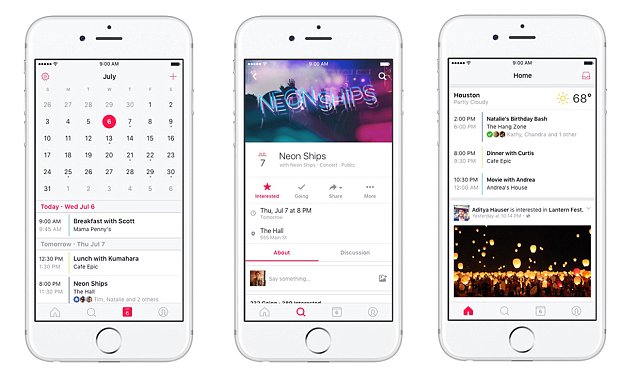
How to Organize a Party on Facebook: A Step-by-step Guide
Are you planning to throw a party, but don’t know where to start? Well, you’re in luck! With the help of social media, organizing a party has never been easier. In this article, we’ll show you how to organize a party on Facebook, step by step.
Why Organize a Party on Facebook?
Organizing a party on Facebook is an excellent way to invite friends and acquaintances, share updates, and get the word out about your event. With over 2 billion monthly active users, Facebook is the perfect platform to reach a large audience.
Creating an Event on Facebook: A Step-by-step Guide
- Accessing Facebook: Open the Facebook app or website on your smartphone or computer.
- Click on The Menu: Tap or click on the three horizontal lines (≡) in the top right corner of the screen.
- Select Events: From the menu, choose “Events.”
- Create a New Event: Tap or click on the “+” button to create a new event.
Step 1: Creating an Event
To create an event, follow these steps:
- Choose the type of event you want to create (Online or Offline).
- Enter the event name, date, time, and location.
- Set the privacy settings for your event (Public, Friends, or Private).
- Add a cover photo and description for your event.
Step 2: Inviting Guests
To invite guests, follow these steps:
- Click on the “Add Guests” button.
- Enter the names of the people you want to invite.
- You can also add a message or invitation text.
Tips For Organizing a Successful Event on Facebook
- Use a Catchy Cover Photo: A visually appealing cover photo will grab attention and encourage people to click on your event.
- Be Specific With Your Details: Make sure to include all the necessary details, such as date, time, location, and RSVP information.
- Keep it Simple: Avoid using too much text or complicated language in your invitation.
- Encourage Engagement: Use Facebook’s built-in features to encourage engagement, such as creating a poll or asking questions.
Conclusion
Organizing a party on Facebook is an excellent way to connect with friends and acquaintances. By following these simple steps and tips, you’ll be able to create a successful event that everyone will remember. So go ahead, get creative, and show the world what you’ve got!
Frequently Asked Questions (FAQs)
Q: Can I organize multiple events on Facebook at once?
A: Yes, you can create multiple events on Facebook, but make sure to keep them organized and easy to manage.
Q: How do I know if someone has RSVP’d to my event?
A: You’ll receive notifications when someone responds to your invitation or updates their RSVP status.
Q: Can I invite people from outside of Facebook to attend my event?
A: Yes, you can share the link to your event with anyone, regardless of whether they have a Facebook account.
Q: How do I make sure that all guests are up-to-date on event details?
A: Use Facebook’s built-in features to keep guests informed, such as sending reminders or updates.
Q: Can I use Facebook Live to stream my party?
A: Yes, you can use Facebook Live to broadcast your event in real-time, but make sure to follow Facebook’s guidelines and policies.
Q: How do I deal with RSVPs for a large number of guests?
A: Use Facebook’s built-in features, such as the “Guest List” feature, to manage RSVPs and keep track of attendees.


