
How to Connect a Subwoofer: A Comprehensive Guide
Are you ready to take your home entertainment system to the next level? Do you want to experience deeper, more immersive sound from your favorite movies and music? If so, connecting a subwoofer is an excellent idea! In this article, we will guide you through the process of connecting a subwoofer to your TV, mixer, or car stereo.
What Does a Subwoofer Serve?
Before we dive into the nitty-gritty details, let’s first understand what a subwoofer serves. A subwoofer is a speaker designed specifically to reproduce low-frequency sounds, typically below 60 Hz. These frequencies are often referred to as “low” or “rumble.” By adding a subwoofer to your system, you can experience more realistic and immersive sound, especially in scenes with explosions, gunfire, or deep bass notes.
Types of Subwoofers
There are two main types of subwoofers: Active and passive. Active subwoofers have an integrated amplifier, which allows them to be self-powered and easier to install. Passive subwoofers, on the other hand, require an external amplifier to function.
Connecting a Subwoofer Active to Your Mixer
If you want to connect your subwoofer directly to your mixer for greater control over the audio signal, follow these steps:
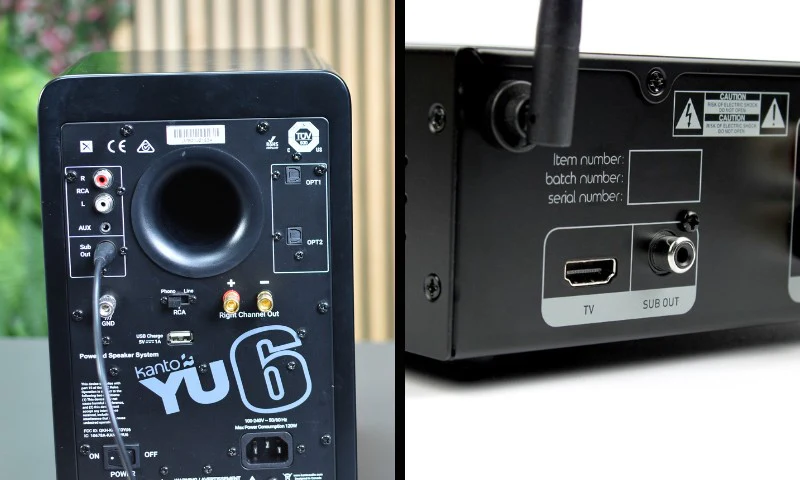
- Check The Mixer: Ensure that your mixer has at least one free input or output labeled “sub” or “*SUB OUT.” Some mixers may have a dedicated subwoofer output.
- Identify The Cable: Use a TRS (Tip-Ring-Sleeve) or RCA cable to connect the subwoofer to the mixer.
- Connect The Subwoofer: Insert one end of the cable into the subwoofer’s input and the other end into the mixer’s subwoofer output.
Connecting a Subwoofer Active to Your TV
If you want to connect your subwoofer directly to your TV, follow these steps:
- Check The TV: Ensure that your TV has an HDMI port with ARC (Audio Return Channel) capabilities.
- Check The Subwoofer: Make sure your subwoofer has a dedicated HDMI input labeled “HDMI” or “*ARC.”
- Connect The Subwoofer: Insert one end of the HDMI cable into the subwoofer’s input and the other end into the TV’s HDMI port.
Connecting a Subwoofer Passive to Your Amplifier
If you have a passive subwoofer, follow these steps:
- Connect The Subwoofer: Use an RCA cable to connect the subwoofer to the amplifier.
- Identify The Input: Insert one end of the cable into the subwoofer’s input and the other end into the amplifier’s subwoofer input.
Connecting a Subwoofer to Your Car Stereo
If you want to add a subwoofer to your car stereo, follow these steps:
- Choose a Suitable Location: Decide where you want to install the subwoofer in your car, such as under the seat or in the trunk.
- Connect The Cables: Use a long cable (at least 5 meters) to connect the subwoofer to the car’s battery and amplifier.
- Route The Cables: Carefully route the cables through the car’s interior to prevent them from getting tangled or damaged.
Conclusion
Connecting a subwoofer is a relatively simple process that can significantly enhance your home entertainment experience. By understanding what a subwoofer serves, choosing the right type of subwoofer for your needs, and following the steps outlined in this guide, you’ll be able to enjoy deeper, more immersive sound from your favorite movies and music.
Frequently Asked Questions
- Q: What is The Difference Between an Active And Passive Subwoofer?
A: An active subwoofer has an integrated amplifier, while a passive subwoofer requires an external amplifier. - Q: How do I Connect my Subwoofer to my Tv?
A: Connect your subwoofer directly to your TV using an HDMI cable with ARC capabilities. - Q: Can I Use Any Type of Cable to Connect my Subwoofer?
A: Use a TRS or RCA cable for active subwoofers and an RCA cable for passive subwoofers. - Q: How do I Install a Subwoofer in my Car?
A: Choose a suitable location, connect the cables carefully, and route them through the car’s interior to prevent damage. - Q: Can I Use a Subwoofer With Any Type of Amplifier?
A: Use an amplifier specifically designed for subwoofers or a separate power amplifier to avoid damaging your equipment. - Q: How do I Adjust The Settings on my Subwoofer?
A: Consult your subwoofer’s manual or online documentation for specific instructions on adjusting settings. - Q: Can I Connect Multiple Subwoofers Together?
A: It is generally not recommended to connect multiple subwoofers together, as this can cause audio conflicts and damage your equipment. - Q: How do I Troubleshoot Issues With my Subwoofer?
A: Check the connections, adjust the settings, or consult the manual or online documentation for troubleshooting tips.


