
How to Recover Erased Messages on Your Smartphone
Are you desperate because you’ve erased important messages from your smartphone? Don’t worry, there are ways to recover them! In this article, we’ll guide you through the process of recovering erased messages on various smartphones and messaging apps.
Why Do I Want to Recover My Erased Messages?
Recovering erased messages can be crucial in many situations. For instance, if you’ve deleted a message containing sensitive information or a vital contact number, it’s essential to recover it to avoid any potential losses.
How Can I Recover Erased Messages on Android?
If you have an Android smartphone, there are several ways to recover erased messages:
- Google One: If you have a Google account and your phone is associated with it, you can use the Google One service to back up your data. You can then recover deleted messages from the backup.
- Samsung Cloud: If you have a Samsung smartphone, you can use the Samsung Cloud service to back up and restore your data. This includes recovering erased messages.
- Easeus Mobisaver: EaseUS MobiSaver is an app that can help you recover deleted messages on Android smartphones. You’ll need to download the app, scan your phone’s memory, and select the messages you want to recover.
How Can I Recover Erased Messages on Iphone?
If you have an iPhone, you can use the following methods to recover erased messages:
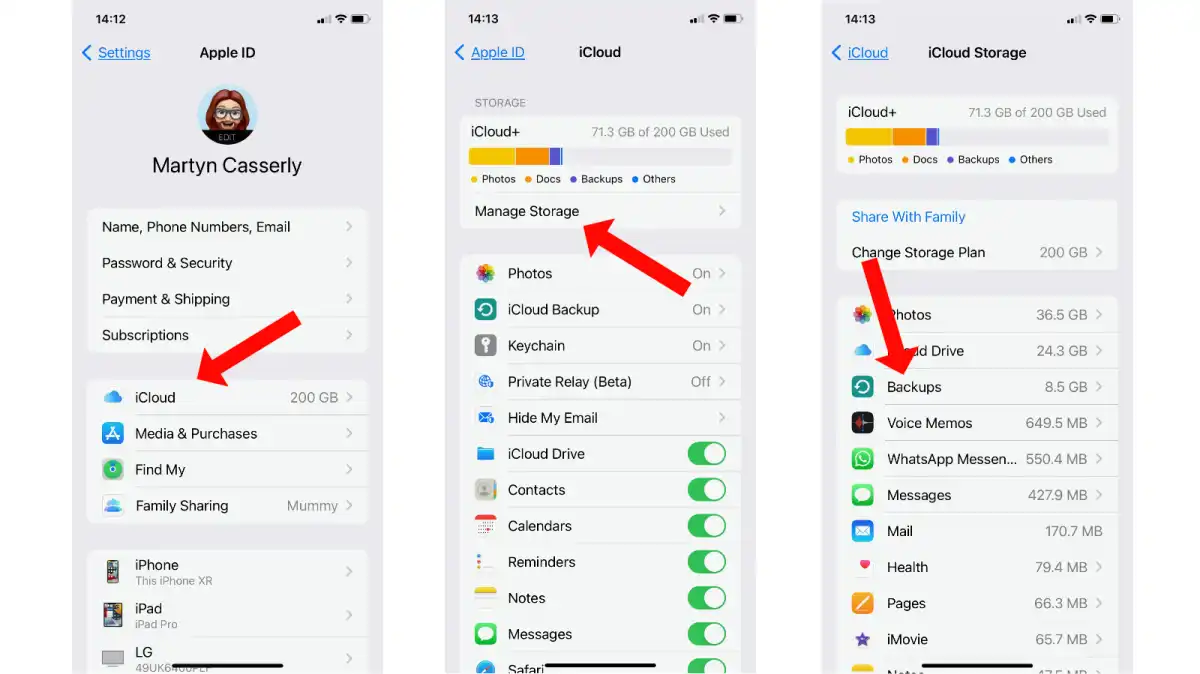
- Icloud: If you have an iCloud account, you can back up your data, including deleted messages. You can then restore the backup to recover the messages.
- Iexplorer: IExplorer is a software that allows you to access and recover deleted messages from your iPhone’s backup.
How Can I Recover Erased Messages on Whatsapp?
If you’ve erased important messages on WhatsApp, don’t worry! There are ways to recover them:
- Backup: Make sure you have a recent backup of your WhatsApp data. You can do this by going to Settings > Chats > Chat Backup.
- Recover From Google Drive or Icloud: If you have a backup of your WhatsApp data on Google Drive or iCloud, you can restore it to recover the deleted messages.
How Can I Recover Erased Messages on Messenger?
To recover erased messages on Messenger, follow these steps:
- Check Filed Chats: Sometimes, deleted messages are filed and not entirely gone. Check your chat history to see if the messages are still there.
- Recover From Cache: You can also try recovering deleted messages from the cache of your smartphone.
How Can I Recover Erased Messages on Gmail?
To recover erased messages on Gmail, follow these steps:
- Check The Spam Folder: Sometimes, deleted emails end up in the Spam folder. Check there to see if the messages are still available.
- Recover From The Trash Folder: You can also try recovering deleted messages from the Trash folder.
Conclusion
Recovering erased messages is possible on various smartphones and messaging apps. By following the steps outlined above, you should be able to recover your important messages.
Faqs
- Q: Can I Recover Deleted Messages if I’ve Restarted my Phone?
A: Unfortunately, restarting your phone does not increase the chances of recovering deleted messages. - Q: How do I Prevent Future Message Deletions?
A: Make sure you have a recent backup of your data and regularly check for updates to your messaging apps. - Q: Can I Recover Deleted Messages From an Old Device?
A: Yes, but it’s essential to ensure that the device is properly backed up before attempting to recover any data. - Q: Are There Any Free Tools Available to Recover Deleted Messages?
A: Yes, EaseUS MobiSaver and iExplorer offer free versions that can help you recover deleted messages. - Q: Can I Recover Deleted Messages on Multiple Devices at Once?
A: Some apps and services allow you to recover deleted messages across multiple devices simultaneously.
I hope this article has helped you understand how to recover erased messages on your smartphone!


