
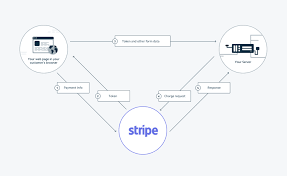
How Stripe Functions: A Guide to Understanding Its Operations
Are you curious about how Stripe functions as a payment platform? You’re not alone. With millions of companies using Stripe for their online payments, it’s essential to understand its operations. In this article, we’ll delve into the world of Stripe and explore how it works, both as a vendor and a buyer.
What is Stripe?
Stripe is an online payment processing system founded in 2011 by John and Patrick Collison. It has become one of the most widely used platforms for online payments, with millions of companies relying on it to process transactions. As a vendor or buyer, understanding how Stripe functions can make all the difference.
How Does Stripe Work as a Vendor?
To integrate Stripe into your e-commerce platform as a vendor, you’ll need to follow the specific procedure outlined by Stripe. Here’s a step-by-step guide:
- Register an Account: Go to Stripe’s registration page and fill out the required information, including email, name, country, and password.
- Verify Email: Check your email for the verification message from Stripe and click on the link provided.
- Access Dashboard: Log in to your Stripe account using your email and password.
- Configure Account: Follow the instructions on the dashboard to set up your account, including choosing a plan and providing basic company information.
- Choose Payment Options: Select the payment options you want to offer to customers, such as credit or debit cards.
- Integrate With Your Website: Add the Stripe payment button to your website using the provided code.
How Does Stripe Work as a Buyer?
As a buyer, using Stripe is relatively straightforward:
- Select Payment Method: Choose the “Card of Credit — Stripe” option during checkout.
- Enter Card Information: Fill out the required information for your credit or debit card.
- Confirm Purchase: Click on the “Confirm” button to complete the purchase.
Using Stripe on Smartphone And Tablet
Stripe can also be used on smartphones and tablets through its official app, available for both Android and iOS devices. The operation is similar to the web version, with some slight differences in navigation.
Frequently Asked Questions (FAQs)
- Q: Is Stripe Free?
A: No, Stripe requires payment for services. - Q: Do I Need a Stripe Account to Use it as a Buyer?
A: No, you don’t need an account; just select the “Card of Credit — Stripe” option during checkout. - Q: Can I Use Stripe on my Smartphone or Tablet?
A: Yes, you can download and install the official Stripe app for Android or iOS devices. - Q: How do I Integrate Stripe With my E-commerce Platform as a Vendor?
A: Follow the specific procedure outlined by Stripe on their registration page. - Q: Is Stripe Secure?
A: Yes, Stripe uses advanced security measures to protect transactions and sensitive information.
Conclusion
In conclusion, Stripe is an essential payment processing system for online commerce. Understanding its operations as a vendor or buyer can simplify the payment process and increase customer satisfaction. By following the steps outlined in this article, you’ll be well on your way to integrating Stripe into your e-commerce platform or using it as a buyer.
Common Mistakes to Avoid
- Not registering an account before attempting to use Stripe
- Not verifying email for registration
- Not configuring account settings correctly
- Not selecting payment options properly
By avoiding these common mistakes, you can ensure a smooth and secure experience with Stripe.


