
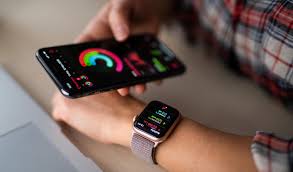
Connecting Your Smartwatch to Your Smartphone: A Step-by-step Guide
Are you looking for a hassle-free way to connect your smartwatch to your smartphone? Look no further! In this article, we will guide you through the process of connecting your smartwatch to your smartphone, regardless of the operating system or brand.
Why Connect Your Smartwatch to Your Smartphone?
Before we dive into the details, let’s talk about why you would want to connect your smartwatch to your smartphone. By doing so, you can enjoy a seamless experience with features like:
- Receiving notifications on your watch
- Tracking your fitness goals and health metrics
- Controlling music playback or taking calls directly from your watch
- Using voice commands to control various functions
The Benefits of Connectivity
In today’s fast-paced world, staying connected is essential. With a connected smartwatch, you can:
- Stay informed about important events and notifications without constantly checking your phone
- Get real-time updates on your fitness progress or health metrics
- Enjoy hands-free control over various aspects of your daily life
Connecting Your Smartwatch to Your Smartphone: A Step-by-step Guide
Smartwatches With Wear OS Operating System
If you have a smartwatch running on the Wear OS operating system, here’s how to connect it to your smartphone:
- Download and install the Wear OS app from the Google Play Store or Apple App Store.
- Launch the app and follow the prompts to set up your watch.
- Select your language and country or region.
- Choose your preferred settings for notifications and other features.
- Pair your watch with your smartphone using Bluetooth.
Smartwatches With Proprietary Operating Systems
If you have a smartwatch running on a proprietary operating system, such as Samsung’s Tizen OS or Huawei’s Lite OS, here’s how to connect it to your smartphone:
- Download and install the companion app from the Google Play Store or Apple App Store.
- Launch the app and follow the prompts to set up your watch.
- Select your language and country or region.
- Choose your preferred settings for notifications and other features.
- Pair your watch with your smartphone using Bluetooth.
Connecting Your Smartwatch to Internet
If you have a smartwatch with Wi-Fi connectivity, you can connect it directly to the internet without relying on your smartphone. Here’s how:
- Ensure that your watch has an active connection to your smartphone via Bluetooth.
- Enable Wi-Fi on your watch and select the network you want to connect to.
- Enter the password for the selected network using your smartphone.
Connecting Your Smartwatch to Google Fit
If you’re a fitness enthusiast, you’ll love connecting your smartwatch to Google Fit. Here’s how:
- Ensure that your watch has an active connection to your smartphone via Bluetooth.
- Launch the Google Fit app on your watch or smartphone and follow the prompts to set up the integration.
Connecting Your Smartwatch to Apple Watch
If you have an Apple Watch, here’s how to connect it to your iPhone:
- Download and install the Wear OS app from the Apple App Store.
- Launch the app and follow the prompts to set up your watch.
- Select your language and country or region.
- Choose your preferred settings for notifications and other features.
- Pair your watch with your iPhone using Bluetooth.
Connecting Your Smartwatch to Huawei Watch
If you have a Huawei smartwatch, here’s how to connect it to your smartphone:
- Download and install the companion app from the Google Play Store or Apple App Store.
- Launch the app and follow the prompts to set up your watch.
- Select your language and country or region.
- Choose your preferred settings for notifications and other features.
- Pair your watch with your smartphone using Bluetooth.
Connecting Your Smartwatch to Internet (Continued)
If you have a smartwatch with cellular connectivity, you can connect it directly to the internet without relying on your smartphone. Here’s how:
- Ensure that your watch has an active connection to your smartphone via Bluetooth.
- Enable cellular connectivity on your watch and select the network you want to use.
- Enter the password for the selected network using your smartphone.
Conclusion
Connecting your smartwatch to your smartphone is a straightforward process, regardless of the operating system or brand. By following these simple steps, you can enjoy a seamless experience with features like notifications, fitness tracking, and voice commands. Happy connecting!
Frequently Asked Questions (FAQs)
- Q: What is The Purpose of Connecting my Smartwatch to my Smartphone?
A: The primary purpose of connecting your smartwatch to your smartphone is to enable features like notifications, fitness tracking, and hands-free control. - Q: Which Operating Systems Support Connectivity Between Smartwatches And Smartphones?
A: Both Wear OS and proprietary operating systems, such as Samsung’s Tizen OS and Huawei’s Lite OS, support connectivity between smartwatches and smartphones. - Q: How do I Connect my Smartwatch to Google Fit?
A: To connect your smartwatch to Google Fit, ensure that your watch has an active connection to your smartphone via Bluetooth. Then, launch the Google Fit app on your watch or smartphone and follow the prompts to set up the integration. - Q: Can I Connect my Apple Watch to Google Fit?
A: Unfortunately, Apple Watch does not natively support integration with Google Fit. However, you can use third-party apps to track your fitness goals and health metrics. - Q: How do I Enable Cellular Connectivity on my Smartwatch?
A: To enable cellular connectivity on your smartwatch, ensure that your watch has an active connection to your smartphone via Bluetooth. Then, enable cellular connectivity on your watch and select the network you want to use. - Q: Can I Connect my Huawei Smartwatch to Google Fit?
A: Yes, you can connect your Huawei smartwatch to Google Fit by following the same steps as described in the article. - Q: How do I Troubleshoot Connectivity Issues Between my Smartwatch And Smartphone?
A: If you encounter connectivity issues between your smartwatch and smartphone, try restarting both devices or resetting the connection settings. - Q: Can I Use my Smartwatch to Control Music Playback on my Smartphone?
A: Yes, most smartwatches support music playback control using voice commands or touch inputs.
Remember: Always consult your user manual or manufacturer’s website for specific instructions and troubleshooting guides for your particular smartwatch model. Happy connecting!


