
How to See Last Access on Whatsapp: A Step-by-step Guide
Are you curious about seeing when your friends last accessed WhatsApp? Do you want to know who’s online and who’s not? Look no further! In this article, we’ll guide you through the process of viewing last access times on WhatsApp for both Android and iOS devices.
Understanding Last Access on Whatsapp
Before we dive into the steps, it’s essential to understand what “last access” means on WhatsApp. This feature shows when a contact was last online or active on the app. It’s a helpful way to see if someone is available to chat or has been inactive for a while.
See Last Access on Whatsapp For Android Devices
To view last access times on WhatsApp for Android devices, follow these steps:
- Open Whatsapp: Start by opening the official WhatsApp app on your Android device.
- Go to Chats: Tap on the “Chats” tab at the bottom of the screen.
- Select a Contact: Choose the contact you want to see the last access time for from the list of recent chats or search for them using the lens icon.
- View Last Access Time: If the contact has not hidden their last access time and hasn’t blocked you, you’ll see the “Last access” timestamp under their name.
See Last Access on Whatsapp For Ios Devices
If you’re using an iPhone, follow these steps to view last access times:
- Open Whatsapp: Open the official WhatsApp app on your iOS device.
- Go to Chats: Tap on the “Chats” tab at the bottom of the screen.
- Select a Contact: Choose the contact you want to see the last access time for from the list of recent conversations or search for them using the pencil icon.
- View Last Access Time: If the contact has not hidden their last access time and hasn’t blocked you, you’ll see the “Last access” timestamp under their name.
See Last Access on Whatsapp For PC Devices
You can also view last access times on WhatsApp for PC devices using WhatsApp Web or the official client for Windows or macOS:
- Open Whatsapp Web: Log in to your WhatsApp account using WhatsApp Web and search for the contact you want to see the last access time for.
- View Last Access Time: If the contact has not hidden their last access time, you’ll see the “Last access” timestamp under their name.
Troubleshooting: Why Can’t I See Last Access on Whatsapp?
If you’re unable to see the last access time for a particular contact, it might be due to one of the following reasons:
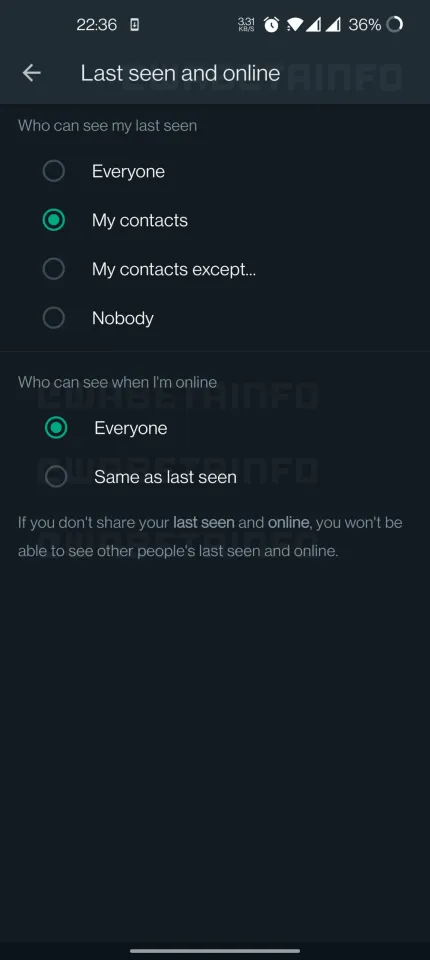
- Last Access is Hidden: The contact may have hidden their last access time by modifying their privacy settings.
- Blocked or Blocked by Contact: You or the contact may have blocked each other, preventing you from seeing their last access time.
How to Unblock a Contact on Whatsapp
If you’ve been blocked or blocked someone else, follow these steps to unblock them:
- Open Whatsapp: Open the official WhatsApp app on your device.
- Go to Settings: Tap on the three dots at the top right corner of the screen and select “Settings.”
- Account: Go to the “Account” section and tap on “Privacy.”
- Blocked Contacts: Find the contact you want to unblock in the list of blocked contacts and tap on it.
- Unblock Contact: Tap on the “Unblock” button to remove them from the blocklist.
Conclusion
Viewing last access times on WhatsApp can be a helpful feature for staying connected with your friends and family. By following these steps, you’ll be able to see when contacts were last active on the app. Remember to troubleshoot any issues that might arise, such as hidden or blocked last access times.
Frequently Asked Questions (FAQs)
- Q: Can I Hide my Last Access Time on Whatsapp?
A: Yes, you can modify your privacy settings to hide your last access time. - Q: Why Can’t I See The Last Access Time For a Particular Contact?
A: It might be due to hidden or blocked last access times. - Q: How do I Unblock a Contact on Whatsapp?
A: Follow the steps outlined in this article to unblock a contact. - Q: Can I View Last Access Times on Whatsapp Web?
A: Yes, you can use WhatsApp Web to view last access times for PC devices. - Q: Why is my Last Access Time Not Visible to Others?
A: It might be due to modified privacy settings or being blocked by the contact. - Q: Can I See Who’s Online on Whatsapp?
A: Yes, you can see when contacts are currently online or active on the app. - Q: How do I Check if a Contact is Online on Whatsapp?
A: Look for the “Online” indicator under their name in the chat list. - Q: Can I Use Whatsapp Without Showing my Last Access Time?
A: Yes, you can modify your privacy settings to hide your last access time.
I hope this article has helped you understand how to see last access on WhatsApp!


