
How to Encrypt Your Email: A Step-by-step Guide
Are you tired of worrying about your email security? Do you want to protect your sensitive information from prying eyes? Look no further! In this article, we will explore the world of encrypted email and show you how to secure your communications with ease.
Why Encrypt Your Email?
Email encryption is a simple yet effective way to safeguard your online communication. With the increasing number of data breaches and cyber attacks, it’s more important than ever to protect your sensitive information. By encrypting your emails, you can ensure that only the intended recipient can read the contents of the message.
What Are The Best Email Encryption Services?
There are several email encryption services available in the market, each with its own strengths and weaknesses. Here are some of the most popular options:
Protonmail: A Secure Email Service
ProtonMail is one of the most popular email encryption services available today. It’s free to use and offers a range of features that make it an ideal choice for individuals and businesses alike.
To get started with ProtonMail, follow these simple steps:
- Go to the ProtonMail website and click on “Create a Free Account”.
- Fill out the registration form with your details.
- Choose a password and confirm it.
- Set up two-factor authentication (2FA) for added security.
Once you’ve set up your account, you can start sending encrypted emails to your contacts.
Tutanota: A Secure Email Service
Tutanota is another popular email encryption service that offers a range of features to protect your online communication.
To get started with Tutanota, follow these simple steps:
- Go to the Tutanota website and click on “Register”.
- Fill out the registration form with your details.
- Choose a password and confirm it.
- Set up 2FA for added security.
Once you’ve set up your account, you can start sending encrypted emails to your contacts.
Lockbin: A Secure Email Service
Lockbin is a simple yet effective email encryption service that allows you to send secure emails without creating an account.
To get started with Lockbin, follow these simple steps:
- Go to the Lockbin website and click on “Send a Secure Message”.
- Fill out the form with your details.
- Choose a password and confirm it.
- Set up 2FA for added security (optional).
Once you’ve sent your message, you’ll receive a confirmation email with a link to view the contents of the message.
Mailvelope: An Email Encryption Extension
Mailvelope is an email encryption extension that allows you to encrypt emails directly from your browser.
To get started with Mailvelope, follow these simple steps:
- Go to the Chrome Web Store and install the Mailvelope extension.
- Go to the Gmail or Outlook website and compose a new email.
- Click on the Mailvelope icon and select “Generate Key”.
- Fill out the form with your details and choose a password.
Once you’ve set up your account, you can start sending encrypted emails to your contacts.
How to Encrypt an Email in Outlook?
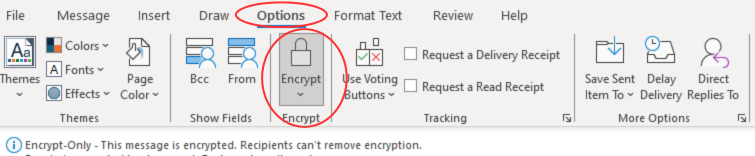
If you’re using Outlook, you can encrypt your emails by following these simple steps:
- Compose a new email.
- Click on the “Options” button and select “Cryptography”.
- Choose the encryption option that suits your needs.
- Set up 2FA for added security.
Conclusion
Encrypting your email is a simple yet effective way to protect your online communication. With the increasing number of data breaches and cyber attacks, it’s more important than ever to safeguard your sensitive information.
In this article, we’ve explored some of the best email encryption services available today, including ProtonMail, Tutanota, Lockbin, and Mailvelope. We’ve also shown you how to encrypt an email in Outlook using two-factor authentication (2FA) for added security.
By following these simple steps, you can ensure that only the intended recipient can read the contents of your emails.
Frequently Asked Questions
- What is Email Encryption?
Email encryption is a process that converts your email messages into unreadable text, making it impossible for unauthorized parties to read the contents. - Why Should I Encrypt my Email?
You should encrypt your email to protect sensitive information from prying eyes. With the increasing number of data breaches and cyber attacks, it’s more important than ever to safeguard your online communication. - Which Email Encryption Service is Best For Me?
The best email encryption service for you will depend on your specific needs. ProtonMail, Tutanota, Lockbin, and Mailvelope are all popular options that offer a range of features to protect your online communication. - How do I Encrypt an Email in Outlook?
To encrypt an email in Outlook, follow these simple steps: Compose a new email, click on the “Options” button and select “Cryptography”, choose the encryption option that suits your needs, and set up 2FA for added security. - What is Two-factor Authentication (2FA)?
Two-factor authentication (2FA) is an additional layer of security that requires you to enter a code sent to your phone or email address in addition to your password. - Can I Encrypt Emails Without Creating an Account?
Yes, some email encryption services like Lockbin allow you to send secure emails without creating an account.
References
- ProtonMail website
- Tutanota website
- Lockbin website
- Mailvelope extension for Chrome


