
The Ultimate Guide to Identifying Fonts: A Step-by-step Approach
Are you tired of struggling to identify fonts in images, PDFs, or online content? Look no further! In this comprehensive guide, we’ll take you through the most effective methods for font identification, ensuring that you can easily recognize and utilize various fonts with ease.
What is a Font?
Before diving into the world of font identification, it’s essential to understand what a font actually is. A font refers to a specific style or design of lettering, which can vary in appearance, size, color, and other characteristics. With so many fonts available, it’s not uncommon for individuals to struggle with identifying them.
Why Identify Fonts?
Identifying fonts is crucial in various contexts:
- Design And Editing: When working on graphic designs, web pages, or documents, knowing the font used can help you maintain consistency and ensure that your work looks professional.
- Accessibility: For people with dyslexia or other reading difficulties, identifying fonts can aid in creating more readable content.
- Research And Analysis: In academic or research settings, understanding font styles can provide valuable insights into a document’s authenticity or historical context.
Tools For Font Identification
Now that we’ve covered the importance of font identification, let’s explore some powerful tools to help you achieve this:
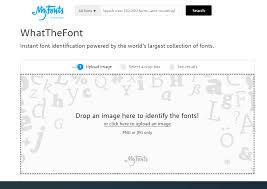
1. Whatthefont
This web-based application allows users to upload an image and identify the font used in it. WhatTheFont uses AI-powered technology to analyze the image and provide a list of potential fonts.
- Visit the WhatTheFont website and follow the instructions.
- Upload your image, select the area containing the text you want to identify, and click “Find Font.”
2. What Font Is
This online tool enables users to upload an image or enter a URL of a webpage with text you’d like to identify. What Font Is will then provide a list of potential fonts.
- Visit the What Font Is website and follow the instructions.
- Upload your image, enter the URL of the webpage, or copy-paste the text from the image.
3. Extractpdf
If you need to identify a font in a PDF file, ExtractPDF is an excellent tool for the job. It allows users to upload their PDF and extract various information, including fonts.
- Visit the ExtractPDF website and follow the instructions.
- Upload your PDF, select the area containing the text you want to identify, and click “Start.”
4. Aconvert
This online tool enables users to upload a PDF file, select the text they’d like to extract information from, and initiate the process.
- Visit the AConvert website and follow the instructions.
- Upload your PDF, choose the area containing the text you want to identify, and click “Submit.”
5. Photoshop
For users familiar with Adobe Photoshop, this software offers a built-in font identification feature.
- Open Photoshop on your computer.
- Select the image containing the text you’d like to identify.
- Go to the “Text” menu, select “Find Font,” and follow the instructions.
6. Fontanello
This browser extension helps users identify fonts in online content.
- Visit the Chrome Web Store or Firefox Add-ons store.
- Search for Fontanelle, click “Add to Chrome” (or “Install and OK” on Firefox), and follow the instructions.
- Select the text you’d like to identify using the contextual menu.
7. Adobe Creative Cloud
For users who need access to Adobe Photoshop or other Creative Cloud tools, subscribe to their service.
- Visit the Adobe website and follow the instructions.
- Sign up for a subscription to Creative Cloud, which includes access to Photoshop and other design software.
Conclusion
Font identification is an essential skill in today’s digital landscape. With these tools at your disposal, you’ll be able to easily recognize and utilize various fonts with ease. Whether you’re working on graphic designs, web pages, or documents, understanding font styles can make a significant difference in maintaining consistency and ensuring that your work looks professional.
Frequently Asked Questions
- Q: What is The Best Tool For Font Identification?
A: The best tool depends on your specific needs. If you’re working with images, WhatTheFont or Adobe Photoshop might be more suitable. For PDF files, ExtractPDF or AConvert could be better options. - Q: Are These Tools Free to Use?
A: Yes, most of the tools mentioned are free to use, although some may offer paid features or subscriptions. - Q: Can I Identify Fonts in Online Content Using Fontanello?
A: Yes, Fontanello is a browser extension that can help you identify fonts in online content. - Q: Do I Need to Subscribe to Adobe Creative Cloud to Use Photoshop?
A: No, while subscription to Adobe Creative Cloud provides access to Photoshop and other design software, it’s not required for font identification purposes.
In conclusion, identifying fonts is a crucial skill that can make a significant difference in various contexts. By using these powerful tools, you’ll be able to easily recognize and utilize various fonts with ease.


