
How to See Your Follower Count on Spotify: A Step-by-step Guide
Are you a music enthusiast who has created a playlist on Spotify? Do you want to keep track of your follower count, but don’t know how? You’re not alone! In this tutorial, we’ll show you how to see your follower count on Spotify, both on your computer and mobile device.
Why See Your Follower Count on Spotify?
Seeing your follower count on Spotify can be a great way to understand the popularity of your playlist. By monitoring your follower count, you can gain insights into what songs are resonating with your audience and make informed decisions about future playlists. In this article, we’ll explore how to see both your own follower count and that of other users’ playlists.
See Your Follower Count on Spotify (Your Own Playlist)
To see your follower count on Spotify for a playlist you created:
- Open The Spotify App: On your computer or mobile device, open the Spotify app.
- Search For Your Playlist: Type in the name of your playlist in the search bar and press Enter.
- Click on The Playlist: Once you find your playlist, click on it to view its details.
- See Your Follower Count: In the top right corner of the page, you’ll see a number indicating how many people have liked (followed) your playlist.
Why Can’t I See My Follower Count?
If you’re not seeing your follower count, there might be a few reasons:
- Your playlist is set to private.
- You don’t have any followers yet.
- There’s an issue with your Spotify account.
See The Follower Count of Another User’s Playlist
To see the follower count of another user’s playlist on Spotify:
- Search For The Playlist: Type in the name of the playlist you want to view in the search bar and press Enter.
- Click on The Playlist: Once you find the playlist, click on it to view its details.
- See The Follower Count: In the top right corner of the page, you’ll see a number indicating how many people have liked (followed) that particular playlist.
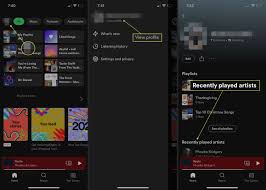
How to See Your Follower Count on Spotify (Mobile Device)
If you’re using a mobile device:
- Open The Spotify App: On your smartphone or tablet, open the Spotify app.
- Search For Your Playlist: Type in the name of your playlist in the search bar and press Enter.
- Click on The Playlist: Once you find your playlist, click on it to view its details.
- See Your Follower Count: In the top right corner of the page, you’ll see a number indicating how many people have liked (followed) your playlist.
Why Can’t I See My Follower Count on Spotify?
If you’re not seeing your follower count on Spotify:
- Your playlist is set to private.
- You don’t have any followers yet.
- There’s an issue with your Spotify account.


