
Opening Epub Files: A Comprehensive Guide
In today’s digital age, electronic publications (ePubs) have become increasingly popular, offering a convenient way to read books, articles, and other written content on various devices. However, opening epub files can be a bit tricky, especially for those who are not familiar with the process. In this article, we will explore the different ways to open epub files on computers, smartphones, tablets, and eReaders.
What is an Epub File?
An ePub file is a digital publication that uses an open standard based on XML to provide dynamic texts optimized for visualization on readers, such as ebook readers, tablets, and PCs. These files can be opened on various devices, including computers, smartphones, tablets, and eReaders.
Why Can’t I Open My Epub File?
If you’re having trouble opening your epub file, it’s likely due to the presence of Digital Rights Management (DRM) restrictions. DRM is a form of digital lock that prevents unauthorized access to copyrighted content. Most solutions to open epub files cannot read files with DRM restrictions, so it’s essential to check if your ebook has DRM before downloading.
Opening Epub Files on PC
There are several software options available for opening epub files on PC:
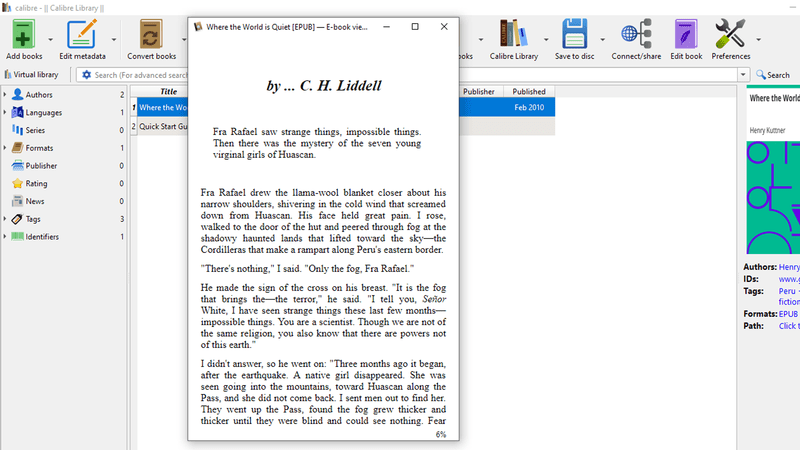
Calibre (Windows/MacOS/Linux)
Calibre is a free and open-source program that allows you to manage, convert, and read e-books. It’s compatible with Windows, MacOS, and Linux operating systems.
- Download Calibre from its official website.
- Open the downloaded file and follow the installation instructions.
- Once installed, launch Calibre and add your epub file by clicking on “Add books” in the toolbar.
- Select the epub file you want to open and click on “Open” to read it.
Fbreader (Windows/MacOS/Linux)
FBReader is another excellent option for reading epub files on PC. It’s a free application that allows you to read ebooks on Windows, MacOS, and Linux operating systems.
- Download FBReader from its official website.
- Open the downloaded file and follow the installation instructions.
- Once installed, launch FBReader and click on the “+” button in the toolbar.
- Select the epub file you want to open and click on “OK” to read it.
Books (macOS)
If you’re using a Mac, you can also use the built-in Books application to open epub files.
- Open Books by clicking on its icon in the dock or launching it from the Applications folder.
- Click on the “+” button in the toolbar and select “Add to Library.”
- Choose the epub file you want to open and click on “Open” to read it.
Other Solutions For Opening Epub Files on PC
There are other software options available for opening epub files on PC, including:
- Freda (Windows)
- Bibliovore (Windows)
- Yomu EBook Reader (macOS)
Opening Epub Files Online
If you don’t have a device or software to open your epub file, you can try using online services like EPUB Viewer.
- Go to the EPUB Viewer website and drag your epub file into the “Drag here” box.
- Alternatively, click on the “Choose files” button and select your epub file from your computer.
- Wait for the upload process to complete, then you can read your epub file online.
Opening Epub Files on Android
If you’re using an Android device, there are several apps available to open epub files:
Media365 Book Reader
Media365 Book Reader is a popular app that allows you to read ebook files, including epub. It’s free to download and offers a vast library of books.
- Download Media365 Book Reader from the Play Store.
- Launch the app and click on the “Start” button.
- Tap on the “+” button in the toolbar and select “Add all books.”
- Choose your epub file and click on “OK” to read it.
Ereader Prestige
EReader Prestige is another excellent option for reading ebook files, including epub, on Android devices.
- Download eReader Prestige from the Play Store.
- Launch the app and click on the “+” button in the toolbar.
- Select your epub file and click on “OK” to read it.
Opening Epub Files on Iphone And Ipad
If you’re using an iOS device, there are several apps available to open epub files:
Books (iOS)
The Books app is a pre-installed application that allows you to download and read ebook files, including epub. It’s free to use and offers a vast library of books.
- Open the Books app by clicking on its icon.
- Tap on the “+” button in the toolbar and select “Add to Library.”
- Choose your epub file and click on “Open” to read it.
Other Apps For Opening Epub Files on Iphone And Ipad
There are other apps available for opening epub files on iOS devices, including:
- Marvin
- KyBook
- FBReader
Conclusion
In conclusion, opening epub files is a relatively straightforward process, but it can be affected by DRM restrictions. By using software like Calibre or FBReader, or online services like EPUB Viewer, you can easily read your epub files on various devices.
If you’re still having trouble opening your epub file, feel free to ask in the comments below!
Faqs
- What is an Epub File?
An ePub file is a digital publication that uses an open standard based on XML to provide dynamic texts optimized for visualization on readers. - Why Can’t I Open my Epub File?
It’s likely due to DRM restrictions or compatibility issues with your device or software. - How do I Open an Epub File on Pc?
You can use software like Calibre, FBReader, or Books (macOS) to open and read epub files. - Can I Open an Epub File Online?
Yes, you can use services like EPUB Viewer to upload and read your epub file online. - How do I Open an Epub File on Android?
You can use apps like Media365 Book Reader or eReader Prestige to open and read epub files. - Can I Open an Epub File on Iphone And Ipad?
Yes, you can use the Books app (iOS) or other third-party apps like Marvin or KyBook to open and read epub files. - What if my Epub File Has Drm Restrictions?
Unfortunately, most software solutions cannot read files with DRM restrictions. You may need to contact the ebook’s publisher or author for assistance.
Please let me know if you’d like me to add anything else!


