
The Power of Flash: Unlocking Creative Possibilities in Photography
Are you ready to take your photography skills to the next level? In this article, we’ll delve into the world of flash photography, exploring its uses, benefits, and creative possibilities.
Understanding Flash Technology
Flash technology is a fundamental instrument in modern photography. A flash is an electronic device that accumulates energy in a condenser and releases it instantaneously to produce a burst of light. This light can be directed at a subject to illuminate it, create shadows, or add depth to a scene.
Types of Flash
There are several types of flash technology available:
- External Flash: An external flash is a separate device that can be attached to a camera or used as a standalone unit. It offers greater flexibility and control over the light output.
- Incorporated Flash: This type of flash is built into a camera and is often used for convenience and ease of use.
- Slave Flash: A slave flash is an external device that can be triggered by a master flash or a camera’s built-in flash.
Using External Flash
External flash offers several advantages over incorporated flash, including:
- Greater control over light output
- Ability to direct the flash in various directions
- More potent and intense light output
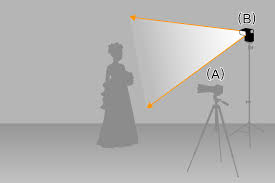
When using external flash, it’s essential to position the device correctly. Directing the flash head towards a surface (e.G., A wall or ceiling) can create interesting effects.
Tips For Using External Flash
- Position the flash head at an angle to the subject to reduce harsh shadows.
- Use a flash diffuser to soften the light and reduce contrast.
- Experiment with different flash angles and positions to achieve unique effects.
Using Incorporated Flash
Incorporated flash is convenient but often lacks the power and control of external flash. When using incorporated flash, it’s essential to consider the following:
- The flash is often not as powerful as an external unit
- The direction of the flash is fixed, which can create harsh shadows
Tips For Using Incorporated Flash
- Use a flash diffuser or modifier to soften the light and reduce contrast.
- Experiment with different camera settings to achieve the desired effect.
Using Flash in Different Situations
Flash can be used in various situations:
- Outdoor Photography: Use flash to fill shadows, add depth, and create interesting effects.
- Indoor Photography: Use flash to illuminate dark areas, reduce harsh shadows, and add warmth to a scene.
- Portrait Photography: Use flash to create flattering light, reduce red-eye effect, and add depth to a subject.
Tips For Using Flash in Different Situations
- When using flash outdoors, consider the distance between the camera and subject. Flash can be less effective at long distances.
- When using flash indoors, pay attention to the lighting conditions. Flash can sometimes make an indoor scene look too bright or harsh.
- When using flash for portraits, position the light source correctly to avoid harsh shadows.
Using Flash on Android And Iphone
If you’re using a smartphone to take photos, it’s essential to know how to use the built-in flash:
- Android: Tap on the camera app icon, then tap on the lightning bolt symbol to enable or disable the flash.
- Iphone: Open the camera app, tap on the settings icon (represented by a gear), and select “Flash” to turn it on or off.
Conclusion
Flash photography offers a world of creative possibilities. By understanding the different types of flash technology, tips for using external and incorporated flash, and how to use flash in various situations, you can unlock new levels of creativity in your photography.
Frequently Asked Questions (FAQs)
- Q: What is Flash Photography?
A: Flash photography involves using a device that releases a burst of light to illuminate a subject or scene. - Q: What Are The Benefits of Using External Flash?
A: External flash offers greater control over light output, ability to direct the flash in various directions, and more potent and intense light output. - Q: How do I Use Flash on my Android Device?
A: Tap on the camera app icon, then tap on the lightning bolt symbol to enable or disable the flash. - Q: Can I Use Flash For Portrait Photography?
A: Yes, but position the light source correctly to avoid harsh shadows and reduce red-eye effect. - Q: What is The Difference Between Incorporated Flash And External Flash?
A: Incorporated flash is built into a camera and often lacks power and control compared to external flash. - Q: Can I Use Flash in Outdoor Photography?
A: Yes, but consider the distance between the camera and subject, as flash can be less effective at long distances. - Q: How do I Reduce Harsh Shadows When Using Flash?
A: Use a flash diffuser or modifier to soften the light and reduce contrast. - Q: Can I Use Flash For Indoor Photography?
A: Yes, but pay attention to the lighting conditions, as flash can sometimes make an indoor scene look too bright or harsh.
Recommended Reading
- “The Art of Flash Photography” by [Author]
- “Flash Photography for Beginners” by [Author]
- “Mastering Flash Technology” by [Author]
Additional Resources
- Online courses on flash photography
- YouTube tutorials on flash photography
- Photography blogs and websites with flash-related content


