
Understanding Audio Issues on Your Phone: A Comprehensive Guide
Are you tired of dealing with audio issues on your phone? Whether it’s a distorted sound or an inability to hear anything, these problems can be frustrating and disrupt your daily life. In this article, we’ll explore the possible causes of audio issues on your phone and provide step-by-step solutions to help you resolve them.
The Basics: Checking Audio Settings
Before diving into more complex solutions, it’s essential to check your phone’s audio settings. This simple step can often resolve the issue without requiring further action.
- On Android: Go to Settings > Sounds/Sounds and Silent. Make sure the “Not disturbing” option is not activated.
- On Iphone: Check if the silent mode is enabled by looking for the orange crescent moon icon on your device’s status bar. If it’s on, toggle it off.
Verifying Audio Functionality
To ensure that the audio issue isn’t related to a hardware problem, try playing sounds through different sources:
- On Android: Open the Settings app and go to Sounds/Sounds and vibration. Adjust the volume level by dragging the slider to the right.
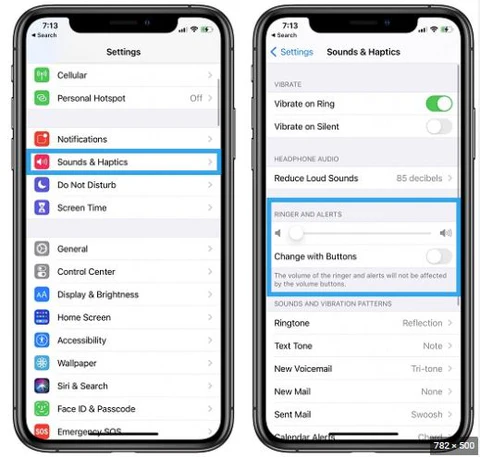
- On Iphone: Go to Settings > Sounds and Haptic Alerts. Drag the slider for Ringer and Alerts to the right.
Resolving Audio Issues: A Step-by-step Guide
Here are some potential solutions to audio issues on your phone:
Checking For Water Damage
If you’ve recently exposed your phone to water, it’s possible that the sound issue is caused by moisture affecting the speakers. To resolve this, try the following:
- Use an App: Download and use apps like Frequency Sound Generator (Android) or Sonic (iPhone) to produce a 165Hz tone for 30-60 seconds.
- Remove Excess Water: Gently tap your phone against a surface to remove any excess moisture. This may help resolve the issue.
Cleaning Microphones And Speakers
Sometimes, dirt or debris can obstruct microphone and speaker functionality. To clean these components:
- Identify the microphones and speakers on your device.
- Use a soft-bristled brush (like those used for painting) to gently sweep away any debris.
- If necessary, use a cotton swab to delicately remove any remaining particles.
When All Else Fails: Contacting Assistance
If none of the above solutions resolve your audio issue, it’s possible that there’s a hardware problem with your phone’s microphone or speaker. In this case:
- Contact Assistance: Reach out to your device manufacturer’s support team for further guidance.
- Schedule a Repair: If necessary, schedule an appointment at a nearby authorized service center to have the affected component repaired.
Conclusion
Audio issues on your phone can be frustrating, but by following these step-by-step solutions, you may be able to resolve them. Remember to always check your device’s audio settings and verify functionality before attempting more complex repairs. If all else fails, don’t hesitate to contact assistance for further guidance.
Frequently Asked Questions (FAQs)
Q: Why am I Experiencing Audio Issues on my Phone?
A: Audio issues can be caused by a variety of factors, including software problems, hardware damage, or dirt/debris obstructing microphone and speaker functionality.
Q: How do I Clean The Speakers on my Android Device?
A: To clean the speakers on your Android device, use a soft-bristled brush to gently sweep away any debris. If necessary, use a cotton swab to delicately remove remaining particles.
Q: Can I Resolve Audio Issues With Water Damage?
A: Yes, if you’ve recently exposed your phone to water and are experiencing audio issues, try using an app like Frequency Sound Generator (Android) or Sonic (iPhone) to produce a 165Hz tone for 30-60 seconds. This may help resolve the issue.
Q: What do I do if None of These Solutions Work?
A: If you’ve tried all the above solutions and still experience audio issues, contact your device manufacturer’s support team for further guidance.


