
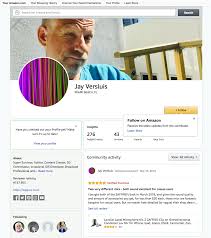
How to See Your Amazon Reviews: A Step-by-step Guide
Are you curious about seeing your Amazon reviews? Do you want to know how many reviews you’ve written and what products they’re for? In this article, we’ll show you exactly how to see your Amazon reviews on both your computer and mobile device.
Why Reviewing on Amazon Matters
Reviewing a product on Amazon is not only helpful to other users who are looking to purchase the same item but also important for getting free products from Amazon’s Vine program. By reviewing products, you’ll be able to help others make informed purchasing decisions while also potentially earning rewards and free products.
How to See Your Reviews on Computer
To see your reviews on computer, follow these steps:
- Log in to your Amazon account.
- Click on the “Account & Lists” dropdown menu and select “Your Orders”.
- In the “Your Orders” section, click on the “Reviews” tab.
- Here, you’ll see a list of all your reviews, including the product name, review title, and date written.
How to See Your Reviews on Mobile
To see your reviews on mobile, follow these steps:
- Open the Amazon app on your device.
- Log in to your Amazon account.
- Tap on the “Menu” icon (three horizontal lines) and select “Your Orders”.
- In the “Your Orders” section, tap on the “Reviews” tab.
- Here, you’ll see a list of all your reviews, including the product name, review title, and date written.
How to View Individual Reviews
To view an individual review in more detail, follow these steps:
- Locate the review you want to view by searching for it in the list.
- Tap on the review to open it in a new page.
- Here, you’ll see the full text of the review, as well as any photos or videos you’ve added.
Understanding Your Amazon Reviewing Experience
As an Amazon reviewer, your experience is not limited to just viewing your reviews. You can also use the platform to:
- Share Your Opinions: Write detailed and honest reviews about products you’ve purchased.
- Help Others Make Informed Decisions: Share your experiences with other users who may be considering purchasing the same product.
- Earn Rewards And Free Products: Participate in Amazon’s Vine program and receive free products or rewards for your reviews.
Conclusion
Seeing your Amazon reviews is a straightforward process that can help you understand how your content is perceived by others. By following these steps, you’ll be able to view all of your reviews on both computer and mobile devices, and gain insight into the feedback from other users.
Frequently Asked Questions (FAQs)
- What is Amazon’s Vine Program?
Amazon’s Vine program allows top reviewers like yourself to receive free products or rewards for writing high-quality reviews. - How do I Join Amazon’s Vine Program?
To join Amazon’s Vine program, you’ll need to have a strong reviewing history and be invited by Amazon. - Can I Delete my Reviews on Amazon?
Yes, you can delete your reviews on Amazon at any time. -
What Happens if my Review is Not Approved by Amazon?
If your review is not approved by Amazon, it will not be visible to other users. -
How long does it take for a review to appear on Amazon?
A review typically appears on Amazon within 48 hours of being submitted.
- Can I edit a review after it’s been published?
Yes, you can edit a review after it’s been published, but you will need to resubmit the revised review for approval by Amazon.
- How do I know if my review has been helpful to others?
You can check your review’s “helpful votes” metric on Amazon to see how many users have found your review useful.


