
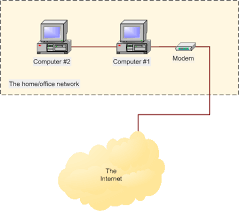
How to Connect Two Pcs by Means of Internet
Are you tired of being stuck at home while your friends are playing games or working remotely from their computers? Do you want to know how to connect two PCs by means of internet, making it possible for them to see each other as if they were in the same local network? Look no further! In this article, we will explore various ways to achieve this, including remote control, VPN (Virtual Private Network), and file sharing.
Programs For Connecting Two Pcs by Means of Internet
There are many programs available that can help you connect two PCs by means of internet. Some of the most popular ones include:
- Teamviewer: This program allows remote control and access to another computer, as well as file transfer and other diagnostic operations.
- Logmein Hamachi: This VPN (Virtual Private Network) software creates a secure network between multiple computers, making it possible for them to communicate with each other as if they were in the same local network.
- Resilio Sync: This program synchronizes folders across multiple devices, including PCs and smartphones.
Using Teamviewer For Remote Control
If you need to access or control another computer remotely, TeamViewer is an excellent choice. Here’s how to use it:
- Install TeamViewer on both computers.
- Launch TeamViewer on the remote computer and provide the other person with the ID and password.
- On the controlling computer, enter the ID and password and click “Connect”.
- Once connected, you can control the remote computer as if you were sitting in front of it.
Creating a Vpn With Logmein Hamachi
If you need to connect multiple computers over the internet and make them communicate with each other as if they were in the same local network, LogMeIn Hamachi is an excellent choice. Here’s how to use it:
- Install LogMeIn Hamachi on both computers.
- Launch LogMeIn Hamachi on one computer and create a new account.
- On the second computer, launch LogMeIn Hamachi and join the existing network using the ID created earlier.
Synchronizing Folders With Resilio Sync
If you need to synchronize folders across multiple devices, including PCs and smartphones, Resilio Sync is an excellent choice. Here’s how to use it:
- Install Resilio Sync on both computers.
- Launch Resilio Sync on one computer and create a new folder.
- On the second computer, launch Resilio Sync and add the folder created earlier.
Other Ways to Connect Two Pcs by Means of Internet
If none of the above solutions work for you, there are other ways to connect two PCs by means of internet. Some of these include:
- Google Drive: This cloud storage service allows file sharing and synchronization across multiple devices.
- Onedrive: This cloud storage service provides 5 GB of free storage space and allows file sharing and synchronization across multiple devices.
- Icloud Drive: This cloud storage service provides 5 GB of free storage space and allows file sharing and synchronization across multiple devices.
Conclusion
In this article, we have explored various ways to connect two PCs by means of internet, including remote control, VPN (Virtual Private Network), and file sharing. Whether you need to access or control another computer remotely or synchronize folders across multiple devices, there is a solution out there for you. Try these programs and services today!
Frequently Asked Questions
- What is The Best Way to Connect Two Pcs by Means of Internet?
The best way to connect two PCs by means of internet depends on your specific needs. If you need remote control or access, TeamViewer is an excellent choice. If you need to create a VPN (Virtual Private Network) between multiple computers, LogMeIn Hamachi is an excellent choice. - How do I Install Teamviewer on my Computer?
To install TeamViewer on your computer, go to the TeamViewer website and download the software. Follow the installation instructions provided. - What is a Vpn (Virtual Private Network)?
A VPN (Virtual Private Network) is a network connection that allows multiple computers to communicate with each other as if they were in the same local network. - How do I Create a Vpn Using Logmein Hamachi?
To create a VPN using LogMeIn Hamachi, follow these steps: Install LogMeIn Hamachi on both computers. Launch LogMeIn Hamachi on one computer and create a new account. On the second computer, launch LogMeIn Hamachi and join the existing network using the ID created earlier. - What is Resilio Sync?
Resilio Sync is a program that synchronizes folders across multiple devices, including PCs and smartphones. - How do I Install Resilio Sync on my Computer?
To install Resilio Sync on your computer, go to the Resilio Sync website and download the software. Follow the installation instructions provided. - What Are Some Other Ways to Connect Two Pcs by Means of Internet?
Some other ways to connect two PCs by means of internet include Google Drive, OneDrive, and iCloud Drive.
Recommended Services
- Google Drive: This cloud storage service allows file sharing and synchronization across multiple devices.
- Onedrive: This cloud storage service provides 5 GB of free storage space and allows file sharing and synchronization across multiple devices.
- Icloud Drive: This cloud storage service provides 5 GB of free storage space and allows file sharing and synchronization across multiple devices.


