
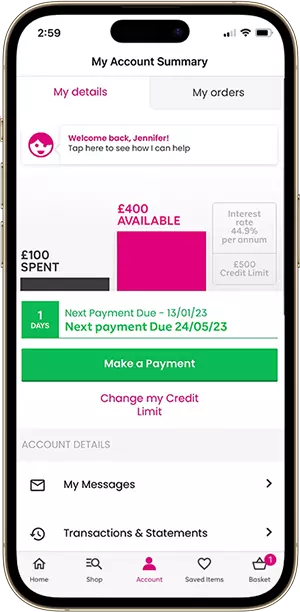
Understanding Your Credit on Very Mobile
Are you a Very Mobile user looking to know your credit status? You’re not alone! Many people face this dilemma when they decide to switch to a new SIM or operator, only to find themselves bewildered by the process. Fear not, dear reader, for we have got you covered. In this comprehensive guide, we’ll walk you through the steps to check your Very Mobile credit, whether on your smartphone or PC.
What You Need to Know
Before we dive into the details, it’s essential to understand that there are different ways to access your credit information on Very Mobile. We’ll explore both methods: Using the official mobile app and making a free call to their customer service number.
Method 1: Using The Official App
To check your credit status via the app, follow these simple steps:
Step 1: Download The Very Mobile App
The official Very Mobile app is available for download on both the Play Store (for Android devices) and the App Store (for iPhone users). You can find it by searching for “Very Mobile” in your device’s app store.
Step 2: Launch The App And Log In
Once you’ve downloaded the app, launch it and log in using your Very Mobile account credentials. If you’re not already registered, you’ll need to create an account first.
Step 3: Check Your Credit Status
After logging in, navigate to the section where your credit information is displayed. You should be able to see your current credit balance and any other relevant details.
Method 2: Making a Free Call to Customer Service
If you prefer not to use the app or are having trouble accessing it, you can make a free call to Very Mobile’s customer service number (1929) for assistance.
Step 1: Open Your Phone App
Open your phone’s dialer app and enter the customer service number (1929).
Step 2: Call And Follow Instructions
A recorded voice will greet you, and you’ll need to press the “1” key to get your credit status. The voice guide will walk you through the process, so be sure to follow its instructions.
Checking Your Credit on PC
Unfortunately, there is no web-based interface for Very Mobile customers to check their credit status directly from their PC browser. However, if you need further assistance or have questions, you can consult our tutorial on how to contact Very Mobile using your PC.
Understanding The Process
Switching to a new SIM or operator might seem daunting, but it’s actually quite straightforward once you know what to expect. The process involves logging in to the official app (or making a free call) and following the instructions provided by the voice guide or on-screen prompts.
Conclusion
In conclusion, checking your Very Mobile credit is a simple process that can be done either using their official mobile app or by making a free call to their customer service number. If you’re unsure about how to proceed, feel free to refer back to this guide for clarification. Happy switching!


