
How to Capsize Tongue Iphone: A Step-by-step Guide
Are you planning to travel abroad and want to know how to capsize tongue your iPhone? Or perhaps you’re an Italian resident who wants to change the language settings on their device? Look no further! This article will guide you through the process of changing the language settings on your iPhone, including the App Store, Maps, WhatsApp, and more.
Why Change Language Settings on Iphone?
Changing the language settings on your iPhone can be helpful in various situations:
- Traveling abroad: If you’re planning to travel to a foreign country, changing the language settings on your iPhone can help you navigate through unfamiliar territories.
- Changing nationality: If you’ve changed your nationality or want to change the default language on your device, this guide is for you.
How to Change Language Settings on Iphone
Changing the language settings on your iPhone is a straightforward process that requires only a few steps. Here’s how to do it:
Change System Language
1. Open the Settings app on your iPhone.
2. Tap on General.
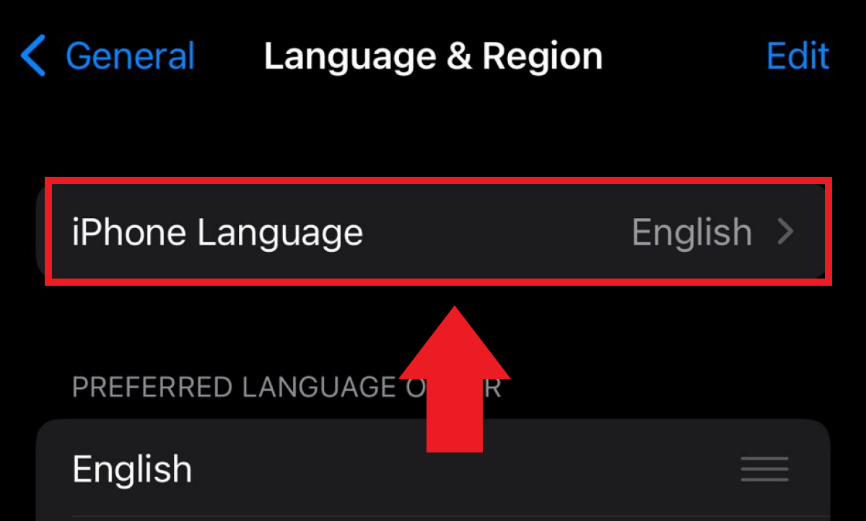
3. Scroll down and tap on Language & Region.
4. Select the language you want to use from the list of available languages.
5. Confirm that you want to change the system language by tapping Done.
Change App Store Language
1. Open the App Store app on your iPhone.
2. Tap on your profile picture in the top-right corner.
3. Scroll down and tap on Country/region.
4. Select the new country or region you want to use from the list of available countries.
5. Confirm that you want to change the App Store language by tapping Accept.
Change Maps Language
1. Open the Settings app on your iPhone.
2. Tap on Maps.
3. Scroll down and tap on Labels.
4. Select the language you want to use from the list of available languages.
5. Confirm that you want to change the Maps language by tapping Done.
Change Whatsapp Language
There is no specific option in WhatsApp to change the language settings. However, changing the system language will automatically change the language used in WhatsApp.
Additional Tips And Tricks
- If you’re having trouble finding the language settings on your iPhone, try searching for “language” or “tongue” in the Settings app.
- Changing the system language will affect all apps that use the system language, including Maps and WhatsApp.
- To change the language used in individual apps, such as Facebook or Instagram, you’ll need to go into each app’s settings.
Conclusion
Changing the language settings on your iPhone can be a helpful feature for travelers, expats, or anyone who wants to communicate in a different language. With this guide, you should now know how to change the system language, App Store language, Maps language, and WhatsApp language on your iPhone.


