
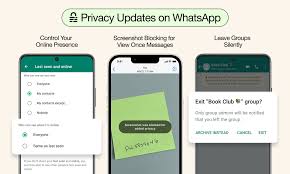
How to Stay Private on Whatsapp: A Comprehensive Guide
In today’s digital age, online privacy has become a major concern. With the widespread use of social media and messaging apps like WhatsApp, it’s essential to know how to protect your personal information and maintain your online privacy.
What You Need to Know About Whatsapp Privacy
WhatsApp is one of the most popular messaging apps worldwide, with over 2 billion users. While it offers a range of features that make communication easy and convenient, it also raises concerns about user data and online security.
Why Hide Online Status on Whatsapp?
There are several reasons why you might want to hide your online status on WhatsApp:
- To avoid distractions from unwanted messages
- To protect your personal time and boundaries
- To maintain a professional image or separate personal and work life
How to Conceal Last Seen And Online Status on Android And Ios Devices
To conceal your last seen and online status on WhatsApp, follow these steps:
- Android:
- Open the WhatsApp app and go to Settings
- Tap on Account > Privacy
- Select “Nobody” for Last Seen and Online
- Confirm your selection by tapping on “Save”
- Ios (iPhone):
- Open the WhatsApp app and tap on Settings
- Scroll down to Account
- Tap on Privacy
- Select “Nobody” for Last Seen and Online
- Confirm your selection by tapping on Done
How to Block a Contact on Whatsapp
If you want to block someone who is being too pushy or invasive, here’s how:
- Android:
- Open the WhatsApp app and go to the chat with the person you want to block
- Tap on the three dots at the top right corner of the screen
- Select “More”
- Choose “Block contact”
- Confirm your selection by tapping on Block
- Ios (iPhone):
- Open the WhatsApp app and go to the chat with the person you want to block
- Tap on the Info button at the top right corner of the screen
- Select “Block contact”
- Confirm your selection by tapping on Block
How to Unblock a Contact on Whatsapp
If you’ve accidentally blocked someone and want to unblock them, here’s how:
- Android:
- Open the WhatsApp app and go to Settings
- Tap on Account > Privacy
- Select “Blocked contacts”
- Find the contact you want to unblock
- Tap on it and select “Unblock”
- Ios (iPhone):
- Open the WhatsApp app and tap on Settings
- Scroll down to Account
- Tap on Privacy
- Select Blocked contacts
- Find the contact you want to unblock
- Tap on it and select “Unblock”
How to Conceal Message Read Receipts on Whatsapp
To conceal message read receipts on WhatsApp, follow these steps:
- Android:
- Open the WhatsApp app and go to Settings
- Tap on Account > Privacy
- Select “Nobody” for Read receipts
- Confirm your selection by tapping on Save
- Ios (iPhone):
- Open the WhatsApp app and tap on Settings
- Scroll down to Account
- Tap on Privacy
- Select “Nobody” for Read receipts
- Confirm your selection by tapping on Done
How to Block Messages From Specific Contacts
If you want to block messages from specific contacts, here’s how:
- Android:
- Open the WhatsApp app and go to Settings
- Tap on Account > Privacy
- Select “Blocked contacts”
- Find the contact you want to block
- Tap on it and select “Block”
- Ios (iPhone):
- Open the WhatsApp app and tap on Settings
- Scroll down to Account
- Tap on Privacy
- Select Blocked contacts
- Find the contact you want to block
- Tap on it and select “Block”
Using Whatsapp Web or Desktop Client
If you’re using WhatsApp Web or the desktop client, here’s how to block a contact:
- Open the WhatsApp app and go to the chat with the person you want to block
- Right-click (Windows) or Control-click (Mac) on the contact’s name
- Select “Block” from the context menu
Conclusion
In conclusion, hiding your online status on WhatsApp is a simple process that can help you maintain your privacy and avoid distractions. By following these steps, you can conceal your last seen and online status, block unwanted contacts, and even unblock them if needed.
Faqs
- Q: How do I Hide my Online Status on Whatsapp?
A: To hide your online status on WhatsApp, go to Settings > Account > Privacy and select “Nobody” for Online. - Q: Can I Block Someone Who is Harassing Me?
A: Yes, you can block someone who is harassing or being too pushy by going to the chat with them, tapping on the three dots at the top right corner of the screen, selecting “More”, choosing “Block contact”, and confirming your selection. - Q: How do I Unblock a Contact?
A: To unblock a contact, go to Settings > Account > Privacy, select “Blocked contacts”, find the contact you want to unblock, tap on it, and select “Unblock”. - Q: Can I Conceal Message Read Receipts on Whatsapp?
A: Yes, you can conceal message read receipts on WhatsApp by going to Settings > Account > Privacy and selecting “Nobody” for Read receipts.


