
How to Actuate Notifications Push on Smartphone And Tablet
Are you tired of missing important notifications from your favorite apps? Do you struggle to get updates in real-time? Look no further! In this article, we will guide you through the process of actuating notifications push on both Android and iPhone devices.
What Are Notifications Push?
Notifications push, also known as remote notifications, are a type of notification that is sent from an app server to your device without needing to open the app. This means you can receive updates in real-time, even when the app is not running.
Why Can’t I Get Any More Notifications?
If you’re not receiving any more notifications from a particular app or service, don’t worry! It’s probably because the app is not configured to send push notifications or there are restrictions on your device. We’ll explain how to resolve this issue later in the article.
Actuating Notifications Push: Android
To enable notifications push on Android devices:
- Open the Settings app.
- Scroll down and select “App & notifications.”
- Select “Notifications” from the menu.
- Choose the app you want to receive notifications from.
- Make sure the toggle switch next to “Display notifications” is turned ON.
Actuating Notifications Push: Iphone
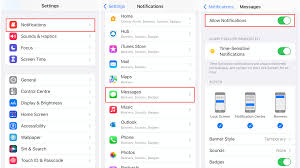
To enable notifications push on iPhone devices:
- Open the Settings app.
- Scroll down and select “Notifications.”
- Select the app you want to receive notifications from.
- Turn ON the toggle switch next to “Allow Notifications.”
- Choose how you want to receive notifications, such as by sound or with a badge icon.
Why Can’t I Get Notifications Push on My Iphone?
If you’re not receiving notifications push on your iPhone, it might be because the app is not configured to send remote notifications or there are restrictions on your device. Some apps, like Gmail, do not allow push notifications within the Mail app.
How Do I Fix It?
To resolve this issue:
- Check that the app is configured to send remote notifications.
- Ensure that the toggle switch next to “Allow Notifications” is turned ON in the Settings app.
- If you’re using a VPN, try disconnecting it and see if that resolves the issue.
Actuating Notifications Push: Home Banking Apps
Many banks and financial institutions offer push notifications for their mobile banking apps. To enable these notifications:
- Open your banking app.
- Go to the Settings menu.
- Select “Notifications” or a similar option.
- Choose the type of notifications you want to receive, such as debit card notifications.
Actuating Notifications Push: Bancoposta
To enable push notifications in the BancoPosta app:
- Open the app and tap on the menu button.
- Select “Settings.”
- Tap on “Notifications” from the menu.
- Choose the type of notifications you want to receive.
Actuating Notifications Push: Chebanca!
To enable push notifications in the CheBanca! app:
- Open the app and tap on the menu button.
- Select “Settings.”
- Tap on “Notifications” from the menu.
- Choose the type of notifications you want to receive.
Actuating Notifications Push: Ing
To enable push notifications in the ING banking app:
- Open the app and tap on the menu button.
- Select “Settings.”
- Tap on “Configuration services alert” from the menu.
- Choose the type of notifications you want to receive.
Why Should I Enable Notifications Push?
Enabling notifications push can help you stay up-to-date with important events, such as:
- Debit card transactions
- Credit card transactions
- Account balance updates
- Payment reminders
By actuating notifications push on your smartphone and tablet devices, you’ll be able to receive these updates in real-time, helping you stay financially organized and secure.
Conclusion
Enabling notifications push is a simple process that can greatly enhance your user experience with mobile apps. By following the steps outlined in this article, you should now be able to actuate notifications push on both Android and iPhone devices. Remember to always check your app settings to ensure that remote notifications are enabled for each app.
Frequently Asked Questions (FAQs)
- Q: What is a Notification Push?
A: A notification push, also known as a remote notification, is a type of notification sent from an app server to your device without needing to open the app. - Q: Why am I Not Receiving Notifications Push?
A: You might not be receiving notifications push because the app is not configured to send remote notifications or there are restrictions on your device. - Q: How do I Fix It?
A: Check that the app is configured to send remote notifications, ensure that the toggle switch next to “Allow Notifications” is turned ON in the Settings app, and try disconnecting any VPN you’re using. - Q: Can I Enable Push Notifications For my Banking App?
A: Yes, many banks offer push notifications for their mobile banking apps. Check your app settings to ensure that remote notifications are enabled. - Q: Why Should I Enable Notifications Push?
A: Enabling notifications push can help you stay up-to-date with important events, such as debit card transactions, credit card transactions, account balance updates, and payment reminders. - Q: Is it Safe to Enable Notifications Push?
A: Yes, enabling notifications push is generally safe, but be aware that some apps might send notifications without your consent. Always review the app’s permissions before granting access. - Q: Can I Customize my Notification Settings?
A: Yes, most mobile devices allow you to customize your notification settings, such as choosing which types of notifications you want to receive and how you prefer to be notified (e.G., By sound or with a badge icon). - Q: Are Notifications Push Free?
A: Yes, receiving notifications push is generally free, but some apps might charge for premium features or services related to notifications.


