
Recovering Your Old Facebook Account: A Step-by-step Guide
Are you struggling to access your old Facebook account because you’ve forgotten the password or can’t remember how to recover it? Don’t worry, we’ve got you covered! In this article, we’ll guide you through the process of recovering your old Facebook account on both smartphone and computer.
Why Can’t I Access My Old Facebook Account?
If you’re unable to access your old Facebook account, there could be several reasons for this. Perhaps you forgot your password or security questions, or maybe your account was disabled due to a breach of Facebook’s terms of use.
How to Recover an Old Facebook Account Without Password
To recover an old Facebook account without a password, follow these steps:
Recovering From Smartphone And Tablet
- Initiate The Facebook App: Open the Facebook app on your smartphone or tablet.
- Log Out: If you’re already logged in with another account, tap on the three horizontal lines (☰) at the top-right corner and select “Go out” to log out of the current profile.
- Find Your Account: Tap on the “Find your account” option at the bottom of the screen.
- Enter Phone Number or Email: Enter the phone number or email address associated with the old Facebook account you’re trying to recover.
- Search For Profile: If you entered a phone number, tap on the “Search in base to your address email” option and enter the email address or name of the profile. Alternatively, tap on the “Search by phone number” option if you entered a phone number.
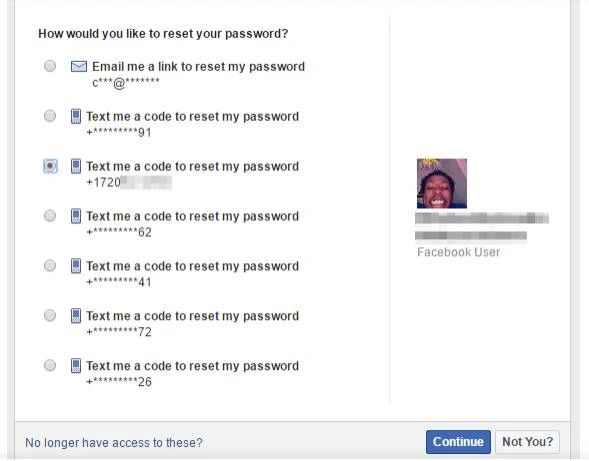
- Select Recovery Option: Select the recovery option that suits you best (e.G., Receiving a code via SMS or email).
- Enter Code And New Password: Enter the code received via SMS or email and create a new password for your account.
Recovering From Computer
- Visit Facebook Website: Open a web browser on your computer and visit the Facebook website.
- Log Out: If you’re already logged in with another account, click on the three dots (▼) at the top-right corner and select “Go out” to log out of the current profile.
- Click on Forgotten Password: Click on the “Forgotten password?” link below the login form.
- Enter Phone Number or Email: Enter the phone number or email address associated with the old Facebook account you’re trying to recover.
- Search For Profile: If you entered a phone number, click on the “Search in base to your address email” option and enter the email address or name of the profile. Alternatively, click on the “Search by phone number” option if you entered a phone number.
- Select Recovery Option: Select the recovery option that suits you best (e.G., Receiving a code via SMS or email).
- Enter Code And New Password: Enter the code received via SMS or email and create a new password for your account.
How to Recover an Old Facebook Account With Password
If you still have access to your old Facebook account but want to recover it, follow these steps:
Recovering From Smartphone And Tablet
- Access Another Account: Open the Facebook app on your smartphone or tablet.
- Log Out: If you’re already logged in with another account, tap on the three horizontal lines (☰) at the top-right corner and select “Go out” to log out of the current profile.
- Find Your Account: Tap on the “Find your account” option at the bottom of the screen.
- Enter Phone Number or Email: Enter the phone number or email address associated with the old Facebook account you’re trying to recover.
- Search For Profile: If you entered a phone number, tap on the “Search in base to your address email” option and enter the email address or name of the profile. Alternatively, tap on the “Search by phone number” option if you entered a phone number.
- Select Recovery Option: Select the recovery option that suits you best (e.G., Receiving a code via SMS or email).
- Enter Code And New Password: Enter the code received via SMS or email and create a new password for your account.
Recovering From Computer
- Visit Facebook Website: Open a web browser on your computer and visit the Facebook website.
- Log Out: If you’re already logged in with another account, click on the three dots (▼) at the top-right corner and select “Go out” to log out of the current profile.
- Click on Access Another Account: Click on the “Access another account” button below the login form.
- Enter Phone Number or Email: Enter the phone number or email address associated with the old Facebook account you’re trying to recover.
- Search For Profile: If you entered a phone number, click on the “Search in base to your address email” option and enter the email address or name of the profile. Alternatively, click on the “Search by phone number” option if you entered a phone number.
- Select Recovery Option: Select the recovery option that suits you best (e.G., Receiving a code via SMS or email).
- Enter Code And New Password: Enter the code received via SMS or email and create a new password for your account.
What If My Old Facebook Account Was Disabled?
If your old Facebook account was disabled due to a breach of Facebook’s terms of use, you’ll need to follow specific steps to re-enable it. Check out our separate article on How to Reactivate a Disabled Facebook Profile for detailed instructions.
Conclusion
Recovering your old Facebook account is a straightforward process that can be done from either smartphone or computer. Remember to follow the steps outlined above and ensure you have access to the phone number or email associated with your account. If you’re still having trouble, feel free to reach out to us for further assistance!
Frequently Asked Questions
Q: What if I forgot my Facebook password?
A: You can reset your password by following the steps outlined in our article.
Q: How do I recover a disabled Facebook profile?
A: Check out our separate article on How to Reactivate a Disabled Facebook Profile.
Q: Can I access my old Facebook account from a different device?
A: Yes, you can access your old Facebook account from any device with an active internet connection.


