
How to Create a Facebook Advertising Account: A Step-by-step Guide
Are you looking to create an advertising account on Facebook? As one of the most popular social media platforms, Facebook offers a wide range of advertising options to help businesses reach their target audience. In this article, we’ll guide you through the process of creating a Facebook advertising account and provide tips for success.
Understanding Facebook Advertising
Before we dive into the step-by-step guide, it’s essential to understand how Facebook advertising works. When you create an ad on Facebook, you’re targeting specific users based on their demographics, interests, and behaviors. The platform uses a complex algorithm to match your ad with the most relevant audience, ensuring maximum visibility and engagement.
Step 1: Create a Business Account
To start creating ads on Facebook, you need to have a business account. If you don’t already have one, follow these steps:
- Go to Meta Business Suite and click on “Create an account.”
- Sign in with your Facebook account.
- Fill out the form with your business name, email address, and password.
- Click on “Next” and then “Confirm” to verify your email address.
Step 2: Set up Your Business Profile
Once you have a business account, it’s time to set up your business profile. This will help Facebook understand who you are and what kind of ads you want to run:
- Go to Meta Business Suite and click on “Settings.”
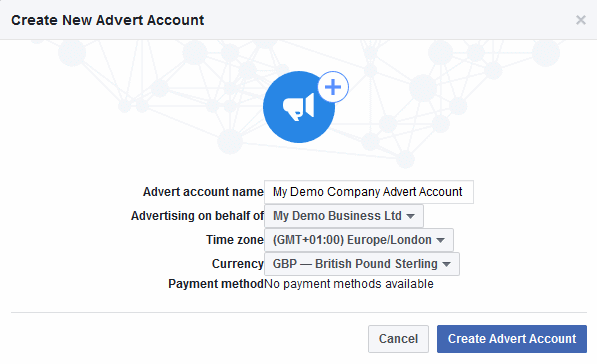
- Click on “Account advertising” and then “Add account advertising.”
- Choose the type of ad account you want to create (e.G., Personal or business).
- Fill out the form with your business information, including name, email address, and password.
Step 3: Create Your First Ad
Now that you have a business account and profile set up, it’s time to create your first ad. Follow these steps:
- Go to Facebook Ads Manager and click on “Create an ad.”
- Choose the type of ad you want to run (e.G., Image, video, or carousel).
- Fill out the form with your ad details, including target audience, budget, and bid strategy.
- Upload your ad creative (image, video, etc.).
- Set up your ad targeting options (e.G., Age range, interests, behaviors).
Troubleshooting Common Issues
If you encounter any issues while creating your Facebook advertising account or running ads, here are some tips to troubleshoot:
- Missing “Create a New ad Account” Option: Make sure you have a business account and profile set up. If the issue persists, contact Facebook support.
- Difficulty Setting up Your ad Account: Try resetting your password or signing out and back in.
Tips For Success
To get the most out of your Facebook advertising campaigns:
- Target Specific Audiences: Use Facebook’s targeting options to reach users who are most likely to engage with your brand.
- Use High-quality ad Creative: Invest time and resources into creating compelling ads that resonate with your target audience.
- Monitor And Adjust Your ad Performance: Regularly check your ad metrics and make adjustments as needed to optimize your campaigns.
Conclusion
Creating a Facebook advertising account is a straightforward process that can help you reach new customers and grow your business. By following these step-by-step instructions, troubleshooting common issues, and implementing tips for success, you’ll be well on your way to creating effective ads and driving real results.
Additional Resources
- Facebook Ads Help Center: Visit the official Facebook Ads Help Center for detailed guides and tutorials on advertising on Facebook.
- Meta Business Suite Documentation: Check out the Meta Business Suite documentation for more information on setting up and using your business account.


