
Are you a Pokémon trainer looking to take your game to the next level? Do you want to know the secret to building strong friendships with other trainers in the Pokémon GO community? Look no further! In this article, we’ll guide you through the process of forwarding pacchi friendship on Pokémon GO.
What is Pacchi Friendship?
Pacchi friendship is a feature in Pokémon GO that allows trainers to share and receive helpful items from each other. By forwarding a pacchi friendship, you can help your fellow trainer unblock some beneficial objects for their adventure.
Why Forward Pacchi Friendship?
Forwarding pacchi friendship not only helps your friend but also increases the level of friendship between you two. This, in turn, boosts the probability of finding rare items within the same pacchi. It’s a win-win situation!
How to Add Friends on Pokémon GO
Before you can forward pacchi friendship, you need to add friends on Pokémon GO. Here’s how:
- Open the Pokémon GO app on your device.
- Go to the Profile section and tap on the icon with your character’s face in the lower left corner.
- Tap on the Friends menu and select Add Friends.
- You can either share your Trainer Code for others to add you or give them your friend’s Trainer Code to enter into the app.
- Alternatively, you can connect your Facebook account to the game and add friends who play Pokémon GO and have you as a friend on Facebook.
How to Forward Pacchi Friendship
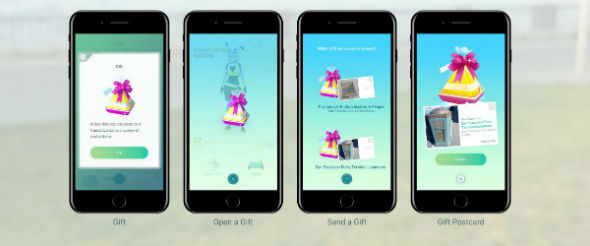
Now that you’ve added friends, it’s time to forward pacchi friendship! Here’s how:
- Open the Pokémon GO app and go to the Profile section.
- Tap on your Trainer avatar (marked with an arrow icon next to their face).
- Go to the Friends menu and select the friend you want to forward a pacchi friendship to.
- Select Pacchi Friendship from the menu.
- Choose a postcard from the Pokémon Stop where you found the pacchi friendship.
How to Find Pacchi Friendship on Pokémon GO
Finding pacchi friendship on Pokémon GO is easy! Here’s how:
- Spin the disc at any Pokémon Stop.
- You might receive a pacchi friendship as a reward.
- If you’ve got a pacchi friendship, you’ll see a postcard with the name of the place where it was found.
How to Open And Rereward Pacchi Friendship
Opening and rerewarding a received pacchi friendship is also straightforward:
- Go to the Profile section.
- Tap on your Trainer avatar (marked with an arrow icon next to their face).
- Access the Friends menu and select the label of the friend who forwarded the pacchi friendship to you.
- You’ll see a notification saying “You sent me a package of friendship!”
- Open the pacchi friendship by tapping on it, and you’ll receive rewards.
Conclusion
Forwarding pacchi friendship on Pokémon GO is an easy and fun way to build friendships with other trainers. By following this guide, you can now easily add friends, find and forward pacchi friendship, and even open and rereward received pacchi friendship. So what are you waiting for? Get out there and start building those friendships!
Faqs
Q: How many pacchi friendship can I hold at a time?
A: You can hold up to 10 pacchi friendship in the Box at once.
Q: Can I forward a pacchi friendship to any friend?
A: No, you can only forward a pacchi friendship to friends who have already opened the last package that was forwarded to them.
Q: How many times can I forward a pacchi friendship per day?
A: You can forward one pacchi friendship per day to each friend.
Q: Can I search for an user by nickname?
A: Yes, you can search for a user by their nickname using the Search feature.
Q: What are the benefits of forwarding pacchi friendship?
A: Forwarding pacchi friendship increases the level of friendship between you and your fellow trainer, boosting the probability of finding rare items within the same pacchi.
Q: Can I forward a pacchi friendship to friends who don’t have an arrow icon next to their Trainer avatar?
A: Yes, you can forward a pacchi friendship to any friend without restrictions.


