
How to Change Language on Whatsapp
Are you tired of communicating with friends and family on WhatsApp in a language that’s not your own? Do you want to explore the world of instant messaging in various tongues? Look no further! In this article, we’ll guide you through the process of changing the language on WhatsApp for Android, iPhone, and even WhatsApp Web.
Why Change Language on Whatsapp?
Changing the language on WhatsApp can be a game-changer for those who want to communicate with people from different countries or backgrounds. With over 2 billion monthly active users, WhatsApp is one of the most popular messaging apps in the world. By changing the language, you’ll be able to:
- Communicate with friends and family who speak different languages
- Explore new cultures and dialects
- Enhance your travel experience by being able to communicate with locals
How to Change Language on Whatsapp For Android
Changing the language on WhatsApp for Android is a straightforward process. Here’s how to do it:
- Open Whatsapp: Open the WhatsApp app on your Android device.
- Go to Settings: Tap on the three dots (⋯) in the top right corner of the screen and select “Settings.”
- Select Language And Keyboard: Scroll down to the “Language and keyboard” section.
- Choose a New Language: Select the language you want to use from the list of available languages.
- Save Changes: Tap on the “Done” button to save your changes.
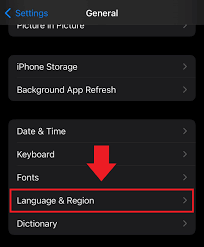
How to Change Language on Whatsapp For Iphone
Changing the language on WhatsApp for iPhone is also easy peasy:
- Open Whatsapp: Open the WhatsApp app on your iPhone.
- Go to Settings: Tap on the gear icon (⚙️) in the top right corner of the screen and select “Settings.”
- Select Language And Region: Scroll down to the “Language and region” section.
- Choose a New Language: Select the language you want to use from the list of available languages.
- Save Changes: Tap on the “Done” button to save your changes.
How to Change Language on Whatsapp Web
If you’re using WhatsApp Web, changing the language is just as easy:
- Open Whatsapp Web: Open WhatsApp Web in a web browser.
- Go to Settings: Click on the three dots (⋯) in the top right corner of the screen and select “Settings.”
- Select Language And Keyboard: Scroll down to the “Language and keyboard” section.
- Choose a New Language: Select the language you want to use from the list of available languages.
- Save Changes: Click on the “Done” button to save your changes.
How to Change Language Only on Whatsapp
If you don’t want to change the language for all apps, but only on WhatsApp, you can do so by:
- Going to Settings: Tap on the three dots (⋯) in the top right corner of the screen and select “Settings.”
- Select Chat And Language App: Scroll down to the “Chat and language app” section.
- Choose a New Language: Select the language you want to use from the list of available languages.
How to Translate Messages on Whatsapp
If you want to translate messages on WhatsApp, you can do so by using the Google Translate app:
- Download Google Translate: Download the Google Translate app from the Play Store or App Store.
- Configure Google Translate: Configure Google Translate to use the language you want to translate in.
- Copy And Paste Messages: Copy and paste messages from WhatsApp into Google Translate.
How to Change Keyboard Language on Whatsapp
If you want to change the keyboard language on WhatsApp, you can do so by:
- Going to Settings: Tap on the three dots (⋯) in the top right corner of the screen and select “Settings.”
- Select Language And Keyboard: Scroll down to the “Language and keyboard” section.
- Choose a New Language: Select the language you want to use from the list of available languages.
Conclusion
Changing the language on WhatsApp is a simple process that can be completed in just a few steps. Whether you’re using Android, iPhone, or WhatsApp Web, our guide has got you covered. By following these easy-to-follow instructions, you’ll be able to communicate with friends and family in various tongues, explore new cultures, and enhance your travel experience.
Frequently Asked Questions (FAQs)
- Q: How do I Change The Language on Whatsapp?
A: To change the language on WhatsApp, go to Settings, select Language and keyboard, and choose a new language. - Q: Can I Translate Messages on Whatsapp?
A: Yes, you can use Google Translate to translate messages on WhatsApp. - Q: How do I Change The Keyboard Language on Whatsapp?
A: To change the keyboard language on WhatsApp, go to Settings, select Language and keyboard, and choose a new language. - Q: Can I Change The Language Only on Whatsapp?
A: Yes, you can change the language only on WhatsApp by going to Settings and selecting Chat and language app. - Q: How do I Translate Messages Directly on Whatsapp?
A: You can use Google Translate to translate messages directly on WhatsApp. - Q: Can I Add Multiple Languages to my Keyboard on Whatsapp?
A: Yes, you can add multiple languages to your keyboard on WhatsApp by going to Settings and selecting Language and keyboard. - Q: How do I Change The Language on Whatsapp Web?
A: To change the language on WhatsApp Web, go to Settings, select Language and keyboard, and choose a new language. - Q: Can I Use Whatsapp in Multiple Languages at Once?
A: Yes, you can use WhatsApp in multiple languages at once by adding multiple languages to your keyboard.
Disclaimer: The information provided in this article is for informational purposes only and may not be applicable to all situations or users. Always refer to the official WhatsApp support page for the most up-to-date information on using WhatsApp.


