
How to Adapt a Microsim to a Standard Sim: A Step-by-step Guide
Are you tired of using an old mobile phone that has been preserved for emergencies, only to find out that it no longer supports the latest MicroSIM technology? Don’t worry! In this article, we will guide you through a simple and safe process to adapt your MicroSIM to a standard SIM, so you can use your smartphone with confidence.
Understanding The Difference Between Microsim And Standard Sim
Before we dive into the adaptation process, let’s first understand the difference between MicroSIM and standard SIM. A MicroSIM measures 15×12 mm and has a thickness of 0.76 Mm, while a standard SIM measures 25×15 mm and also has a thickness of 0.76 Mm. As you can see, the main difference is in size.
Adapting Microsim to Standard Sim With an Adapter
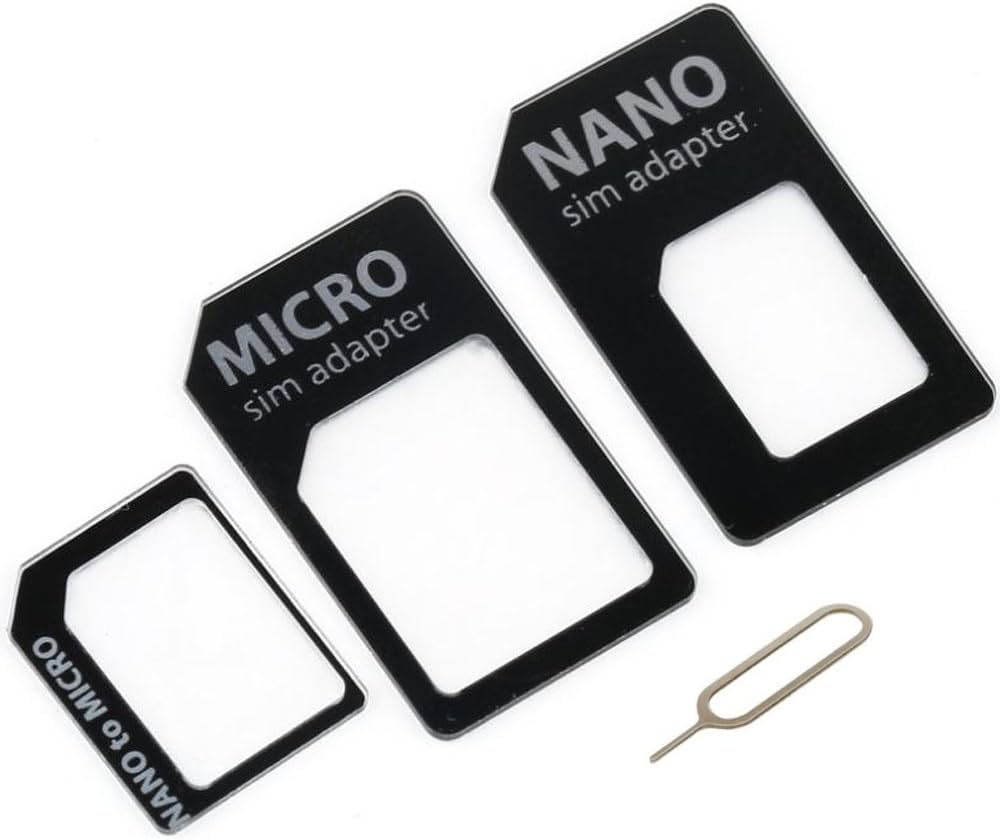
The most practical solution to adapt your MicroSIM to a standard SIM is by using an adapter. These adapters are specifically designed to convert your MicroSIM into a standard SIM, making it compatible with phones that do not support MicroSIM technology.
You can find these adapters online or in electronics shops. The price range is between 4-10 euros, and they usually come in kits with three pieces: An adapter for MicroSIM to standard SIM, NanoSIM to standard SIM, and NanoSIM to MicroSIM.
Adapting Microsim to Standard Sim Without Adapter
If you don’t have access to an adapter or are facing a urgent situation where you need to use your phone immediately, we can guide you through the process of adapting your MicroSIM to a standard SIM without using an adapter.
Materials Needed:
- Original paperboard of the SIM
- A pair of scissors (preferably with a sharp blade)
- A knife or card abrasive for refining the edges of the SIM
Step-by-step Process:
- Cut the original paperboard of the SIM to create a standard SIM size.
- Refine the edges of the SIM using a knife or card abrasive.
- Insert the SIM into your phone, making sure it fits snugly.
Important: If you’re not comfortable with DIY projects, we recommend avoiding this process and consulting your phone manufacturer for alternative solutions.
Alternative Solution:
If you’re not feeling confident about adapting your MicroSIM to a standard SIM yourself, you can always consult your phone manufacturer or visit their official website for guidance. They may offer replacement services or provide detailed instructions on how to adapt your SIM.
Adapting Standard Sim to Microsim:
While this article focuses on adapting MicroSIM to standard SIM, we also want to touch on the reverse process. If you need to adapt a standard SIM to a MicroSIM, it’s relatively simple. You can use a SIM cutter or follow online tutorials to achieve this.
Conclusion:
Adapting your MicroSIM to a standard SIM is easier than you think! With an adapter or by following our DIY guide, you can breathe new life into your old mobile phone and enjoy seamless communication with friends and family. Remember to always handle your SIM cards with care, as they contain sensitive information.
Frequently Asked Questions (FAQs):
- Q: Can I use a standard SIM in my MicroSIM-compatible phone?
A: Yes, but you will need an adapter or to follow the DIY process outlined above. - Q: How much does it cost to purchase an adapter?
A: The price range is between 4-10 euros, depending on the brand and quality of the adapter. - Q: Can I adapt my SIM without using an adapter?
A: Yes, but this requires DIY skills and attention to detail. - Q: Will adapting my MicroSIM affect its functionality?
A: No, as long as you follow proper procedures, your MicroSIM will continue to function normally. - Q: Can I use a standard SIM in all phones that support MicroSIM technology?
A: Unfortunately not. Please consult your phone manufacturer for specific guidelines.


