
How to Open .XML Files: A Step-by-step Guide
Are you curious about the world of XML files but don’t know where to start? Do you want to open a file with the .Xml extension but have no idea how? You’re not alone! In this guide, we’ll take you through the process of opening an XML file on various platforms and devices.
What is an Xml File?
Before we dive into the nitty-gritty, let’s briefly explain what an XML file is. An XML (Extensible Markup Language) file is a type of document that contains data in a human-readable format. Unlike HTML files, which are structured documents with predefined tags, XML files are containers for data that can be used by other software applications.
Opening Xml Files on Windows
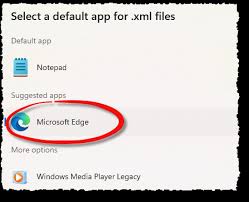
If you’re using a Windows computer, opening an XML file is a breeze. Here’s how:
- Block Grades or Wordpad: You can open an XML file using the built-in Block Grades or WordPad editors.
- Right-click on the XML file and select “Open with” > Block Grades (or WordPad).
- Alternatively, you can double-click on the file to open it in its default editor.
- Browser: You can also open an XML file using a web browser like Google Chrome, Mozilla Firefox, or Microsoft Edge.
- Right-click on the file and select “Open with” > your preferred browser.
Opening Xml Files on Mac
If you’re using a Mac, opening an XML file is just as easy:
- Safari: You can open an XML file using the built-in Safari browser.
- Right-click on the file and select “Open with” > Safari.
- Textedit: Alternatively, you can use the TextEdit editor to view the contents of the XML file.
- Right-click on the file and select “Open with” > TextEdit.
Opening Xml Files With Excel
If you’re using Microsoft Excel, you can open an XML file as a picture:
- Excel: Open Excel and go to File > Open Other Files.
- Select The Xml File: Choose the XML file you want to open.
- View as Picture: Select “XML” as the file type and click “Open”.
Opening Xml Files Online
If you don’t have access to a computer or prefer to use an online tool, there are several options available:
- Codebeautify.Org: This online tool allows you to view and edit XML files.
- Upload your XML file or enter the URL of the file.
- Choose the format you want to view (e.G., Text, tree view).
- Xmlgrid.Net: Another online tool that lets you open and visualize XML files.
- Enter the URL of the XML file or upload it from your computer.
Opening Xml Files on Smartphone And Tablet
If you have an Android device, opening an XML file is straightforward:
- File Manager: Open the File Manager app and navigate to the location of the XML file.
- Open With Editor: Select the XML file and choose “Open with” > Editor (the default text editor).
On iOS devices, follow these steps:
- Icloud: If you used iCloud to transfer the file, open it directly from the Files app.
Opening Xml Files in Pdf
While you can’t directly open an XML file using a PDF viewer, you can convert it into a PDF format:
- Pdf Converter: Use an online tool or software to convert the XML file into a PDF.
- Be aware that this may alter the formatting and structure of the original file.
Opening Electronic Bills in .XML And .XML.P7M Format
If you have an electronic bill in the .Xml or .Xml.P7m format, use specialized tools like Dike or AssoInvoice to open it:
- Dike: This software allows you to view and edit XML files while preserving their original formatting.
- Assoinvoice: Another tool that enables you to open and manage electronic bills in the
.Xml.P7mformat.
Conclusion
Opening an XML file may seem daunting at first, but with this guide, you should be able to navigate through various platforms and devices with ease. Remember to use the appropriate tools for your specific needs, and don’t hesitate to seek help if needed.
Frequently Asked Questions (FAQs)
- Q: What is an Xml File?
A: An XML file is a type of document that contains data in a human-readable format. - Q: How do I Open an Xml File on Windows?
A: You can use Block Grades, WordPad, or a web browser like Google Chrome or Microsoft Edge to open an XML file. - Q: Can I Open an Xml File on Mac?
A: Yes, you can use Safari or TextEdit to view the contents of an XML file. - Q: How do I Open an Xml File in Excel?
A: You can open an XML file as a picture by selecting “XML” as the file type and clicking “Open”. - Q: Are There Online Tools to Open Xml Files?
A: Yes, you can use Codebeautify.Org or XMLGrid.Net to view and edit XML files online. - Q: Can I Open an Xml File on my Smartphone or Tablet?
A: Yes, you can open an XML file using the default text editor on Android devices or by accessing it through iCloud on iOS devices. - Q: How do I Convert an Xml File to Pdf?
A: You can use online tools or software to convert the XML file into a PDF format, but be aware that this may alter the formatting and structure of the original file. - Q: Can I Open Electronic Bills in .Xml And .Xml.P7m Format?
A: Yes, you can use specialized tools like Dike or AssoInvoice to open and manage electronic bills in these formats.


