
Installing Kali Linux: A Step-by-step Guide
Are you a tech enthusiast eager to dive into the world of penetration testing and cybersecurity? Look no further than Kali Linux, a powerful distribution based on Debian that’s designed for security professionals and enthusiasts alike. In this article, we’ll walk you through the process of installing Kali Linux on your computer, covering various methods such as Windows 11, USB drive, dual boot, and VirtualBox.
What is Kali Linux?
Kali Linux is a popular Linux distribution that’s specifically designed for penetration testing, digital forensics, and security research. It comes with a wide range of tools and software pre-installed, making it an ideal choice for cybersecurity professionals and enthusiasts who want to explore the world of hacking and security.
Installing Kali Linux on Windows 11
One of the easiest ways to install Kali Linux is by using the Windows Subsystem for Linux (WSL). This feature allows you to run a Linux environment directly within Windows, without the need for virtualization software or dual booting. To get started:
- Open PowerShell as an administrator.
- Type
wsl --installand press Enter. - Follow the prompts to download and install the necessary components.
- Once installed, restart your computer.
- Launch Kali Linux by searching for it in the Start menu.
Installing Kali Linux on a Usb Drive
Another way to run Kali Linux is by creating a live USB drive. This method allows you to boot into a fully functional Linux environment without modifying your existing operating system:
- Download the Kali Linux image from the official website.
- Create a live USB drive using a tool like Unetbootin or Rufus.
- Boot your computer from the USB drive.
- Choose the desired kernel and start the installation process.
Installing Kali Linux in Dual Boot
Dual booting allows you to run multiple operating systems on the same computer, switching between them as needed:
- Create a separate partition for Kali Linux using a tool like GParted or Disk Management.
- Download the Kali Linux image and create a live USB drive.
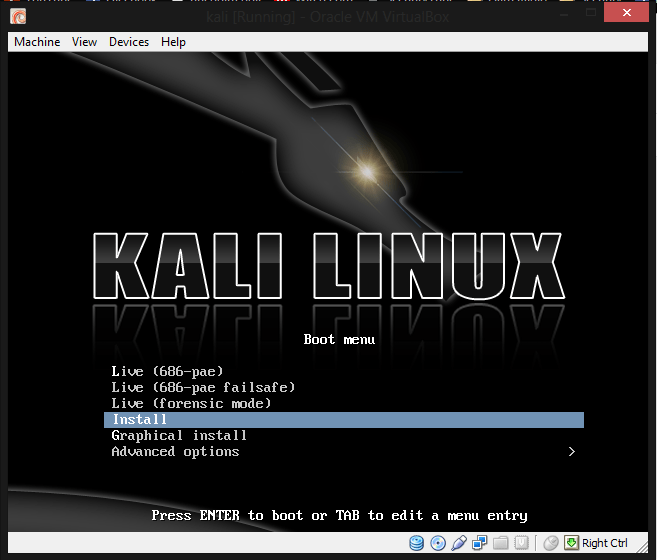
- Boot your computer from the USB drive and choose the “Graphical Install” option.
- Follow the prompts to install Kali Linux alongside your existing operating system.
Installing Kali Linux on Virtualbox
Virtualization software like VirtualBox allows you to run multiple operating systems within a single instance:
- Download and install VirtualBox from its official website.
- Create a new virtual machine by selecting “Kali Linux” as the operating system.
- Choose the desired kernel and start the installation process.
- Configure your network settings and other preferences.
Installing Kali Linux on Mac
While the process is similar to Windows, there are some additional steps required for installing Kali Linux on a Mac:
- Create a separate partition for Kali Linux using a tool like GParted or Disk Management.
- Download the Kali Linux image and create a live USB drive.
- Boot your computer from the USB drive and choose the “Graphical Install” option.
- Follow the prompts to install Kali Linux alongside your existing operating system.
Conclusion
Installing Kali Linux is a straightforward process, regardless of your preferred method. With WSL, USB drives, dual booting, or virtualization software, you can easily access the powerful tools and features that Kali Linux has to offer. Whether you’re a seasoned cybersecurity professional or an enthusiast looking to explore the world of hacking and security, Kali Linux is the perfect choice.
Faqs
- What is Kali Linux?
Kali Linux is a popular Linux distribution designed for penetration testing, digital forensics, and security research. - How do I Install Kali Linux on Windows 11?
You can use the Windows Subsystem for Linux (WSL) to run a Linux environment directly within Windows. - Can I Install Kali Linux on a Usb Drive?
Yes, you can create a live USB drive using a tool like Unetbootin or Rufus. - How do I Install Kali Linux in Dual Boot?
You’ll need to create a separate partition for Kali Linux and download the image from the official website. - Can I Install Kali Linux on Virtualbox?
Yes, you can use virtualization software like VirtualBox to run multiple operating systems within a single instance. - Is Kali Linux Compatible With Mac?
While the process is similar to Windows, there are some additional steps required for installing Kali Linux on a Mac. - What Tools And Software Come Pre-installed in Kali Linux?
Kali Linux comes with a wide range of tools and software pre-installed, including Metasploit, Nmap, and Wireshark. - Is Kali Linux Free to Use?
Yes, Kali Linux is completely free and open-source, making it accessible to everyone.


