
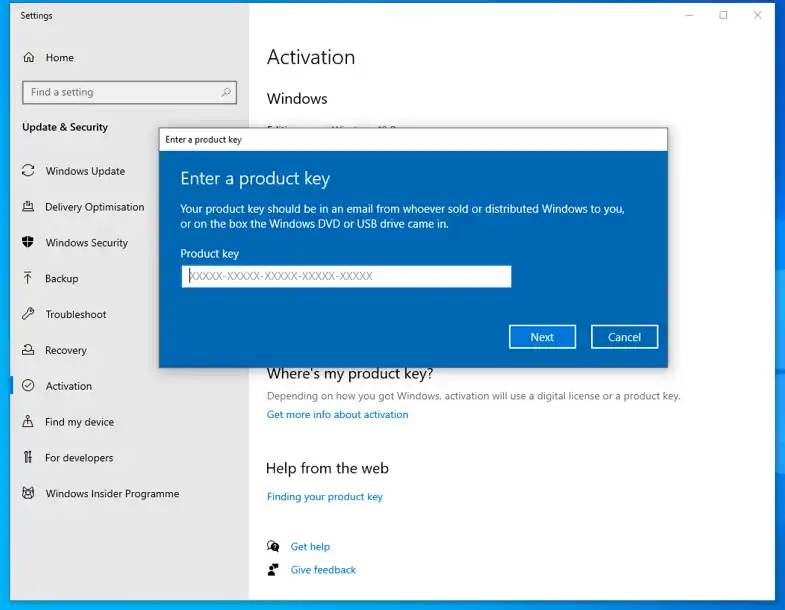
Actuating Windows: A Step-by-step Guide
Are you struggling to activate your Windows operating system? Do you have questions about the process or concerns about digital licenses and product keys? Look no further! In this comprehensive guide, we’ll walk you through the steps to actuate Windows 10, Windows 11, and Windows Defender.
Understanding Actuating Windows
Actuating Windows refers to the process of validating your operating system using a product key or digital license. This step is crucial to ensure that your Windows installation is legitimate and functioning properly.
What You Need to Know Before Actuating Windows
Before we dive into the nitty-gritty, here are some essential things to know:
- Product Key: A 25-character code used to validate your Windows installation.
- Digital License: A license associated with your Microsoft account or computer hardware.
- Windows Editions: You can choose from various editions, including Home and Pro.
Actuating Windows 10
To actuate Windows 10 using a product key:
- Open the Settings app by clicking on the Start button or pressing the Windows key + I.
- Click on the Update & Security option.
- Select Activation from the left-hand menu.
- Click on “Change product key” and enter your 25-character code.
Actuating Windows 11
The process for actuating Windows 11 is similar to that of Windows 10:
- Open the Settings app by clicking on the Start button or pressing the Windows key + I.
- Click on the System option.
- Select Activation from the left-hand menu.
- Click on “Change product key” and enter your 25-character code.
Actuating Windows Defender
To actuate Windows Defender, follow these steps:
- Open the Settings app by clicking on the Start button or pressing the Windows key + I.
- Click on the Update & Security option.
- Select Virus Protection in the left-hand menu.
- Click on “Manage settings” and toggle on the switch to enable Windows Defender.
Frequently Asked Questions (FAQs)
- What is a Product Key?: A product key is a 25-character code used to validate your Windows installation.
- How do I Obtain a Digital License?: You can obtain a digital license by purchasing a Windows copy from the Microsoft Store or through other authorized channels.
- Can I Upgrade my Windows Edition?: Yes, you can upgrade your Windows edition using the Settings app. However, this may require additional steps and possibly new product keys.
Conclusion
Actuating Windows is a straightforward process that ensures your operating system is legitimate and functioning properly. By following these step-by-step guides for actuating Windows 10, Windows 11, and Windows Defender, you’ll be able to overcome any obstacles and keep your computer safe with the latest security features.
Stay informed and up-to-date by visiting our website and exploring other articles on various topics.


