
How to Pay on Playstation Store: A Step-by-step Guide
Are you a gamer who’s found a video game that you love on the PlayStation Store, but doesn’t know how to acquire it? Or maybe you’re wondering how to pay for digital titles on the PlayStation Store using your preferred method. Well, wonder no more! In this article, we’ll guide you through the process of paying on the PlayStation Store using various methods, including credit cards, PayPal, and more.
Getting Started: Creating a Playstation Network Account
Before you can start shopping on the PlayStation Store, you need to create a PlayStation Network (PSN) account. This is a straightforward process that involves connecting your device to the internet, creating an account, and setting up a payment method. If you’re using a PS4 or PS5, we recommend checking out our guide on how to connect to the internet with these devices.
Methods of Payment Supported by Playstation Store
The PlayStation Store supports a wide range of payment methods, including credit cards (VISA, Mastercard, American Express), PayPal, and more. Here are some of the most popular methods:
- Credit/Debit Cards: You can use your VISA, Mastercard, or American Express card to make payments on the PlayStation Store.
- PayPal: PayPal is a popular digital payment service that allows you to send and receive money online.
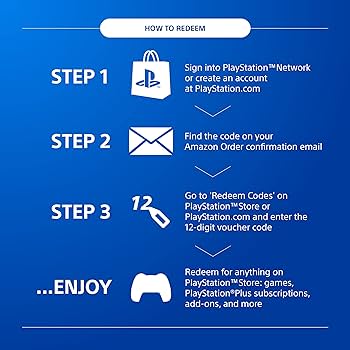
- PlayStation Network (PSN) Card: The PSN card is a pre-paid card that you can use to purchase games and other content on the PlayStation Store.
Paying With Postepay
Postepay is a popular prepaid card in Italy, and it’s also accepted on the PlayStation Store. Here’s how to pay using Postepay:
- On your PS4 or PS5, navigate to the Settings menu and select PlayStation Network.
- Select Account Information, then Add a Card of Credit/Debit.
- Insert the card details (name, number, deadline, CVC code) and confirm.
Paying With Paysafecard
Paysafecard is another popular prepaid card that’s accepted on the PlayStation Store. Here’s how to pay using Paysafecard:
- On your PS4 or PS5, navigate to the Settings menu and select PlayStation Network.
- Select Account Information, then Add a Card of Credit/Debit.
- Insert the card details (name, number, deadline, CVC code) and confirm.
Paying With Paypal
PayPal is a popular digital payment service that’s accepted on the PlayStation Store. Here’s how to pay using PayPal:
- On your PS4 or PS5, navigate to the Settings menu and select PlayStation Network.
- Select Account Information, then Add a PayPal account.
- Insert the PayPal email address and password and confirm.
Changing Payment Methods
If you want to change your payment method on the PlayStation Store, here’s how to do it:
- On your PS4 or PS5, navigate to the Settings menu and select PlayStation Network.
- Select Account Information, then Management Payments.
- Select the new payment method (credit card, PayPal, etc.) And confirm.
Troubleshooting: What to Do in Case of Issues
If you’re experiencing issues with your payment on the PlayStation Store, here’s what to do:
- Check the PlayStation Store website for any known issues or updates.
- Contact Sony Support through their website or phone number.
- Try restarting your console and checking again.
Conclusion: Easy Payments on Playstation Store
Paying on the PlayStation Store is a breeze with these methods. Whether you’re using credit cards, PayPal, or other payment options, we’ve got you covered. By following these simple steps, you’ll be able to enjoy your favorite games and content without any hassle.
Faqs
Q: How do I Pay For Digital Titles on The Playstation Store?
A: You can use various methods, including credit cards (VISA, Mastercard, American Express), PayPal, PlayStalion Network (PSN) Card, or other payment options.
Q: Can I Change my Payment Method on The Playstation Store?
A: Yes, you can change your payment method by navigating to Settings > Account Information > Management Payments and selecting a new payment option.
Q: What if I Experience Issues With my Payment on The Playstation Store?
A: Check the PlayStation Store website for known issues or updates. Contact Sony Support through their website or phone number, or try restarting your console and checking again.
Q: Can I Use Other Prepaid Cards Like Postepay or Paysafecard on The Playstation Store?
A: Yes, Postepay and Paysafecard are accepted on the PlayStation Store. Follow the same steps as paying with credit cards.
Q: How do I Add a Paypal Account to my Playstation Network Account?
A: Navigate to Settings > Account Information > Add a PayPal account and insert the PayPal email address and password. Confirm to complete the process.
By following these simple steps, you’ll be able to enjoy your favorite games and content on the PlayStation Store without any hassle.


