
Extending Your Wi-fi Network: A Comprehensive Guide
Are you tired of having a weak or unreliable Wi-Fi signal in your home? Do you struggle to get online from every room, let alone outside? You’re not alone! Many of us face this problem, but there are solutions available. In this article, we’ll explore the various ways to extend your Wi-Fi network, making it stronger and more reliable.
Why Extend Your Wi-fi Network?
Before we dive into the solutions, let’s quickly discuss why extending your Wi-Fi network is important. A strong and stable internet connection is essential for:
- Seamless online gaming
- Smooth video streaming
- Efficient video conferencing
- Reliable work-from-home productivity
Method 1: Using a Range Extender
A range extender is a device that picks up your existing Wi-Fi signal and rebroadcasts it, extending its coverage area. This method is simple and effective.
- How to Use a Range Extender: Connect the range extender to your router with an Ethernet cable. Place it halfway between your router and the area you want to cover.
- Types of Range Extenders: There are various types available, including TP-Link, Netgear, and Xiaomi. Choose one that suits your needs.
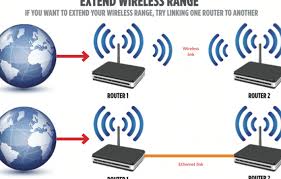
Method 2: Using Two Routers
If you have a second router with wireless connectivity, you can use it to extend your Wi-Fi network. This method requires some technical know-how but is highly effective.
- How to Set up Two Routers: Connect the two routers together using an Ethernet cable. Configure the secondary router as a repeater or in bridge mode.
- Types of Dual-router Setups: You can use either a LAN-to-LAN (LAN-LAN) connection, a waterfall setup, or a repeater configuration.
Method 3: Using a Mesh System
A mesh system is a network of multiple access points that work together to provide a strong and stable internet connection. This method is ideal for large homes or offices with multiple rooms.
- How to Set up a Mesh System: Place the mesh units throughout your home, ensuring they’re within range of each other.
- Types of Mesh Systems: There are various mesh systems available from companies like Google, TP-Link, and Netgear. Choose one that suits your needs.
Method 4: Using Powerline Technology
Powerline technology uses your home’s electrical wiring to create a network connection between devices. This method is ideal for areas with poor Wi-Fi coverage.
- How to Set up Powerline Technology: Connect the powerline adapters to your router and plug them into nearby outlets.
- Types of Powerline Technologies: Companies like Devolo offer advanced powerline solutions that combine mesh technology with Powerline.
Tips For Improving Your Wi-fi Signal
In addition to using a range extender, dual-router setup, or mesh system, here are some tips to improve your Wi-Fi signal:
- Change The Wi-fi Channel: If you have multiple devices competing for the same Wi-Fi channel, change it to reduce congestion.
- Position External Antennas Correctly: If your router has external antennas, position them at a 90-degree angle (like an “L”) to optimize coverage.
Conclusion
Extending your Wi-Fi network is easier than you think. By using a range extender, dual-router setup, mesh system, or powerline technology, you can ensure a strong and stable internet connection throughout your home. Remember to also optimize your router’s configuration for maximum performance.
Frequently Asked Questions (FAQs)
- Q: What is The Best Method For Extending my Wi-fi Network?
A: The best method depends on your specific needs and setup. - Q: Can I Use a Range Extender With Multiple Routers?
A: Yes, you can use a range extender in conjunction with a dual-router setup. - Q: How do Mesh Systems Differ From Traditional Wi-fi Networks?
A: Mesh systems create a single, seamless network across multiple access points, whereas traditional Wi-Fi networks rely on a central router and extenders. - Q: Can I Use Powerline Technology to Improve my Wi-fi Signal?
A: Yes, powerline technology can be used in conjunction with other methods to enhance your Wi-Fi signal. - Q: How do I Optimize my Router’s Configuration For Maximum Performance?
A: Regularly update your router’s firmware and adjust settings like channel selection and antenna orientation to improve coverage. - Q: Are Range Extenders And Mesh Systems The Same Thing?
A: No, while both can extend Wi-Fi coverage, they serve different purposes and have distinct features. - Q: Can I Use a Range Extender With a Powerline Adapter?
A: Yes, you can combine a range extender with a powerline adapter for enhanced performance. - Q: How do I Choose The Best Device For my Wi-fi Extension Needs?
A: Consider factors like coverage area, network type (Wi-Fi or Powerline), and compatibility with your existing equipment.


