
How to Install Shaders on Minecraft: A Step-by-step Guide
Are you tired of the same old graphics in Minecraft? Do you want to take your gaming experience to the next level with stunning visuals? Look no further! Installing shaders on Minecraft is a simple process that can give you a whole new perspective on this beloved game.
What Are Shaders?
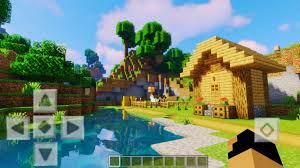
Shaders are modifications to the game’s graphics that enhance the overall visual appearance. They can add realistic lighting effects, detailed textures, and other features that make your gameplay experience more immersive. Think of shaders as a way to upgrade your Minecraft visuals without modifying the game’s core mechanics.
Which Version of Minecraft Should I Use?
You have two main options: Java Edition or Bedrock Edition (also known as PE). Both versions are compatible with shaders, but the process is slightly different. We’ll cover both in this guide.
Installing Shaders on Minecraft Java Edition
To install shaders on Minecraft Java Edition, follow these steps:
- Download The Glsl Shaders Mod: This mod allows you to install and use shaders in Minecraft. Download the latest version (compatible with your game version) from the official website.
- Install The Mod: Place the downloaded .Jar file in the mods folder of your Minecraft directory. If you’re using Windows, this is usually located at
C:\Users\<YourUsername>\AppData\Roaming\.Minecraft\mods. - Launch Minecraft And Select The Mod: Once installed, launch Minecraft and select the mod by clicking on “Mods” from the main menu.
- Install Shaders: Browse through the available shaders and select one to install.
Installing Shaders on Minecraft Bedrock Edition
To install shaders on Minecraft Bedrock Edition, follow these steps:
- Access The Marketplace: Open the Marketplace app within your Minecraft game on a Windows 10 or 11 device.
- Search For Rtx Worlds: Type “RTX” in the search bar and select the result that says “RTX Worlds”.
- Download an Rtx World: Browse through the available worlds, select one to download, and confirm by clicking “Create this world”.
How to Use Shaders With Rtx
To use shaders with RTX, follow these steps:
- Enter a New Game: Select a new game mode or load a saved game.
- Adjust Video Settings: Go to the video settings (Esc key) and toggle on “Ray Tracing”.
- Explore The World: Enjoy your immersive Minecraft experience with enhanced visuals.
Alternative Shaders
If you’re interested in exploring alternative shaders, consider checking out the following options:
- Optifine: This mod offers more advanced graphics features, including shaders.
- Community-created Shaders: Visit websites like 9Minecraft or other forums to find user-created shaders for Minecraft.
Conclusion
Installing shaders on Minecraft is a simple process that can greatly enhance your gaming experience. Whether you choose Java Edition or Bedrock Edition, following these steps will guide you through the installation and usage of shaders with RTX. Happy crafting!
Faqs
- What Are The Minimum Requirements to Run Shaders in Minecraft?
- The minimum requirements depend on the shader pack and your device’s specifications.
- How do I Download Shaders For Minecraft Bedrock Edition?
- You can find shaders through the Marketplace app within the game.
- Can I Use Shaders With Optifine?
- Yes, OptiFine is a mod that allows you to install and use shaders in Minecraft.
- Are Community-created Shaders Safe to Use?
- Most community-created shaders are safe to use, but exercise caution when downloading from unknown sources.
- How do I Uninstall Shaders From Minecraft?
- To remove shaders from your Minecraft installation, delete the shader pack files and disable any related mods.
- Can I Use Shaders on Minecraft Ps4 or Nintendo Switch?
- Unfortunately, shaders are not currently supported on console versions of Minecraft.
- What is Rtx Worlds in Minecraft Bedrock Edition?
- RTX Worlds is a feature that allows you to explore immersive, visually stunning worlds with real-time ray tracing.
- How do I Create my Own Shaders For Minecraft?
- You can use third-party software or coding languages like GLSL to create your own shaders.


