
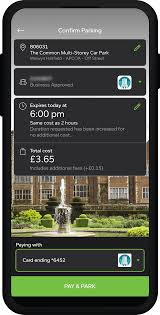
The Ultimate Guide to Paying Parking With Your Smartphone
Are you tired of searching for parking spaces in crowded cities? Do you want to make your life easier by paying parking fees without having to physically visit a payment machine? Look no further! In this article, we’ll explore the best apps to pay parking using your smartphone.
The Problem With Traditional Parking Payment Methods
In many cities, finding a parking space can be a challenge. When you finally do find one, paying for it can be even more frustrating. You have to physically visit a payment machine, insert coins or cards, and hope that the machine is working correctly. But what if we told you there’s a better way?
The Benefits of Using Apps to Pay Parking
Using an app to pay parking offers several benefits, including:
- Convenience: No need to leave your car to pay for parking.
- Time-saving: You can pay for parking without having to physically visit a payment machine.
- Easy to use: Most apps are user-friendly and require minimal input.
The Best Apps to Pay Parking
We’ve researched the best apps to pay parking, and here are our top picks:
Mycicero (Android/iOS)
MyCicero is one of the most popular apps to pay parking. It’s available in over 100 Italian cities, including Rome, Milan, and Turin. The app allows you to pay for parking directly from your smartphone, using either debit or credit card payments.
How to Use Mycicero
To use myCicero, simply:
- Download the app and create a free account.
- Add your vehicle details and payment method.
- Select the parking zone you’re in and pay for parking using the app.
Easypark (Android/iOS/iPadOS)
EasyPark is another popular app to pay parking. It’s available in over 2200 cities across Europe, making it one of the most widely used apps of its kind.
How to Use Easypark
To use EasyPark:
- Download the app and create a free account.
- Add your vehicle details and payment method.
- Select the parking zone you’re in and pay for parking using the app.
Phonzie (Android/iOS)
Phonzie is an app that not only allows you to pay parking but also enables you to buy public transportation tickets directly from your smartphone.
How to Use Phonzie
To use Phonzie:
- Download the app and create a free account.
- Add your vehicle details and payment method.
- Select the parking zone you’re in and pay for parking using the app.
Other Apps to Pay Parking
If the above apps don’t cover your city or aren’t to your liking, here are some other options:
- ParkAppy (Android/iOS): Available in Rome, Naples, Turin, Bologna, Lecce, and Marina di Sant’ Nicola.
- Telepass (Android/iOS/iPadOS): A dedicated app for those with an active account to the toll service.
- ParkMan (Android/iOS): A simple app that allows you to find parking and pay for it using your smartphone.
Conclusion
Using an app to pay parking is a convenient, time-saving way to make your life easier. With so many options available, there’s no excuse not to give it a try! Remember to download the app of your choice, create a free account, add your vehicle details and payment method, and start paying for parking directly from your smartphone.
Frequently Asked Questions
- What Are The Benefits of Using an App to Pay Parking?
Using an app to pay parking offers convenience, time-saving, and ease of use. - Which Apps Can I Use to Pay Parking?
There are several options available, including myCicero, EasyPark, Phonzie, ParkAppy, Telepass, and ParkMan. - How do I Use an App to Pay Parking?
To use an app to pay parking, simply download the app, create a free account, add your vehicle details and payment method, and select the parking zone you’re in. - Are There Any Costs Associated With Using an App to Pay Parking?
Yes, some apps may charge a small fee for their services. - Can I Use an App to Pay Parking if I’m Not in a Covered City?
Some apps have expanded coverage beyond their original areas, so it’s worth checking if your city is now included. - How do I Get Started With Using an App to Pay Parking?
To get started, simply download the app of your choice and follow the on-screen instructions. - What Are The Requirements For Using an App to Pay Parking?
You’ll typically need a smartphone with internet access and a payment method (e.G., Debit or credit card) to use these apps. - Can I Cancel my Parking Session if I’m Unable to Find a Spot?
Some apps allow you to cancel your parking session, but this may vary depending on the app you’re using.


