
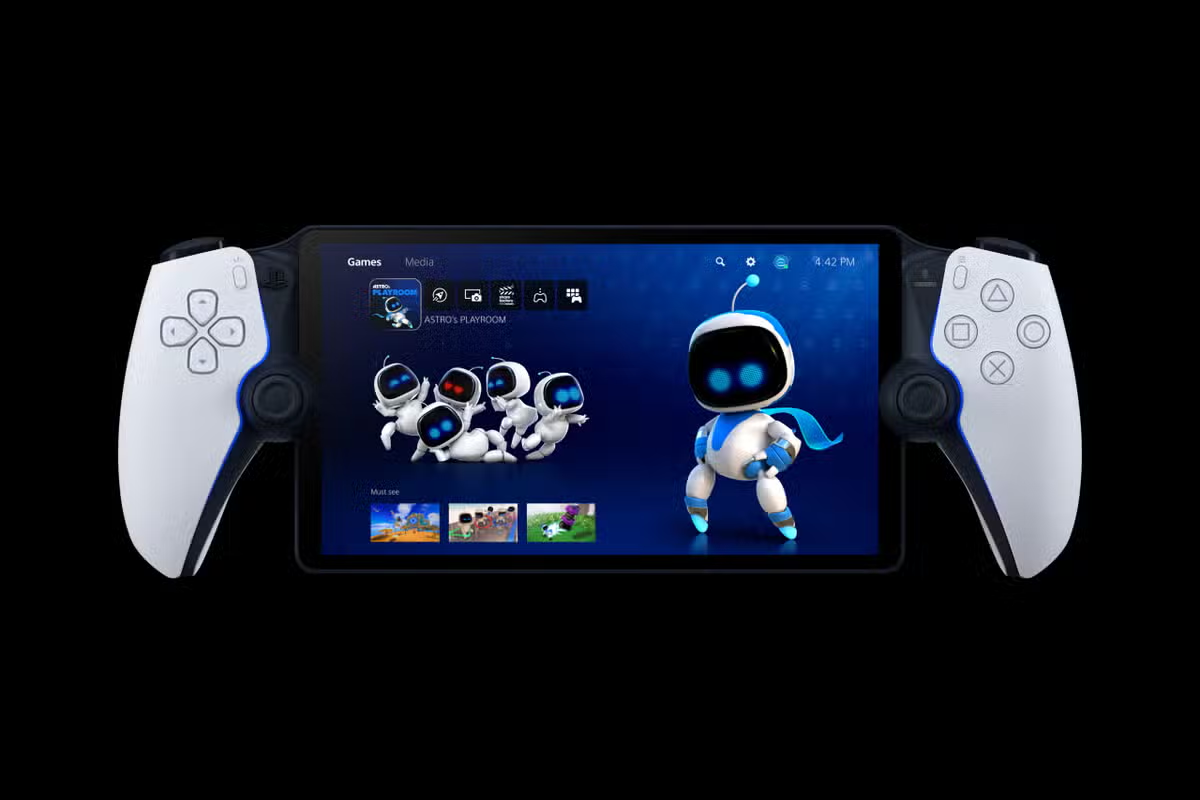
Unveiling The Secrets of Playstation Portal: A Comprehensive Guide
Are you eager to unlock a new level of gaming experience? Look no further! In this article, we will delve into the world of PlayStation Portal, a revolutionary device that promises to transform your gaming sessions.
What is Playstation Portal?
PlayStation Portal is not a portable console, nor is it a handheld device. It’s actually a wireless remote reader designed by Sony to enhance the gaming experience on your PS5. This innovative device allows you to play your favorite games on any screen, without the need for a separate monitor.
How Does Playstation Portal Work?
PlayStation Portal connects to your PS5 via Wi-Fi and uses the DualSense controller’s built-in features to provide an immersive gaming experience. The device streams video content from the console, allowing you to play games on any compatible screen.
Key Features of Playstation Portal
- Wireless remote reader
- Compatible with PS5 only
- Uses DualSense controller for enhanced gaming experience
- Streams video content from the console
- Requires a stable internet connection for optimal performance
Benefits of Using Playstation Portal
- Enhances gaming experience with immersive visuals and audio
- Allows you to play games on any compatible screen, including TVs and monitors
- Perfect for gamers who want to enjoy their favorite titles in different rooms or locations within their home
- Supports remote playing with friends and family members
Technical Requirements For Using Playstation Portal
- PS5 console connected to the same Wi-Fi network as the Portal device
- DualSense controller with Bluetooth connectivity enabled
- Stable internet connection with a minimum speed of 15 Mbps required for optimal performance
Setup And Installation Process
To get started, follow these simple steps:
- Connect your PS5 console to the same Wi-Fi network as the PlayStation Portal device.
- Ensure that the DualSense controller is connected to the PS5 via Bluetooth.
- Open the Settings menu on your PS5 console and navigate to System > Remote Play.
- Select “Qualify remote play” to enable the feature.
- Launch the Portal app and follow the on-screen instructions to complete the setup process.
Tips And Tricks For Using Playstation Portal
- Use a stable internet connection with a minimum speed of 15 Mbps for optimal performance.
- Ensure that your PS5 console is connected to the same Wi-Fi network as the Portal device.
- Use the official DualSense controller with Bluetooth connectivity enabled for the best gaming experience.
- Experiment with different screen sizes and resolutions to find the perfect setting for your games.
Frequently Asked Questions (FAQs)
Q: What is the price of PlayStation Portal?
A: The retail price of PlayStation Portal typically ranges from €200 to €300, depending on the region and availability.
Q: Can I use PlayStation Portal with other gaming consoles or devices?
A: Unfortunately, no. PlayStation Portal is specifically designed for use with PS5 consoles only.
Q: Do I need a separate monitor or TV to use PlayStation Portal?
A: No, you can use any compatible screen to play games with the Portal device.
Q: Can I connect multiple screens to my PS5 using PlayStation Portal?
A: Yes, you can connect multiple screens to your PS5 console using the Portal device.


