
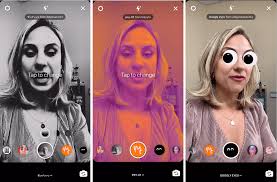
How to Contact Effects on Instagram: A Step-by-step Guide
Are you tired of your photos looking dull on Instagram? Do you want to know the secret to making them look more vibrant and engaging? Look no further! In this article, we will guide you through the process of contacting effects on Instagram, so you can take your photography to the next level.
What Are Effects on Instagram?
Effects on Instagram refer to the various filters and editing tools that can be applied to photos and videos to enhance their appearance. These effects can range from simple adjustments like brightness and contrast to more complex transformations like adding music or text overlays.
How to Contact Effects on Instagram Posts
To contact effects on Instagram posts, follow these steps:
- Open The Instagram App: First, make sure you have the latest version of the Instagram app installed on your device.
- Choose a Photo: Select the photo you want to edit by tapping on it from your gallery or by taking a new photo using the camera icon.
- Tap on The “+” Button: Tap on the “+” button in the top-right corner of the screen to open the editing menu.
- Select an Effect: Choose one of the pre-made effects, such as Clarendon or Gingham, from the list below the photo.
- Adjust Parameters: If you want to make more precise adjustments, tap on the “Modify” button and select a parameter like brightness or contrast to adjust it manually.
Using Third-party Apps to Contact Effects
If you want to apply more complex effects or have access to a wider range of filters, consider using third-party apps like:
- Snapseed: A powerful photo editing app that allows you to apply various effects and presets.
- Vsco: A popular app for creating and applying unique effects and filters.
How to Contact Effects on Instagram Stories
To contact effects on Instagram stories, follow these steps:
- Open The Instagram App: Make sure you have the latest version of the Instagram app installed on your device.
- Choose a Photo or Video: Select a photo or video from your gallery or record a new one using the camera icon.
- Tap on The “+” Button: Tap on the “+” button in the top-right corner of the screen to open the editing menu.
- Swipe Right: Swipe right to scroll through the effects and choose the one you like.
How to Add Music to Instagram Stories
To add music to your Instagram stories, follow these steps:
- Open The Instagram App: Make sure you have the latest version of the Instagram app installed on your device.
- Choose a Photo or Video: Select a photo or video from your gallery or record a new one using the camera icon.
- Tap on The “+” Button: Tap on the “+” button in the top-right corner of the screen to open the editing menu.
- Select Music: Choose a song from your music library or search for one online.
How to Update Instagram And Get New Effects
To update Instagram and get new effects, follow these steps:
- Open The App Store: Open the Google Play Store (for Android) or Apple App Store (for iOS).
- Search For Instagram: Search for Instagram in the search bar.
- Check For Updates: Check if there are any updates available for the app.
Troubleshooting: How to Fix Common Issues With Effects
If you’re experiencing issues with effects on Instagram, try these troubleshooting steps:
- Clear Cache And Data: Clear the app’s cache and data from your device.
- Reinstall Instagram: Reinstall the Instagram app from the app store.
- Contact Instagram Support: Contact Instagram support for further assistance.
Conclusion
Contacting effects on Instagram can be a fun and creative way to enhance your photos and videos. By following these step-by-step guides, you’ll be able to unlock new features and take your photography skills to the next level.
Frequently Asked Questions (FAQs)
- Q: How do I Apply Multiple Effects at Once?
A: You can apply multiple effects by tapping on the “Modify” button and selecting a parameter like brightness or contrast, then adjusting it manually. - Q: Can I Use Third-party Apps to Contact Effects?
A: Yes, you can use third-party apps like Snapseed or VSCO to contact more complex effects or have access to a wider range of filters. - Q: How do I Add Music to my Instagram Stories?
A: To add music to your Instagram stories, tap on the “+” button and select music from your library or search for one online. - Q: Why Can’t I Update my Instagram App?
A: Make sure you have a stable internet connection and try restarting your device before trying again. - Q: How do I Fix Common Issues With Effects on Instagram?
A: Try clearing cache and data, reinstalling the app, or contacting Instagram support for further assistance.
Bonus Tip: Experiment with different effects and filters to find the ones that work best for you and your brand!


