
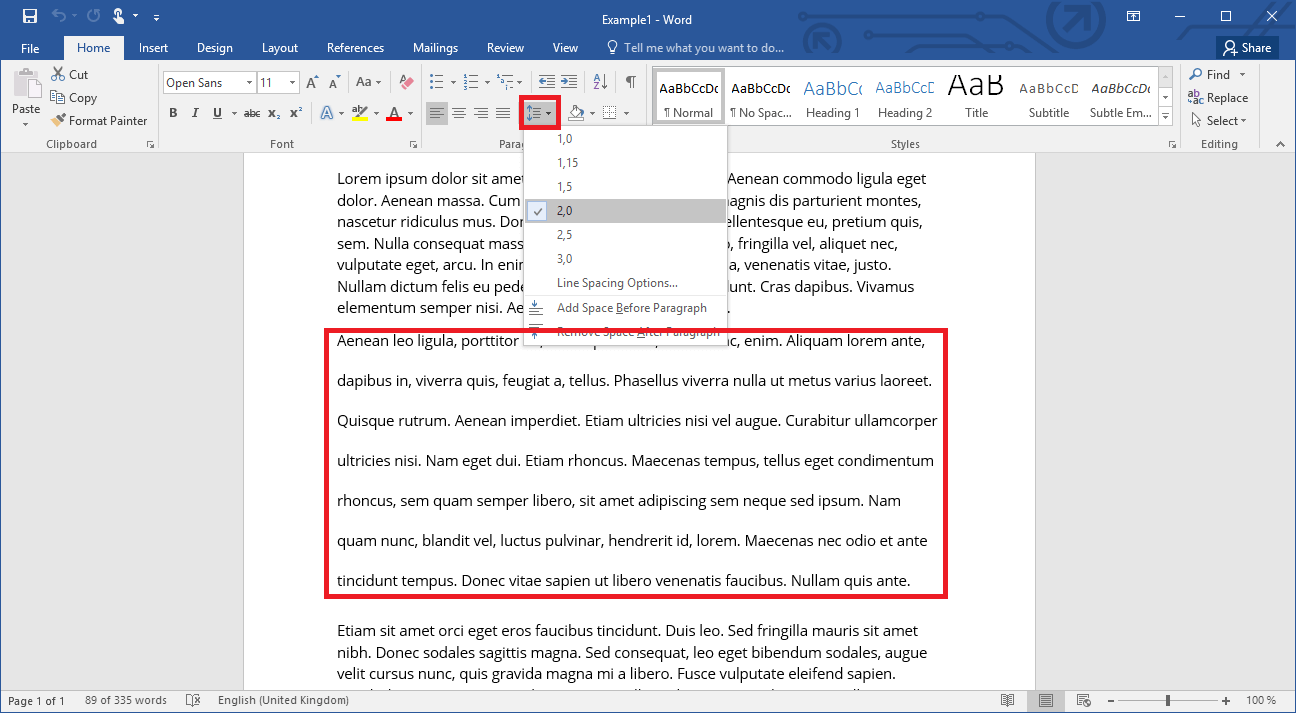
As a user of Microsoft Word, you can modify interlinea (line spacing) to adjust the blank space between lines of text. This feature allows you to customize the look and feel of your documents.
What is Interlinea?
Interlinea refers to the distance between lines of text in a document. By adjusting this setting, you can change the density and readability of your text.
Why Modify Interlinea?
Modifying interlinea can be useful for various reasons:
- Improving Readability: Adjusting line spacing can make your text more readable.
- Enhancing Visual Appeal: Changing line spacing can add a touch of professionalism to your documents.
- Customizing Your Style: By modifying interlinea, you can tailor the look and feel of your documents.
How to Modify Interlinea in Microsoft Word
Here are the steps to modify interlinea:
On Windows
- Open Microsoft Word: Launch the software on your computer.
- Select Your Document: Open the document where you want to adjust line spacing.
- Highlight The Text: Select the text where you want to adjust line spacing.
- Access The Home Tab: Go to the Home tab in the ribbon.
- Click on Line Spacing: Click on the “Line Spacing” button and select your preferred option.
On Mac
- Open Microsoft Word: Launch the software on your computer.
- Select Your Document: Open the document where you want to adjust line spacing.
- Highlight The Text: Select the text where you want to adjust line spacing.
- Access The Home Tab: Go to the Home tab in the ribbon.
- Click on Line Spacing: Click on the “Line Spacing” button and select your preferred option.
How to Modify Interlinea Online
If you don’t have Microsoft Word installed on your computer, you can still modify interlinea online using Microsoft’s web-based version:
- Access Microsoft Word Online: Sign in to your Microsoft account and access the online version of Microsoft Word.
- Select Your Document: Open the document where you want to adjust line spacing.
- Highlight The Text: Select the text where you want to adjust line spacing.
- Click on Line Spacing: Click on the “Line Spacing” button and select your preferred option.
Modifying Interlinea in Smartphones And Tablets
Microsoft Word is available as an app for smartphones and tablets:
- Download Microsoft Word: Download the Microsoft Word app from the App Store (for iOS devices) or Google Play Store (for Android devices).
- Open Your Document: Open the document where you want to adjust line spacing.
- Highlight The Text: Select the text where you want to adjust line spacing.
- Tap on Line Spacing: Tap on the “Line Spacing” button and select your preferred option.
Faqs
- Q: What is interlinea, and why should I modify it?
A: Interlinea refers to the blank space between lines of text in a document. Modifying it can improve readability, enhance visual appeal, and customize your style. - Q: How do I modify interlinea in Microsoft Word on Windows?
A: Open Microsoft Word, select your document, highlight the text, access the Home tab, and click on Line Spacing to adjust line spacing. - Q: Can I modify interlinea online using Microsoft’s web-based version?
A: Yes, you can access Microsoft Word online, open your document, highlight the text, click on Line Spacing, and select your preferred option. - Q: How do I modify interlinea in smartphones and tablets?
A: Download the Microsoft Word app, open your document, highlight the text, tap on Line Spacing, and select your preferred option.


