
How to Download Movies With Utorrent: A Step-by-step Guide
Are you tired of searching for movies online? Do you want to download your favorite films quickly and easily? Look no further than uTorrent! In this article, we’ll show you how to download movies with uTorrent, a popular torrent client that’s free and easy to use.
What is Utorrent?
UTorrent is a lightweight and efficient BitTorrent client that allows you to download files from the internet quickly and easily. It’s available for Windows, macOS, and Linux, making it a versatile choice for users of all operating systems.
Why Choose Utorrent?
There are many reasons why you should choose uTorrent as your torrent client:
- Fast Download Speeds: UTorrent uses advanced algorithms to optimize download speeds, ensuring that you get the files you need quickly.
- Low Resource Usage: UTorrent is designed to be lightweight and efficient, making it easy on system resources.
- User-friendly Interface: The uTorrent interface is simple and intuitive, making it easy to navigate even for beginners.
Downloading Movies With Utorrent
To download movies with uTorrent, follow these steps:
- Download And Install Utorrent: Head to the uTorrent website and download the client for your operating system.
- Launch Utorrent: Once installed, launch the uTorrent client and navigate to the “Options” menu.
- Configure Utorrent: In the “Options” menu, select the “Settings” option and configure the client to suit your needs.
Configuring Utorrent
To configure uTorrent for optimal performance:
- Choose Your Download Location: Select a location on your computer where you want to save downloaded files.
- Set Your Bandwidth Limitations: If necessary, set bandwidth limitations to ensure that downloads don’t consume too much of your internet connection.
Opening The Router For Utorrent
To open the router for uTorrent:
- Access Your Router Configuration: Log in to your router’s configuration page using your username and password.
- Create a New Rule: Create a new rule to allow incoming traffic on the port used by uTorrent (usually 6881-6889).
- Save Changes: Save changes to the rule and restart your router.
Optimizing Utorrent Settings
To optimize uTorrent settings for optimal performance:
- Run a Speed Test: Run a speed test using the built-in “Speed Test” feature in uTorrent.
- Adjust Your Download Settings: Adjust your download settings based on the results of the speed test.
- Save Changes: Save changes to your download settings.
Finding Movies to Download
To find movies to download with uTorrent:
- Use a Torrent Search Engine: Use a torrent search engine like The Pirate Bay or 1337x to find movies available for download.
- Select Your Movie: Select the movie you want to download and click on the “Download” button.
Downloading Movies
To download movies with uTorrent:
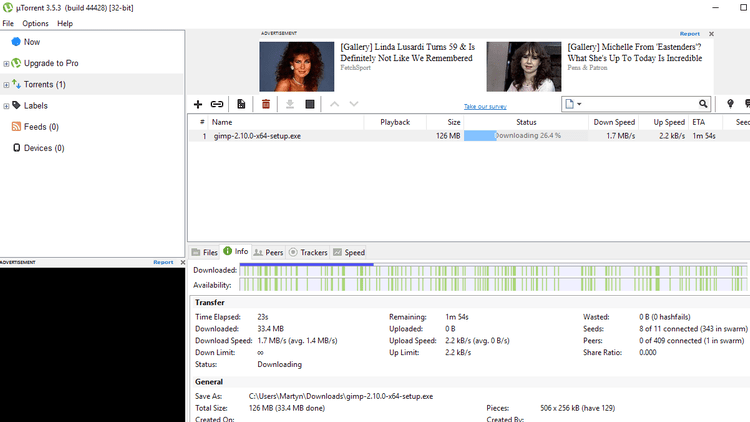
- Initiate The Download: Initiate the download by clicking on the “Download” button in uTorrent.
- Monitor Progress: Monitor progress as the file downloads.
- Save The File: Save the file to your designated location once it’s complete.
Tips And Tricks
Here are some tips and tricks for using uTorrent:
- Use a Vpn: Use a VPN to protect yourself from ISP throttling and other online threats.
- Avoid Downloading Copyrighted Content: Avoid downloading copyrighted content without permission from the copyright holder.
- Keep Your Utorrent Client Up-to-date: Keep your uTorrent client up-to-date to ensure you have the latest security patches and features.
Conclusion
Downloading movies with uTorrent is a simple and straightforward process. By following these steps, you’ll be able to download your favorite films quickly and easily. Remember to always follow safety guidelines and respect copyright laws when downloading content online.
Frequently Asked Questions (FAQs)
Here are some frequently asked questions about using uTorrent:
- Q: What is The Best Way to Optimize my Utorrent Settings?
A: The best way to optimize your uTorrent settings is to run a speed test and adjust your download settings based on the results. - Q: How do I Find Movies to Download With Utorrent?
A: You can use a torrent search engine like The Pirate Bay or 1337x to find movies available for download. - Q: What Are Some Tips For Using Utorrent Safely?
A: Some tips for using uTorrent safely include using a VPN, avoiding downloading copyrighted content without permission, and keeping your client up-to-date. - Q: How do I Open The Router For Utorrent?
A: To open the router for uTorrent, access your router configuration page, create a new rule to allow incoming traffic on the port used by uTorrent, and save changes. - Q: What is The Best Way to Monitor my Download Progress With Utorrent?
A: The best way to monitor your download progress with uTorrent is to use the built-in “Speed Test” feature or check the download status in the uTorrent client.
I hope this article has been helpful in answering your questions about using uTorrent. If you have any further questions, feel free to ask!


