
Unlocking The Power of Sky On Demand: A Comprehensive Guide
Are you ready to unlock the full potential of your Sky subscription? Look no further! In this article, we’ll delve into the world of Sky On Demand, exploring its features, benefits, and how to access it on various devices.
What is Sky On Demand?
Sky On Demand is a feature that allows you to access a vast library of content, including movies, TV shows, and documentaries, at any time. This service is included in your Sky subscription, providing you with endless entertainment options.
How to Access Sky On Demand on Your Decoder
To access Sky On Demand on your decoder, follow these simple steps:
- Ensure your decoder is connected to the internet.
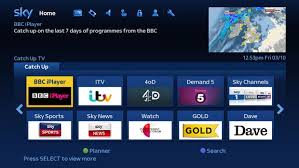
- Navigate to the Sky On Demand section on your decoder’s menu.
- Select the content you want to watch and press the “Play” button.
Actuating Sky On Demand on Sky Q
If you have a Sky Q decoder, accessing Sky On Demand is even easier! Simply:
- Ensure your decoder is connected to the internet.
- Press the “Home” button on your remote control.
- Select the Sky On Demand section from the menu.
- Choose the content you want to watch and press the “Play” button.
Actuating Sky On Demand on Smartphones And Tablets
To access Sky On Demand on your smartphone or tablet, follow these steps:
- Download the Sky Go app from the App Store (for iOS devices) or Google Play Store (for Android devices).
- Sign in with your Sky ID and password.
- Browse through the available content and select what you want to watch.
Actuating Sky On Demand on PC
To access Sky On Demand on your PC, follow these steps:
- Download the Sky Go software from the Sky website.
- Install the software on your computer.
- Sign in with your Sky ID and password.
- Browse through the available content and select what you want to watch.
Troubleshooting: Activation of Sky On Demand Not Working
If you’re experiencing issues activating Sky On Demand, try the following:
- Check that your decoder is connected to the internet.
- Restart your decoder and try again.
- Update your decoder’s software to ensure you have the latest version.
- Contact Sky’s customer support for assistance.
Conclusion
Sky On Demand offers a vast library of content at your fingertips, providing endless entertainment options. With this guide, you’ll be able to access Sky On Demand on various devices, including your decoder, smartphone, tablet, and PC. Remember to troubleshoot any issues that may arise by following the steps outlined above.
Frequently Asked Questions (FAQs)
- What is Sky On Demand?
Sky On Demand is a feature that allows you to access a vast library of content, including movies, TV shows, and documentaries, at any time. - How do I Access Sky On Demand on my Decoder?
To access Sky On Demand on your decoder, ensure it’s connected to the internet, navigate to the Sky On Demand section, and select the content you want to watch. - Can I Access Sky On Demand on my Smartphone or Tablet?
Yes! Download the Sky Go app from the App Store (for iOS devices) or Google Play Store (for Android devices), sign in with your Sky ID and password, and browse through the available content. - What if I’m Experiencing Issues Activating Sky On Demand?
Try restarting your decoder, updating its software, or contacting Sky’s customer support for assistance. - Is Sky On Demand Included in my Subscription?
Yes! Sky On Demand is an included feature in your Sky subscription, providing you with endless entertainment options. - Can I Watch Sky On Demand on Multiple Devices at Once?
No, you can only have one device connected to the internet and accessing Sky On Demand at a time. - What if I Want to Download Content For Offline Viewing?
You can download select content on your smartphone or tablet for offline viewing using the Sky Go app. - Can I Use my Apple Pencil With Sky On Demand?
Yes! Use your Apple Pencil to navigate through the menu and select content on your decoder, but note that it’s not compatible with all devices.
I hope this article has helped you unlock the full potential of your Sky subscription. Happy viewing!


