
How to Recover Your Iccid Tim: A Step-by-step Guide
Are you thinking of switching your mobile number from TIM to another operator? If so, you’ll likely need to retrieve your ICCID (Integrated Circuit Card ID) number. In this article, we’ll walk you through the process of recovering your ICCID TIM on both Android and iOS devices.
What is an Iccid Number?
The ICCID number is a unique 19-digit code that identifies your SIM card. It’s essential for operators to recognize your SIM and facilitate smooth switching between providers. If you’re planning to switch from TIM to another operator, you’ll need this code to complete the process.
Recovering Your Iccid Tim on Android Devices
If you have an Android device running version 9 or later, you can recover your ICCID TIM directly from the settings app.
- Access Settings: Tap on the gear icon (Settings) on your home screen.
- Go to System: Select “System” from the menu.
- Choose Info Phone: Tap on “Info phone” or “Informazioni on the phone.”
- Select State of The Sim: Choose “State of the SIM” (or “Slot SIM 1”).
- View Iccid: Your ICCID TIM should be displayed next to the option “EID.”
If you don’t see your ICCID in this section, don’t worry! You can still recover it using one of the methods outlined below.
Using The Simcard App
The SIMCard app is a free utility that allows you to view essential information about your SIM card. Here’s how to use it:
- Download And Install: Get the SIMCard app from the Google Play Store.
- Launch The App: Open SIMCard, and tap on the “Information” button.
- View Iccid: Your ICCID TIM should be displayed under the “SIM Card” section.
Other Methods For Android Devices
If you’re using an older version of Android or can’t find your ICCID in the settings app, there are other ways to recover it:
- Use App Specific to Operators: Some telecom operators provide apps that allow you to retrieve your ICCID directly from their platform.
- Ask Your Operator: Contact TIM customer support for assistance with recovering your ICCID.
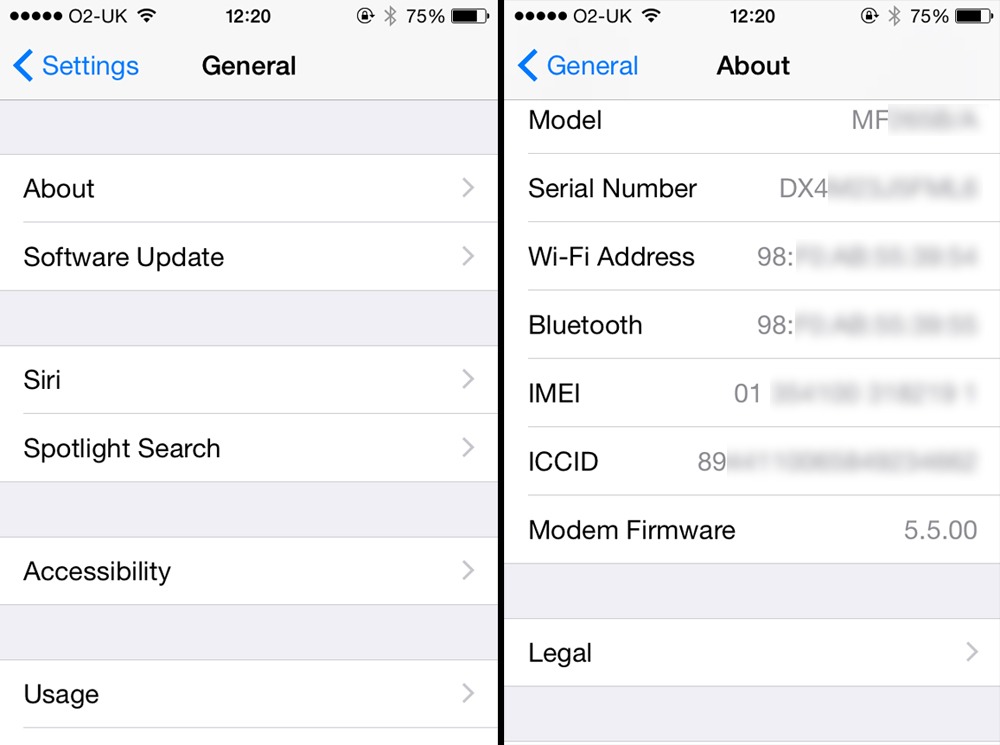
Recovering Your Iccid Tim on Iphone
If you’re using an iOS device, the process is slightly different:
- Access Settings: Tap on the gear icon (Settings) on your home screen.
- Go to General: Select “General” from the menu.
- Choose Info: Tap on “Info.”
- View Iccid: Your ICCID TIM should be displayed next to the option “ICCID.”
Recovering Your Iccid Tim Using Itunes
If you have a Mac or Windows PC with an older version of macOS (Mojave or earlier), you can recover your ICCID TIM using iTunes:
- Connect Your Iphone: Connect your iPhone to your computer using a Lightning cable.
- Launch Itunes: Open iTunes, and wait for it to sync with your device.
- View Information: Click on the icon representing your iPhone in the top left corner of iTunes.
- Select Summary: Choose “Summary” from the menu.
- View Iccid: Your ICCID TIM should be displayed next to the option “ICCID.”
Recovering Your Iccid Tim Using Finder
If you have a Mac running macOS Catalina or later, the process is similar:
- Connect Your Iphone: Connect your iPhone to your Mac using a Lightning cable.
- Launch Finder: Open Finder, and select “Locations” from the menu.
- Select Iphone: Choose your iPhone from the list of devices connected to your Mac.
- View Information: Click on the icon representing your iPhone in the top left corner of Finder.
- Select Summary: Choose “Summary” from the menu.
- View Iccid: Your ICCID TIM should be displayed next to the option “ICCID.”
Recovering Your Iccid Tim Without a Phone
If you don’t have access to a phone or can’t insert your SIM card into one, you can still recover your ICCID TIM by looking for it on the SIM card itself.
The ICCID number is usually printed on the smooth side of the SIM card, alongside your phone number. If this is not visible due to the SIM card being in a protective sleeve, check the plastic card that came with the purchase of the SIM card – the code should be printed there as well.
Conclusion
In conclusion, recovering your ICCID TIM is a relatively straightforward process on both Android and iOS devices. By following these steps, you should be able to retrieve your unique 19-digit code and complete any necessary switching between telecom operators.


