
The Ultimate Guide to Crystal Disk Mark: Unlocking Your Hard Drive’s Potential
Are you looking to upgrade your hard drive or solid-state drive (SSD)? Before making a purchase, it’s essential to test the performance of your current drive. This is where Crystal Disk Mark comes in – a free and open-source program that helps you benchmark your drive’s speed, capacity, and overall performance.
What is Crystal Disk Mark?
Crystal Disk Mark is a software tool developed by Noriyuki Miyazaki, specifically designed for Windows operating systems. It’s a user-friendly program that allows you to test the read and write speeds of your hard drive or SSD. The tool is available in two versions: Standard and Portable.
Why Use Crystal Disk Mark?
Using Crystal Disk Mark can benefit you in several ways:
- Identify Potential Issues: By testing your drive’s performance, you can identify any potential issues that may affect its overall lifespan.
- Compare Different Drives: If you’re considering purchasing a new hard drive or SSD, Crystal Disk Mark allows you to compare the performance of different drives and make an informed decision.
- Optimize Your System: By understanding how your drive performs, you can optimize your system for better speed and responsiveness.
How to Use Crystal Disk Mark
Using Crystal Disk Mark is straightforward. Here’s a step-by-step guide:
- Download The Software: You can download Crystal Disk Mark from its official website or through Microsoft Store.
- Choose The Right Version: Select either the Standard or Portable version, depending on your needs.
- Run The Program: Once downloaded and installed (for the Standard version), run the program to initiate the benchmarking process.
- Select The Test Options: Choose the type of test you want to run, such as sequential or random access.
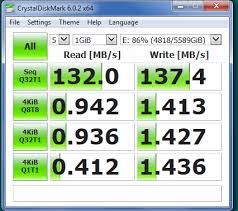
- Monitor The Results: The program will display the read and write speeds, as well as other performance metrics.
Understanding Crystal Disk Mark Results
The results provided by Crystal Disk Mark are crucial in understanding your drive’s performance. Here’s what to look for:
- Read And Write Speeds: Check the average read and write speeds in megabytes per second (MB/s).
- Access Times: Look at the access time, which represents the time it takes for the drive to retrieve data.
- Queue Depths: This metric measures how well your drive can handle multiple requests simultaneously.
Tips And Precautions
When using Crystal Disk Mark, keep the following tips in mind:
- Avoid Intensive Usage: Refrain from running intense tests on your SSD, as this can shorten its lifespan.
- Monitor Your Drive’s Temperature: Keep an eye on your drive’s temperature to prevent overheating.
- Compare Results With Industry Standards: Compare your results with those of other drives and benchmarks to get a comprehensive understanding.
Conclusion
Crystal Disk Mark is a powerful tool for testing the performance of your hard drive or SSD. By using this software, you can identify potential issues, compare different drives, and optimize your system for better speed and responsiveness. Remember to use the software responsibly and follow the tips provided above to ensure accurate results.


