
Getting a Payment With Paypal: A Comprehensive Guide
Are you looking for a safe and easy way to receive payments online? Look no further than PayPal! In this article, we’ll show you how to get a payment with PayPal using your desktop or mobile device.
The Safety of Paypal
Before we dive into the nitty-gritty of getting a payment with PayPal, let’s talk about one of the most important things: Safety. PayPal is one of the safest ways to make online transactions, and for good reason. With advanced cryptography and secure protocols in place, your account and funds are protected from unauthorized access.
Receiving Payments With Paypal
So, how do you receive a payment with PayPal? It’s surprisingly easy! Here’s a step-by-step guide:
- Access Your Account: First, log into your PayPal account using your credentials.
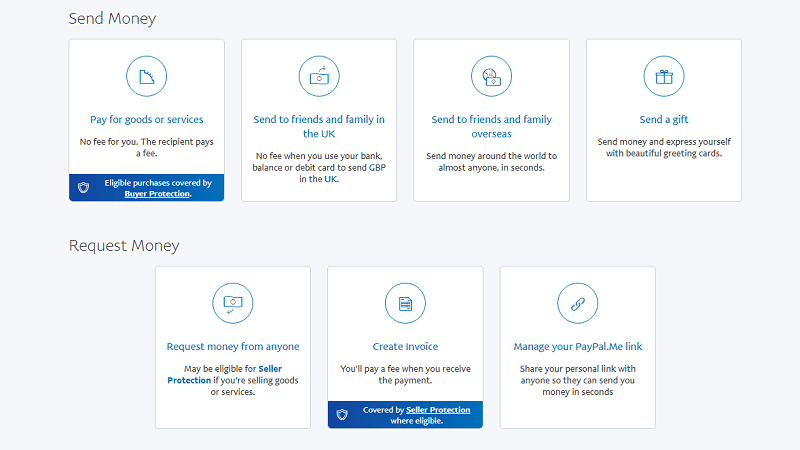
- Click on “Request”: Once logged in, click on the “Request” button in the menu bar.
- Fill Out The Form: Fill out the form with the recipient’s details, including their name, email address, and phone number.
- Choose a Currency: Select the currency you want to receive the payment in.
- Add a Reason (Optional): If you want to add a reason for requesting the money, now is the time to do it.
- Click “Request Money Now”: Once you’ve filled out all the details, click on the “Request Money Now” button.
Using Paypal.Me
PayPal also offers a feature called PayPal.Me, which allows you to create a personalized link that can be shared with others to send money directly to your account. Here’s how it works:
- Create a Paypal.Me Link: First, go to the PayPal website and click on “Create a Profile” under the PayPal.Me section.
- Choose Your Details: Fill out the form with your details, including your name, email address, and phone number.
- Add a Photo (Optional): If you want to add a photo to your profile, now is the time to do it.
- Click “Create”: Once you’ve filled out all the details, click on the “Create” button.
Receiving Payments on Paypal Using Your Smartphone
If you prefer using your smartphone to receive payments with PayPal, here’s how you can do it:
- Download The Paypal App: First, download and install the PayPal app from the Google Play Store or Apple App Store.
- Log In: Log in to your PayPal account using your credentials.
- Click on “Pay”: Once logged in, click on the “Pay” button at the bottom of the screen.
- Fill Out The Form: Fill out the form with the recipient’s details, including their name and email address.
- Choose a Currency: Select the currency you want to receive the payment in.
- Add a Reason (Optional): If you want to add a reason for requesting the money, now is the time to do it.
- Click “Pay”: Once you’ve filled out all the details, click on the “Pay” button.
Using Paypal With Ebay
If you’re selling items online using eBay, here’s how you can use PayPal to receive payments:
- Add Paypal as a Payment Option: First, add PayPal as a payment option in your eBay account settings.
- Provide Your Paypal Details: Provide your PayPal details, including your email address and account number.
- Click “Save”: Once you’ve entered all the details, click on the “Save” button.
The Protection Sales of Paypal
If you’re selling items online using PayPal, you may be eligible for their protection sales program. This program helps protect sellers from buyer claims or chargebacks. To qualify, make sure to follow these steps:
- Sell a Physical Item: Sell a physical item that can be tracked and verified.
- Use a Trackable Shipping Method: Use a trackable shipping method to ensure the item is delivered to the buyer.
- Respond Promptly to Buyer Demands: Respond promptly to any buyer demands or claims.
Conclusion
Getting a payment with PayPal is easy, safe, and convenient. Whether you’re using your desktop or mobile device, following these simple steps will help you receive payments in no time. Remember to always follow the security guidelines and best practices to ensure a smooth transaction process.
Frequently Asked Questions (FAQs)
- Q: Is Paypal Safe?
A: Yes, PayPal is one of the safest ways to make online transactions. - Q: How do I Receive a Payment With Paypal?
A: To receive a payment with PayPal, log in to your account, click on “Request,” and fill out the form with the recipient’s details. - Q: What is Paypal.Me?
A: PayPal.Me is a feature that allows you to create a personalized link to send money directly to your account. - Q: Can I Use Paypal With Ebay?
A: Yes, you can add PayPal as a payment option in your eBay account settings. - Q: What is The Protection Sales Program of Paypal?
A: The protection sales program helps protect sellers from buyer claims or chargebacks if they follow certain guidelines and best practices. - Q: How do I Use Paypal With my Smartphone?
A: To use PayPal with your smartphone, download the app, log in to your account, and follow the prompts to send a payment request. - Q: Is There a Fee For Using Paypal?
A: Yes, there may be fees associated with using PayPal, depending on the type of transaction and the country you’re in. - Q: Can I Cancel a Payment Request With Paypal?
A: Yes, you can cancel a payment request with PayPal if it’s still pending or within a certain timeframe after it’s been sent.
Recommended Reading
- “How to Use PayPal for Online Payments”
- “PayPal Security Guidelines and Best Practices”
- “The Protection Sales Program of PayPal: A Guide for Sellers”
Note: This article is meant for informational purposes only, and the author is not affiliated with PayPal or any other financial institution. The information provided is based on publicly available sources and may be subject to change.


