
The Ultimate Guide to Choosing a Motherboard
Are you looking to assemble a computer desktop and want to give your PC the best possible performance? Choosing the right motherboard can be a daunting task, but don’t worry, we’ve got you covered.
In this comprehensive guide, we’ll walk you through the essential parameters to consider when selecting a motherboard that meets your specific needs. Whether you’re a seasoned gamer or a professional user, our expert advice will help you make an informed decision and avoid costly mistakes.
Parameters of Choosing a Motherboard
To make an educated choice, it’s crucial to understand the fundamental characteristics of motherboards. Here are the key factors to consider:
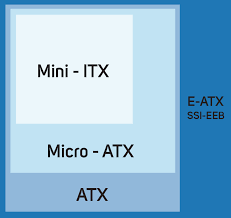
- Form Factor: The physical size of the motherboard, which can affect compatibility with your PC case.
- Socket Type: Ensure that the socket is compatible with your chosen CPU.
- Chipset: A critical component that coordinates data transfer between components, affecting performance and functionality.
- Ram Capacity And Speed: Consider the type and speed of RAM (DDR4 or DDR5) you need for optimal system performance.
- Peripheral On-board: Some motherboards come with integrated peripherals like Wi-Fi, Bluetooth, or audio interfaces, which can save you money on separate purchases.
- Bus And Connection Type: Think about the types of connections you need, such as SATA, PCIe x16, M.2, USB, and Ethernet ports.
Motherboard Form Factors
- Atx (Advanced Technology Extended): The most common form factor, offering ample space for components.
- Micro Atx: A compact version of ATX, suitable for smaller cases or mini-PCs.
- Mini Itx: The smallest and most compact form factor, ideal for ultra-small PCs or embedded systems.
Socket Types
- Lga 1151 (Intel): Compatible with Intel Core i5 and i7 processors from the Skylake to Coffee Lake generations.
- Am4 (AMD): Designed for AMD Ryzen CPUs, including Ryzen 9, Ryzen 7, and Ryzen 3 models.
Chipset Selection
- B360 (Intel) And B350 (AMD): Budget-friendly chipsets suitable for basic gaming and office use.
- Z390 (Intel) And X570 (AMD): High-end chipsets ideal for gaming and content creation, offering advanced features like PCIe 4.0.
Choosing The Right Motherboard
To find the perfect motherboard, consider your specific needs:
- For gamers, look for a motherboard with a high-speed chipset (B360 or Z390) and ample RAM capacity.
- For professionals and content creators, opt for a motherboard with a robust chipset (Z390 or X570) and extensive storage capabilities.
Conclusion
Choosing the right motherboard can be a complex task, but by understanding the essential parameters, you’ll be well-equipped to make an informed decision. Remember to consider your specific needs, including form factor, socket type, chipset, RAM capacity, peripheral on-board, bus, and connection types. Don’t hesitate to ask for help if you need it.
Frequently Asked Questions (FAQs)
- Q: What is The Best Motherboard For Gaming?
A: A high-speed chipset (B360 or Z390) and ample RAM capacity are essential for gamers. - Q: Can I Use a Micro Atx Motherboard in a Full-sized Case?
A: Yes, but ensure that your case supports micro ATX motherboards. - Q: What is The Difference Between Ddr4 And Ddr5 Ram?
A: DDR5 offers faster speeds (up to 6400 MHz) and improved performance compared to DDR4. - Q: Do I Need a Separate Wi-fi Card if my Motherboard Has On-board Wi-fi?
A: No, but ensure that your motherboard’s built-in Wi-Fi meets your specific needs.
Hope this helps you make an informed decision about the best Motherboard for your requirements


