
Converting Pdf Files to Word Documents: A Step-by-step Guide
Are you tired of dealing with PDF files that are difficult to edit? Do you want to convert them into Word documents for easier modification? You’re not alone! In this article, we’ll explore the various ways to convert PDF files to Word documents, including free online services and downloadable software.
The Importance of Converting Pdf Files
PDF (Portable Document Format) files are widely used for sharing documents, but they can be a pain to edit. The format is designed for printing and viewing, not for editing. When you try to modify a PDF file, you might find that the changes don’t stick or that the formatting gets messed up.
Microsoft Word: A Powerful Tool
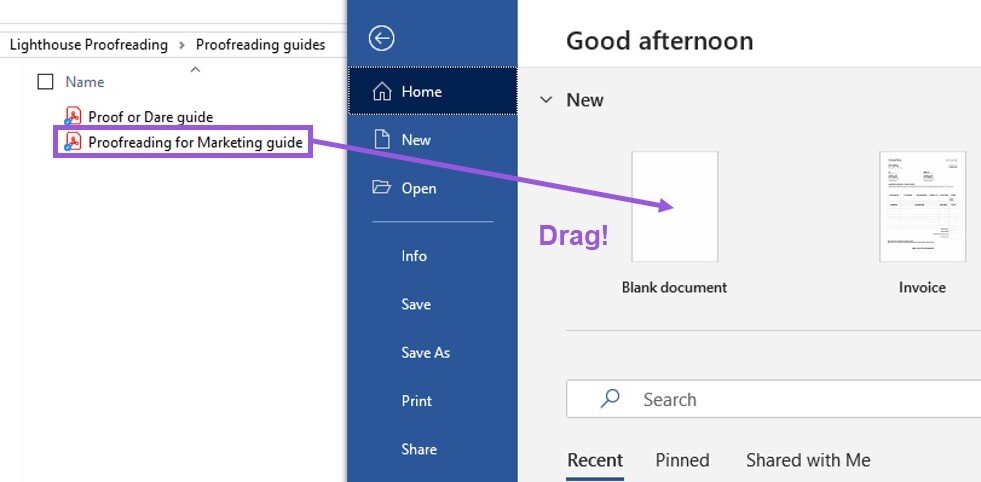
If you’re looking for a reliable solution, Microsoft Word is an excellent choice. With its latest versions, Word can now import and edit PDF files directly. Here’s how:
- Open Microsoft Word on your Windows or macOS device.
- Click on “File” > “Open” and select the PDF file you want to convert.
- Word will automatically convert the PDF into a editable document.
- Save the file in the desired format (DOCX, DOC, etc.).
Adobe Acrobat Reader: A Free Alternative
If you don’t have Microsoft Word or prefer not to use it, Adobe Acrobat Reader is another excellent option. This free software can open and edit PDF files, as well as convert them into editable documents.
- Download and install Adobe Acrobat Reader from the official website.
- Open the program and select the “Open” button.
- Choose the PDF file you want to convert and click on “Open”.
- Select the “Export” option and choose the format you prefer (DOCX, DOC, etc.).
Online Services: A Convenient Option
If you don’t want to download any software or prefer a more straightforward process, online services can be a great alternative. Here are some popular options:
- Docspal: This free service allows you to upload your PDF file and convert it into a Word document.
- Zamzar: Another free online converter that supports multiple formats, including PDF to Word.
- Pdf Candy: A user-friendly service that converts PDF files into editable documents.
Mobile Apps: On-the-go Conversions
If you’re always on the go, mobile apps can be a convenient option. Here are some popular apps for converting PDF files:
- Ilovepdf (Android, iOS, iPadOS): This app allows you to convert PDF files into Word documents directly.
- Converter Pdf to Word (Android, iOS, iPadOS): A straightforward app that converts PDF files into editable documents.
Other Apps And Services
There are many other apps and services available for converting PDF files. Some popular options include:
- Pdf2go: An online converter that supports multiple formats.
- Document Converter: A mobile app that converts PDF files into various formats.
- Ocr Converters: Software programs that use OCR technology to convert scanned documents into editable files.
Tips And Tricks
When converting PDF files, keep in mind the following tips:
- Quality Matters: Make sure the original PDF file is of high quality for better conversion results.
- Format Choices: Choose the correct format (DOCX, DOC, etc.) Depending on your needs.
- Free Services May Have Limitations: Some online services might have restrictions or watermarks on converted files.
Conclusion
Converting PDF files to Word documents can be a daunting task, but with the right tools and techniques, it becomes much easier. Whether you choose Microsoft Word, Adobe Acrobat Reader, or an online service, there’s a solution for everyone. Remember to always check the quality of your original PDF file and choose the correct format for your needs.
Frequently Asked Questions
- What is The Best Way to Convert Pdf Files?
The best way depends on your specific needs and preferences. Microsoft Word, Adobe Acrobat Reader, and online services are all viable options. - Are There Any Free Pdf Converters Available?
Yes, many free online services and software programs offer PDF conversion capabilities. - Can I Convert a Scanned Document Into an Editable File?
Yes, using OCR technology can help you convert scanned documents into editable files. - How Long Does The Conversion Process Take?
Conversion times vary depending on the service or software used and the size of the original file. - Are There Any Risks Involved in Converting Pdf Files?
Generally, no, but some online services might have security concerns or limitations. - Can I Convert a Large Pdf File Into Multiple Smaller Documents?
Yes, some converters allow you to split large PDF files into smaller sections. - What is The Maximum File Size Limit For Conversion?
File size limits vary depending on the service or software used, but most are in the range of 50-500 MB. - Can I Convert a Password-protected Pdf File?
Some converters might not support converting password-protected files, so be sure to check before proceeding.
Remember, when working with PDF files, always ensure that your original document is high-quality and formatted correctly for better conversion results. Happy converting!


