
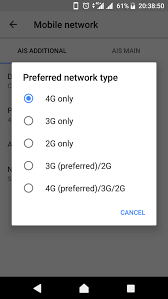
Actuating The 4G on Your New Smartphone
Are you excited about your newly acquired smartphone and eager to experience the high-speed internet connectivity of the 4G network? Look no further! This guide will walk you through the simple steps to actuate the 4G on your device.
Understanding The 4G Technology
Before we dive into the practical aspects, let’s take a brief look at what the 4G technology is all about. The 4G, also known as LTE (Long-Term Evolution), is a fourth-generation wireless network technology that provides faster data speeds and lower latency compared to its predecessors.
Key Features of The 4G Technology
Here are some key features of the 4G technology:
- Speed: The 4G technology offers maximum download speeds of up to 150 Mbps and upload speeds of up to 50 Mbps.
- Coverage: The 4G network covers a wide area, making it possible to stay connected even when you’re on the move.
- Reliability: The 4G network is designed to provide a stable and reliable connection, ideal for streaming and online gaming.
Actuating The 4G on Android Devices
If you’re using an Android device, follow these simple steps to actuate the 4G:
- Access The Settings App: Go to your device’s home screen and find the Settings app.
- Tap on “Cellular Networks” or “Other Networks”: Depending on your device, you might see either “Cellular Networks” or “Other Networks”. Tap on it.
- Select The Option For Lte or 4G: Choose the option that says “LTE” or “4G”.
- Confirm Your Choice: Confirm your selection by tapping on the “OK” button.
Actuating The 4G on Ios Devices
If you’re using an iOS device, follow these steps to actuate the 4G:
- Access The Settings App: Go to your device’s home screen and find the Settings app.
- Tap on “Cellular” or “Mobile Data”: Depending on your device, you might see either “Cellular” or “Mobile Data”. Tap on it.
- Select The Option For Lte or 4G: Choose the option that says “LTE” or “4G”.
- Confirm Your Choice: Confirm your selection by tapping on the “OK” button.
Troubleshooting Common Issues
If you’re facing any issues while trying to actuate the 4G, here are some troubleshooting tips:
- Check if Your Device is Compatible: Make sure that your device is compatible with the 4G network.
- Check if Your Carrier Supports 4G: Ensure that your carrier supports the 4G network in your area.
- Restart Your Device: Sometimes, a simple restart can resolve connectivity issues.
Conclusion
Actuating the 4G on your smartphone or tablet is a straightforward process. By following these simple steps, you’ll be able to enjoy high-speed internet connectivity and stay connected even when you’re on the move.
Frequently Asked Questions (FAQs)
Here are some frequently asked questions related to actuating the 4G:
- Q: What is The Difference Between 4G And Lte?
A: The terms “4G” and “LTE” refer to the same wireless network technology. - Q: Can I use the 4G network with my existing carrier?
A: Yes, you can use the 4G network with your existing carrier if they support it in your area. - Q: Is the 4G network available everywhere?
A: No, the 4G network is not available everywhere. It’s best to check with your carrier for availability in your area.
Final Tips
Here are some final tips to keep in mind:
- Regularly Check Your Device For Software Updates: Make sure that your device has the latest software updates installed.
- Check if Your Carrier Has Any Promotions or Offers: Keep an eye out for any promotions or offers from your carrier that might save you money on data usage.


