
How to Change Your Name on Clash Royale
Are you tired of your current nickname in Clash Royale? Do you want to change it to something more unique and personalized? Look no further! In this article, we will guide you through the process of changing your name on Clash Royale.
Why Change Your Name on Clash Royale?
Changing your name on Clash Royale can be a great way to revamp your gaming experience. Maybe you’ve outgrown your old nickname or want to try something new. Whatever the reason, it’s easy and fun to change your name on Clash Royale.
Requirements For Changing Your Name on Clash Royale
Before we dive into the steps, there are some requirements you need to meet:
- You must be at least Level 5 in the game.
- You can only change your name once a day (free) and every subsequent change will require gems (Clash Royale’s virtual currency).
Step-by-step Guide to Changing Your Name on Clash Royale
Here’s how to change your name on Clash Royale:
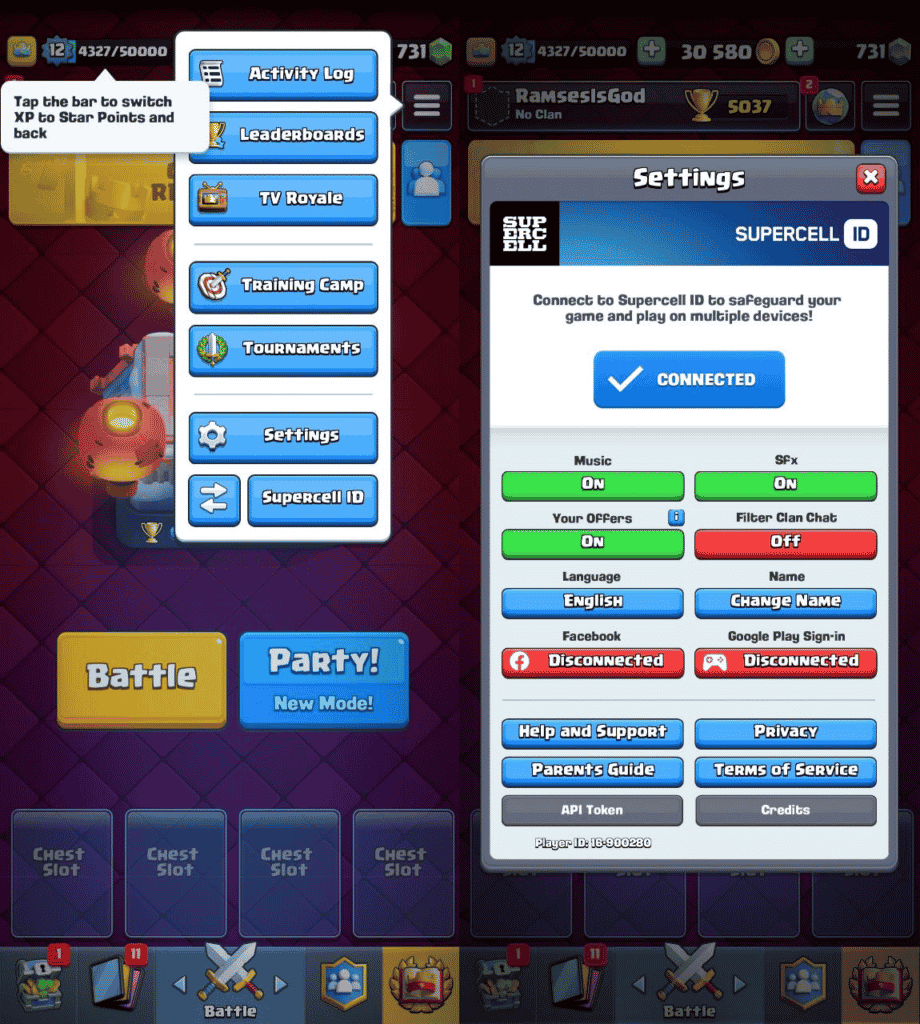
- Access The Settings: Open the game, go to the Battle section, and tap on the icon of two swords.
- Tap on The Gear Icon: Tap on the gear icon (in the top-right corner) to access the settings menu.
- Select “Change Name”: In the settings menu, select “Change Name.”
- Enter Your New Name: Enter your new name in the text field and tap “Continue.”
- Confirm Your New Name: Confirm your new name by tapping “OK.”
How to Change Your Name on Clash Royale Multiple Times
If you want to change your name more than once, follow these steps:
- Access the Settings as mentioned above.
- Select “Change Name” and enter your new name.
- Tap “Continue” and confirm your new name.
- To change your name again, repeat the process.
Changing The Name of Your Supercell ID Account
If you’re wondering how to change the name of your Supercell ID account, here’s what you need to do:
- Open Clash Royale and go to the Battle section.
- Tap on the icon of two swords.
- Select “Supercell ID” from the menu.
- Tap on the gear icon (in the top-right corner) to access the settings menu.
- Select “Change Name” and enter your new name.
How to Change The Name of Your Clan on Clash Royale
If you’re wondering how to change the name of your clan on Clash Royale, here’s what you need to do:
- Open Clash Royale and go to the Clan section (in the bottom-right corner).
- Tap on the “Show” button.
- Tap on the “Create New” button.
- Fill out the form with your new clan name, description, decoration, and other settings.
Conclusion
Changing your name on Clash Royale is easy and fun! Just follow these steps and you’ll be able to change your nickname in no time. Remember to meet the requirements (Level 5 and at least one free change per day) before attempting to change your name.
Frequently Asked Questions (FAQs)
- Q: Can I Change my Name on Clash Royale Multiple Times?
A: Yes, you can change your name on Clash Royale multiple times, but each subsequent change will require gems. - Q: How do I Change The Name of my Supercell ID Account?
A: To change the name of your Supercell ID account, follow the steps mentioned above. - Q: Can I Change The Name of my Clan on Clash Royale?
A: Yes, you can change the name of your clan on Clash Royale by following the steps mentioned above.
Bonus Tips
- Make sure to choose a unique and creative nickname that reflects your personality.
- If you’re unsure about changing your name, try using a temporary nickname to test it out.
- Remember to keep an eye on your gems, as they are required for each subsequent change of your name.


