
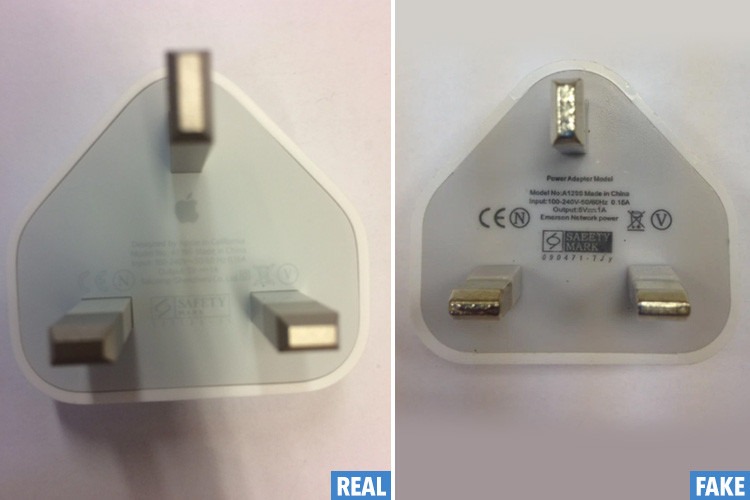
This is a comprehensive guide on how to identify original Apple chargers for iPhone, iPad, and MacBook devices. Here are the main points:
Why Choose Original Apple Chargers?
- Ensures safe and efficient charging of your device
- Designed specifically for each device model, taking into account factors such as power output, voltage, and current
How to Identify Original Apple Chargers: Iphone And Ipad
- Observe the design: Distinctive white plastic material with rounded edges
- Look for the Apple logo: Printed on one side of the charger
- Check the certification label: Indicates power output and safety standards (e.G., CE mark)
- Verify the cable: Usually white with 30-pin to USB, Lightning to USB, or Lightning to USB-C connectors
How to Identify Original Apple Chargers: Macbook
- Observe the design: Distinctive white plastic material with rounded edges
- Look for the Apple logo: Printed on one side of the charger
- Check the certification label: Indicates power output and safety standards (e.G., CE mark)
- Verify the cable: Usually white with USB-C to MagSafe 3, USB-C to USB-C, or other connectors specific to your MacBook model
What Happens if I Use a Third-party Charger?
- May cause problems such as damage to your device, sudden spikes in voltage, or difficulty charging
- Can also lead to malfunctions or other issues with your device
How to Check Your Mac’s Alimentatore (Charger)
- Hold down the Option key on your keyboard
- Click on “About This Mac”
- Select “System Information” at the bottom of the window
- Look for the alimentatore section in the Hardware menu bar
Conclusion
Using an original Apple charger ensures safe and efficient charging of your device. By following these steps, you can identify an original Apple charger for your iPhone, iPad, or MacBook.
Faqs
- What happens if I use a non-original Apple charger?
- May cause problems such as damage to your device, sudden spikes in voltage, or difficulty charging.
- How do I identify an original Apple charger for my MacBook?
- Look for the distinctive white plastic material with rounded edges, the Apple logo printed on one side of the charger, and the certification label indicating power output and safety standards.
- Can I use a third-party charger to charge my iPhone or iPad?
- Yes, but it’s recommended to choose certified third-party chargers that meet safety standards to avoid any issues.
- How do I check my Mac’s alimentatore (charger)?
- Hold down the Option key on your keyboard and click on “About This Mac” to access System Information and look for the alimentatore section.
Overall, this guide provides a comprehensive step-by-step process for identifying original Apple chargers for iPhone, iPad, and MacBook devices. It also highlights the importance of using certified third-party chargers if you need a replacement.


