
The Deep Web: Unlocking The Hidden World on Your Phone
Are you curious about the mysterious world of the Deep Web? Do you want to explore the hidden corners of the internet without leaving your phone? Look no further! In this article, we’ll guide you through the process of accessing the Deep Web and Dark Web on your Android or iOS device.
What is The Deep Web?
The Deep Web refers to the part of the internet that’s not visible during normal navigation using a browser. It’s like a hidden library where sensitive information and private websites are stored. Unlike the surface web, which is indexed by search engines like Google, the Deep Web remains unindexed.
What is The Dark Web?
The Dark Web is a subset of the Deep Web that’s intentionally hidden from public view. It’s like a secret society where users can access sensitive information and engage in illicit activities without being detected. However, it’s essential to exercise caution when navigating the Dark Web, as it’s often associated with malicious content and activities.
Why Should I Care About The Deep Web?
While the Deep Web may seem mysterious and intimidating, it holds significant value for those seeking anonymity and secure communication. With the rise of surveillance capitalism and government monitoring, accessing the Deep Web can provide a sense of security and freedom.
How Can I Access The Deep Web on My Phone?
Fortunately, accessing the Deep Web is easier than you think. You don’t need to be a tech-savvy individual or possess any special skills. With the right tools and knowledge, you can navigate the Deep Web from your phone. Here’s how:
Step 1: Download Tor Browser
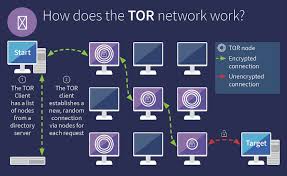
The first step is to download the official Tor Browser for Android or iOS devices. This browser will allow you to access the Deep Web securely and anonymously.
Android:
- Download Tor Browser from the Google Play Store.
- Follow the installation process, and once completed, tap on the “Connect” button to establish a connection to the Tor network.
Ios:
- Download Onion Browser from the App Store.
- Install the app and launch it. Tap on the “Start” button to begin browsing the Deep Web.
Step 2: Configure Your Identity
To ensure anonymity, you’ll need to configure your identity within the Tor browser. This process is simple:
On Android:
- Open the notification area of your phone.
- Expand the Tor Browser menu and tap on the “New Identity” option.
- Confirm that you want to create a new identity.
On Ios:
- Launch Onion Browser and navigate to the settings menu.
- Tap on the “Bridge Configuration” option.
- Select the bridge that suits your needs and confirm the configuration.
Step 3: Browse The Deep Web
Now that you’ve set up your identity, it’s time to explore the Deep Web. You can access various websites and platforms using the Tor browser or Onion Browser app. Remember to exercise caution when navigating this realm, as some content may be illicit or malicious.
Accessing Hidden Wiki
One popular resource within the Deep Web is Hidden Wiki, a collaborative platform where users share links to sensitive information. You can access Hidden Wiki by entering the onion address in your Tor browser.
Is Accessing The Deep Web Safe?
While accessing the Deep Web can provide a sense of security and anonymity, it’s essential to remember that some content may be malicious or illicit. Be cautious when navigating this realm, and avoid engaging with suspicious websites or activities.
Conclusion:
The Deep Web is a fascinating world that holds significant value for those seeking anonymity and secure communication. By following the steps outlined in this article, you can access the Deep Web on your phone using the Tor browser or Onion Browser app. Remember to exercise caution when navigating this realm, and always prioritize your safety and security.
Frequently Asked Questions:
- What is The Difference Between The Deep Web And Dark Web?
The Deep Web refers to the part of the internet that’s not visible during normal navigation using a browser. The Dark Web is a subset of the Deep Web that’s intentionally hidden from public view. - Is Accessing The Deep Web Illegal?
No, accessing the Deep Web itself is not illegal. However, engaging with illicit activities or malicious content within this realm can lead to consequences. - Can I Use my Regular Browser to Access The Deep Web?
No, you cannot use your regular browser to access the Deep Web. You’ll need to download and install a Tor-compatible browser, such as Tor Browser on Android or Onion Browser on iOS. - Is Accessing The Dark Web Safe?
While it’s possible to access the Dark Web safely, it’s essential to exercise extreme caution when navigating this realm. Some content may be malicious or illicit, so always prioritize your safety and security.


