
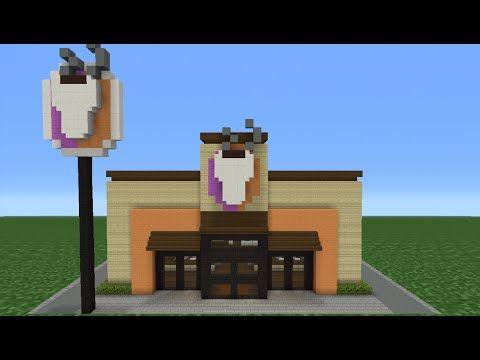
Creating a Thriving Shop in Minecraft: A Step-by-step Guide
Are you ready to create a bustling shop in the world of Minecraft? Look no further! In this comprehensive guide, we’ll take you through the process of building a shop that will attract customers and thrive in the game’s economy.
Understanding The Basics
Before diving into the construction process, it’s essential to understand how commerce works in Minecraft. The game features a bartering system where players can trade emeralds for various goods and services. A shop is essentially a building that functions as a hub for buying and selling items.
Step 1: Choosing The Right Location
When selecting a location for your shop, consider factors such as accessibility, visibility, and proximity to potential customers. You want to create an inviting space that will draw in players looking to trade or purchase goods.
Step 2: Designing Your Shop
Now it’s time to get creative! Design your shop with the target audience in mind. Consider the layout, décor, and overall aesthetic of your building. You can use various materials such as wood, stone, or brick to create a unique look that will stand out from the crowd.
Step 3: Constructing Your Shop
To build a basic shop structure, follow these steps:
- Place 6 blocks of smooth quartz on the terrain
- Square 4 additional blocks around the center block
- Create high walls (4 blocks total) on all sides, leaving an open roof and two central lines in front of the frame
- Add a high superior coat (2 blocks tall) to the top part of the building, covering the roof with brick slabs
- Position 4 brick slabs just above the entrance and 4 steps leading up to it
Step 4: Adding Finishing Touches
Now that your shop is taking shape, it’s time to add some finishing touches. Consider adding:
- A counter or reception area where players can interact with the shopkeeper
- Shelves or display cases for showcasing goods
- Decorative elements such as signs, lanterns, or other ornaments
Step 5: Enabling Shop Functionality
To make your shop fully functional, you’ll need to add a villager NPC (character no player can play) using the Egg of the Wandering Trader command. This will allow players to interact with the shopkeeper and purchase goods.
Tips And Variations
- Experiment with different designs and layouts to create a unique shop that reflects your personality or style
- Consider adding additional features such as an auction house, storage rooms, or even a restaurant
- Don’t be afraid to get creative and try out new ideas – the possibilities are endless!
Modding For More Options
If you’re looking for more advanced options or want to add specific features to your shop, consider using mods. The Admin Shop mod, available for Minecraft 1.12.2, Offers a range of customization options and additional features.
Conclusion
Building a thriving shop in Minecraft requires creativity, patience, and practice. By following these steps and tips, you’ll be well on your way to creating a bustling hub of commerce that will attract customers and thrive in the game’s economy. Happy building!
Frequently Asked Questions (FAQs)
- Q: What is The Best Location For my Shop?
A: Choose a spot with good accessibility, visibility, and proximity to potential customers. - Q: How do I Make my Shop Functional?
A: Use the Egg of the Wandering Trader command or install mods like Admin Shop to enable shop functionality. - Q: What Are Some Tips For Designing my Shop?
A: Consider factors such as layout, décor, and overall aesthetic when designing your shop. - Q: Can I Add Additional Features to my Shop?
A: Yes, you can experiment with different designs, layouts, and features such as an auction house, storage rooms, or a restaurant. - Q: What is The Admin Shop Mod?
A: The Admin Shop mod offers customization options and additional features for Minecraft shops.
Feel free to ask me any questions if you need further assistance with building your shop in Minecraft!


