
Finding a Vendor on Ebay: A Step-by-step Guide
Are you looking to find a vendor on eBay, but not sure how to go about it? Look no further! In this article, we’ll guide you through the process of finding a vendor on eBay, both from your computer and mobile device.
Why Find a Vendor on Ebay?
Finding a vendor on eBay can be beneficial in several ways. Firstly, it allows you to find vendors who have sold items similar to what you’re looking for in the past. This increases the chances of getting a good deal and ensures that the product is genuine. Secondly, finding a vendor on eBay helps you build trust with the seller, which is essential for any online transaction.
How to Find a Vendor on Ebay From Your Computer
To find a vendor on eBay from your computer, follow these steps:
Step 1: Access The Ebay Website
Firstly, access the eBay website by typing www.Ebay.Com in your browser. If you’re already logged in to your account, you can skip this step.
Step 2: Click on The “Access” Button
Click on the “Access” button at the top right corner of the page. This will take you to a new page where you need to enter your login credentials.
Step 3: Enter Your Login Credentials
Enter your email address or user name and password in the respective fields. Click on the “Access” button to log in to your account.
Step 4: Click on “My Ebay”
Once logged in, click on the “My eBay” tab at the top right corner of the page. This will take you to a new page where you can view all your account-related information.
Step 5: Select “Chronology Shoppings”
From the drop-down menu, select “Chronology Shoppings”. This will show you a list of all your past purchases on eBay.
Step 6: Search For Your Vendor
Scroll down to the bottom of the page and click on the “See commands” button. You’ll see a list of all the vendors who have sold items to you in the past. Select the vendor whose name you’re looking for, or search by keyword if you don’t remember their name.
Step 7: View Your Vendor’s Profile
Once you’ve found your vendor’s name, click on it to view their profile. From here, you can see their feedback rating, the items they have in sale, and much more.
How to Find a Vendor on Ebay From Your Mobile Device
To find a vendor on eBay from your mobile device, follow these steps:
Step 1: Open The Ebay App
Firstly, open the eBay app on your smartphone or tablet. If you don’t have it installed already, download it from the app store.
Step 2: Search For Your Vendor
Tap on the search bar at the top of the page and enter the name of the vendor you’re looking for. Alternatively, tap on the “Search an user” option in the menu to find a vendor by their user name.
Step 3: View Your Vendor’s Profile
Once you’ve found your vendor’s name, tap on it to view their profile. From here, you can see their feedback rating, the items they have in sale, and much more.
Finding a Shop on Ebay
If you’re looking for a shop on eBay instead of an individual vendor, follow these steps:
Step 1: Access The Ebay Website
Access the eBay website by typing www.Ebay.Com in your browser. If you’re already logged in to your account, you can skip this step.
Step 2: Click on “Advanced”
Click on the “Advanced” button at the top right corner of the page. This will take you to a new page where you can search for vendors by name or keyword.
Step 3: Search For Your Shop
Scroll down to the bottom of the page and click on the “For shops” tab. Enter the name of your shop in the search bar, or search by keyword if you don’t remember their name.
Step 4: View Your Shop’s Profile
Once you’ve found your shop’s name, click on it to view their profile. From here, you can see their items in sale, feedback rating, and much more.
Tips For Finding a Vendor on Ebay
Here are some tips to keep in mind when searching for vendors on eBay:
- Make sure the vendor has an active insertion list.
- Check their feedback rating before making any purchases.
- Look for shops with high ratings and good reviews.
Conclusion
Finding a vendor on eBay is easier than you think! By following these steps, you can find reliable vendors who sell items similar to what you’re looking for. Remember to always check their feedback rating and shop profile before making any purchases. Happy shopping!
Faqs
-
How do I Find a Vendor on Ebay?
To find a vendor on eBay, access the website, click on the “Advanced” button, and select the option for vendors. Enter the name of your vendor in the search bar or search by keyword if you don’t remember their name. -
Can I Search For Vendors on my Mobile Device?
Yes! You can find a vendor on eBay from your smartphone or tablet using the eBay app. -
How do I View my Vendor’s Profile?
To view your vendor’s profile, click on their name when searching for them. From there, you’ll see their feedback rating, items in sale, and much more. -
Can I Find a Shop on Ebay Instead of an Individual Vendor?
Yes! To find a shop on eBay, access the website, click on the “Advanced” button, and select the option for shops. -
How do I Search For Vendors by Keyword?
To search for vendors by keyword, enter the name or description of your shop in the search bar when searching for vendors. -
What Should I Look For When Finding a Vendor on Ebay?
When finding a vendor on eBay, make sure they have an active insertion list, check their feedback rating, and read reviews from other customers. -
Can I Find a Vendor by Location?
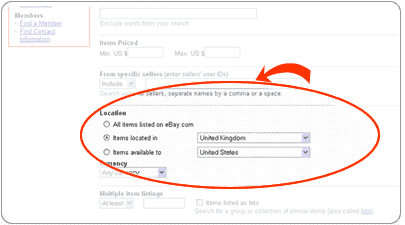
Yes! To search for vendors by location, use the “Location” filter when searching for vendors on the eBay website or app. -
How do I Contact my Vendor if I Have Any Issues?
To contact your vendor, click on their profile and look for the “Contact” button. This will give you access to their email address or other contact information. -
Can I Save my Favorite Vendors For Later?
Yes! To save your favorite vendors for later, click on the “Favorite” button when viewing their profile. You can then easily find them in your favorites list when searching for vendors. -
How do I Report a Vendor if They’re Not Following Ebay’s Rules?
To report a vendor who is not following eBay’s rules, click on the “Report” button when viewing their profile. This will alert eBay to any issues you may have with this vendor.


