
How to Add a Place in Your Instagram Bio: A Step-by-step Guide
Are you looking to add a specific location or place in your Instagram bio? You’re not alone! Many users want to indicate their current location or favorite spot, but don’t know how. In this article, we’ll guide you through the process of adding a place in your Instagram bio on both Android/iOS and PC.
Why Add a Place in Your Instagram Bio?
Adding a place in your Instagram bio can be beneficial for several reasons:
- It helps users identify where you’re from or currently located.
- It allows friends, family, and followers to easily find you.
- It’s a great way to showcase your personality and interests.
How to Add a Place in Your Instagram Bio on Android/ios
To add a place in your Instagram bio on mobile devices, follow these steps:
- Open the Instagram app on your device (available for both iOS and Android).
- Tap on the profile icon located at the bottom right corner of the screen.
- Select “Modify Profile” from the menu options.
- Tap on the “Biography” section, which is where you can add a personal message or description about yourself.
- Type in the name of the place you want to add (e.G., “Milano”).
- If desired, you can also add an emoji to represent the location (e.G., ????️).
- Confirm the changes by tapping on the “√” icon.
How to Add a Place in Your Instagram Bio on PC
To add a place in your Instagram bio on PC, follow these steps:
- Access the Instagram website using a web browser.
- Log in to your account if you haven’t already done so.
- Click on your profile picture at the top right corner of the screen.
- Select “Edit Profile” from the dropdown menu.
- Type in the name of the place you want to add (e.G., “Milano”).
- If desired, you can also add an emoji to represent the location (e.G., ????️).
- Confirm the changes by clicking on the “Save Changes” button.
Alternative Solutions: Using a Professional Instagram Account
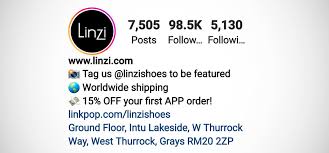
If you’re having trouble adding a place in your bio using the methods above, consider switching to a professional Instagram account. This type of account allows you to add a precise geographic address in your bio, which can be beneficial for businesses or individuals with a physical location.
To switch to a professional Instagram account:
- Open the Instagram app on your device.
- Tap on the profile icon located at the bottom right corner of the screen.
- Select “Modify Profile” from the menu options.
- Tap on the “Type of Account” section.
- Choose the option “Switch to a Professional Account.”
- Select the category that best describes your account (e.G., “Business”).
- Follow the prompts to configure your professional Instagram account.
Conclusion
Adding a place in your Instagram bio is a straightforward process, and we’ve provided you with step-by-step guides for both Android/iOS and PC. Remember, using a professional Instagram account can also be beneficial if you need to add a precise geographic address. With these tips, you’ll be able to showcase your personality and interests on the platform.
Faqs
- Q: Can I Add Multiple Places in my Instagram Bio?
A: Yes, you can add multiple places in your Instagram bio by typing them out separately or using different emojis. - Q: How do I Edit or Remove a Place From my Instagram Bio?
A: To edit or remove a place from your Instagram bio, follow the same steps as adding a new place. Simply tap on the “Modify Profile” option and make the necessary changes. - Q: Can I Use a Professional Instagram Account For Personal Reasons?
A: Yes, you can switch to a professional Instagram account even if you’re using it for personal purposes. This type of account offers additional features that can be beneficial for anyone who wants to showcase their interests or personality. -
Q: How do I Access my Instagram Insights as a Professional User?
A: To access your Instagram insights, follow these steps:- Open the Instagram app on your device.
- Tap on the profile icon located at the bottom right corner of the screen.
- Select “Insights” from the menu options.
Frequently Asked Questions (FAQs)
- Q: Can I Add a Place in my Instagram Bio Without Being a Professional User?
A: Yes, you can add a place to your Instagram bio as a regular user. - Q: How do I Know if Someone Has Visited my Profile Based on The Location Added in Their Bio?
A: Unfortunately, Instagram doesn’t provide information about users who have visited your profile based on location. However, you can use other features such as “Stories” and “Reels” to engage with your followers. - Q: Can I Use Different Emojis For Each Place in my Instagram Bio?
A: Yes, you can use different emojis for each place in your Instagram bio.
Note that the content provided is for informational purposes only. The accuracy of the information might vary and should be verified by a qualified professional if necessary.


