
How to Compress Pdf Online: A Step-by-step Guide
Are you tired of dealing with large and cumbersome PDF files? Do you want to share them with colleagues or friends, but don’t know how to reduce their size without sacrificing quality? Look no further! In this article, we’ll explore the best ways to compress PDF online, using various services that are free, easy to use, and efficient.
Why Compress Pdf Online?
Compressing PDF online is a simple and effective way to reduce the file size of your documents. This is especially useful when you need to share them via email or upload them to cloud storage platforms like Google Drive or Dropbox. By compressing your PDFs, you can:
- Save space on your computer
- Reduce upload times
- Make sharing easier and faster
Top Services For Compressing Pdf Online
Here are some of the best services for compressing PDF online:
Online2pdf
Online2PDF is a web-based service that allows you to compress PDF files up to 150 MB, with no limits on file size or compression level. The service is free, and your data will be deleted from their servers after one hour.
To use Online2PDF:
- Visit the website and select the “Optimize” option.
- Choose the desired compression level (Maximum, Recommended, or Least).
- Select the PDF files you want to compress.
- Wait for the process to complete, then download your optimized PDFs.
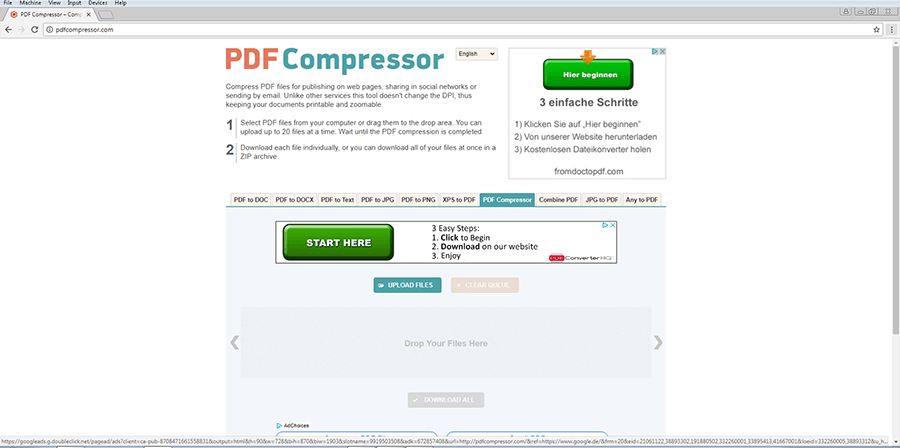
Pdf Compressor
PDF Compressor is another free service that allows you to compress PDF files up to 100 MB without modifying their resolution. The service also protects user privacy by erasing files from their servers after one hour.
To use PDF Compressor:
- Visit the website and select the “Compress” option.
- Choose the desired compression level (Maximum, Recommended, or Least).
- Select the PDF file you want to compress.
- Wait for the process to complete, then download your optimized PDFs.
Ilovepdf
ILovePDF is a helpful service that allows you to compress PDF files up to 200 MB without modifying their resolution. The service also protects user privacy by erasing files from their servers after two hours.
To use iLovePDF:
- Visit the website and select the “Compress” option.
- Choose the desired compression level (Maximum, Recommended, or Least).
- Select the PDF file you want to compress.
- Wait for the process to complete, then download your optimized PDFs.
Pdf Candy
PDF Candy is another free service that allows you to compress PDF files up to 100 MB without modifying their resolution. The service also protects user privacy by erasing files from their servers after one hour.
To use PDF Candy:
- Visit the website and select the “Compress” option.
- Choose the desired compression level (Maximum, Recommended, or Least).
- Select the PDF file you want to compress.
- Wait for the process to complete, then download your optimized PDFs.
Adobe Online
Adobe is a well-known company that offers various software solutions, including Adobe Acrobat. If you’re looking for a more advanced solution, you can use Adobe’s online service to compress PDF files. However, this service requires a subscription and has limitations on the number of free operations per day.
To use Adobe Online:
- Visit the website and select the “Compress” option.
- Choose the desired compression level (Low, Medium, or High).
- Select the PDF file you want to compress.
- Wait for the process to complete, then download your optimized PDFs.
Other Services
There are several other services available that can help you compress PDF files online. Some of these include:
- SodaPDF
- PDFAID
- WeCompress
These services offer various features and compression levels, so be sure to check them out and see which one works best for your needs.
Conclusion
Compressing PDF online is a simple and effective way to reduce file size and make sharing easier. With the services listed above, you can compress PDF files without sacrificing quality or compromising user privacy. Try out these options today and experience the benefits of compressed PDFs!
Frequently Asked Questions (FAQs)
- What Are The Benefits of Compressing Pdf Online?
Compressing PDF online allows you to reduce file size, save space on your computer, and make sharing easier and faster.
- Which Services Can I Use to Compress Pdf Online?
There are several services available that allow you to compress PDF online, including Online2PDF, PDF Compressor, iLovePDF, PDF Candy, Adobe Online, SodaPDF, PDFAID, and WeCompress.
- Are These Services Free?
Yes, most of the services mentioned above offer free compression options. However, some may require a subscription or have limitations on the number of free operations per day.
- How do I Protect User Privacy When Using These Services?
Most of the services listed above protect user privacy by erasing files from their servers after a certain period (usually one hour). Always check the service’s terms and conditions to ensure they align with your needs.
- Can I Compress Multiple Pdf Files at Once?
Yes, some services allow you to compress multiple PDF files simultaneously. Check each service’s features and limitations to see which one works best for your needs.
- What Compression Levels Are Available?
Each service offers various compression levels, ranging from maximum to least. Choose the level that suits your needs, depending on the quality of the original file.
- Can I Use These Services With Other Cloud Storage Platforms?
Yes, most services allow you to compress PDF files and save them directly to cloud storage platforms like Google Drive or Dropbox.
- What Should I do if I Encounter Any Issues During Compression?
If you experience any problems while using the services mentioned above, refer to their user manuals or contact their support teams for assistance.


