
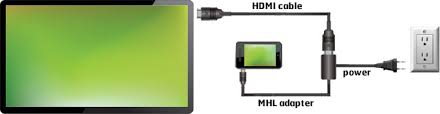
How to Connect Your Phone to a Non-smart TV
Are you tired of missing out on your favorite shows and movies because you have a non-smart TV? Look no further! With the right tools and knowledge, you can easily connect your phone to your TV and enjoy streaming services like Netflix, YouTube, and more.
Understanding The Problem
A non-smart TV is just that – a TV without any smart features. This means it can’t connect to the internet or stream content on its own. However, with a little creativity, you can turn your phone into a makeshift smart TV.
Solutions: Connecting Your Phone to a Non-smart TV
There are several ways to connect your phone to a non-smart TV:
Google Chromecast
One of the most popular solutions is Google Chromecast. This device plugs into your TV’s HDMI port and allows you to stream content from your phone or tablet to your TV.
Benefits:
- Easy setup
- Low cost
- Wide range of compatible devices (phones, tablets, computers)
- Supports streaming services like Netflix, YouTube, and more
Apple Tv
If you have an iPhone or iPad, Apple TV is another great option. This device streams content from your iOS device to your TV using the AirPlay protocol.
Benefits:
- Simple setup
- Low cost
- Wide range of compatible devices (iPhones, iPads, Macs)
- Supports streaming services like Netflix, YouTube, and more
Amazon Fire Tv
Amazon Fire TV is another popular solution for connecting your phone to a non-smart TV. This device streams content from your phone or tablet to your TV using the Amazon app.
Benefits:
- Easy setup
- Low cost
- Wide range of compatible devices (phones, tablets, computers)
- Supports streaming services like Netflix, YouTube, and more
Other Devices
There are other devices available that can connect your phone to a non-smart TV, such as:
- TV Box Android: A small device that plugs into your TV’s HDMI port and allows you to stream content from your phone or tablet.
- Timvision Box: A device specifically designed for streaming content from TIMVision, but also compatible with other streaming services.
How it Works
Connecting your phone to a non-smart TV is relatively simple. Here are the basic steps:
- Connect the device (Chromecast, Apple TV, or Amazon Fire TV) to your TV’s HDMI port.
- Download and install the app on your phone or tablet.
- Open the app and select the streaming service you want to use.
- The content will be streamed from your phone to your TV.
Tips And Tricks
- Make sure your device is connected to the same Wi-Fi network as your phone.
- Use a HDMI cable if possible, for better quality video.
- Experiment with different apps and streaming services to find what works best for you.
Conclusion
Connecting your phone to a non-smart TV is easier than you think. With Google Chromecast, Apple TV, Amazon Fire TV, or other devices, you can enjoy streaming services like Netflix, YouTube, and more on your TV. Just follow the basic steps outlined above, and you’ll be streaming in no time!
Frequently Asked Questions
- What is The Best Device to Use?
The best device for connecting your phone to a non-smart TV depends on your specific needs and preferences. Google Chromecast is a popular choice, but Apple TV and Amazon Fire TV are also great options. - How do I Set up The Device?
Setting up the device is relatively simple. Just follow the basic steps outlined above: Connect the device to your TV’s HDMI port, download and install the app on your phone or tablet, and open the app to select the streaming service you want to use. -
What Are The Benefits of Using a Smart TV Instead?
Using a smart TV can offer more features and functionality than connecting your phone to a non-smart TV. Some benefits include:- A wider range of apps available
- More advanced streaming capabilities
- The ability to browse and stream content directly on your TV
-
Can I Use my Phone as a Remote Control?
Yes, you can use your phone as a remote control to control the device connected to your non-smart TV. Just download and install the app, and follow the instructions to set up remote control functionality. -
What Are Some Popular Streaming Services Available?
Some popular streaming services available include:- Netflix
- YouTube
- Amazon Prime Video
- Hulu
- Disney+
-
Can I Connect Multiple Devices at Once?
Yes, you can connect multiple devices to your non-smart TV at once. Just follow the basic steps outlined above for each device, and you’ll be streaming in no time! -
What Are Some Potential Issues or Limitations?
Some potential issues or limitations of connecting your phone to a non-smart TV include:- Limited video quality
- Interference from other devices on the same network
- Compatibility issues with certain apps or services
-
Can I Use This Method For Other Purposes, Like Gaming?
Yes, you can use this method for other purposes, like gaming! Just make sure your device is compatible with the game and that it meets the system requirements for smooth gameplay.


